How Would You Build YouTube? A Beginner’s Guide to System Design
Hello there! Welcome back to my system design series. In my previous post, we explored the architecture behind a Twitter-like social network. Today, we’re tackling an even bigger challenge: building a video platform like YouTube.
Recently, I watched an excellent YouTube video about designing a YouTube-like system (link to the video), and I wanted to summarize the key concepts here. This post will walk through the high-level architecture and design decisions that make such a massive video platform possible.
Ever wondered what it takes to run a video platform like YouTube? It might seem straightforward on the surface—you upload a video, and others watch it. But behind that smooth experience is a fascinating and complex engineering puzzle that handles billions of video views every single day.
Our goal here is to peek behind the curtain and understand the high-level architecture of such a system. We won’t get lost in the weeds, but by the end, you’ll have a solid grasp of the core concepts that make massive-scale video platforms possible.
Every great system design starts with a clear understanding of what the system must do and the qualities it must possess. This blueprint guides every architectural decision we make.
1. The Blueprint: Defining the Requirements
Before we dive into the technical details, let’s establish what our system needs to accomplish. This foundation will guide every design decision we make.
1.1. What Must the System Do? (Functional Requirements)
These are the core actions users can perform on the platform:
-
Uploading Videos: Users can upload video files to the platform.
-
Watching Videos: Users can play back previously uploaded videos.
Simple enough, right? But the real challenge lies in the qualities the system must have.
1.2. What Qualities Must the System Have? (The “Non-Functional” Promises)
These requirements define the experience and reliability of the platform, especially at a massive scale.
Reliability: Users must be able to trust that their uploaded videos will never be lost or corrupted. A video, once uploaded, should be stored safely and permanently. Imagine spending hours editing a video only to have it disappear—that’s simply unacceptable.
High Availability: The platform must always be accessible. This is often prioritized over perfect consistency. For example, it’s better for a user to see a subscription feed that is missing a video uploaded 5 seconds ago than for the page to fail to load entirely. The system should always return a valid response, even if the data is momentarily stale.
Low Latency: Videos should start playing almost instantly. For users with a good internet connection, frustrating buffering or long load times should be minimized as much as possible. Nobody wants to wait 30 seconds just to watch a cat video.
Massive Scale: The system must be designed to handle immense traffic. Our target scale is:
YouTube’s Daily Scale
| Metric | Daily Number |
|---|---|
| Active Users | 1 Billion |
| Video Uploads | 50 Million |
| Video Watches | 5 Billion |
| Read-to-Write Ratio | 100:1 |
The key insight from this data is clear: this is an extremely read-heavy system. For every video uploaded, there are 100 video watches. This read-heavy pattern is the single most critical factor in our design, demanding aggressive optimization for reads through techniques like denormalization, caching, and Content Delivery Networks (CDNs), which we will explore next.
With our blueprint in place, let’s follow the journey of a single video file as it gets uploaded to our platform.
2. The Upload Pipeline: Getting a Video onto the Platform
This “write path” is the sequence of steps that occurs when a user uploads a new video. It involves storing the video, organizing its data, and preparing it for viewers.
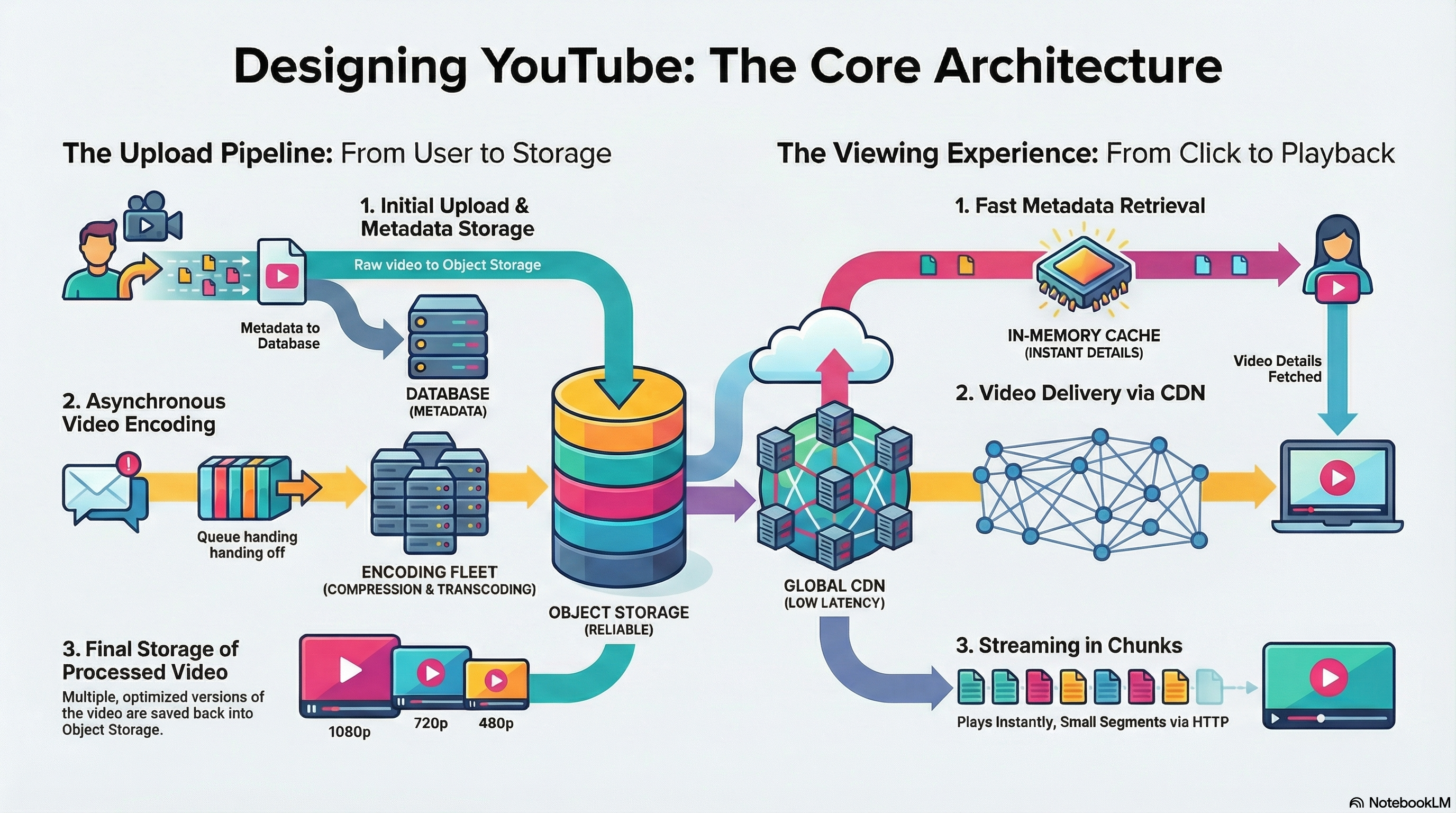
Video Upload Process (Write Path)
Here’s a visual representation of the complete upload pipeline:

2.1. The First Stop: Storing the File and its Data
A fundamental design decision is to store the large video files and their descriptive data (metadata) separately. Think of it like a library: the books (videos) are stored in the warehouse, while the card catalog (metadata) tells you where to find them and what they’re about.
For the Video File: We use Object Storage (like AWS S3). This type of storage is ideal for large, immutable files like videos. Videos are “immutable” because once uploaded, you don’t edit the file byte-by-byte; you replace it entirely. This “write-once, read-many” characteristic is exactly what object storage is designed for. It also automatically handles replication and data durability, ensuring high reliability. Think of it as a massive digital warehouse, specifically designed to store and serve huge amounts of media files efficiently.
For the Metadata: We need a database to store information about the video, such as its title, description, tags, upload date, and a reference to the user who uploaded it. This is the information you see on a video’s page before you even press play.
2.2. Organizing the Information: The NoSQL Database Approach
To handle metadata at a massive scale, we choose a NoSQL database (like MongoDB). This choice allows for flexibility and high performance, particularly for read-heavy workloads.
Introduce Denormalization: A key strategy used with NoSQL databases is denormalization, which means intentionally storing duplicate data to speed up reads. For example, instead of performing a costly “join” operation between a videos table and a users table every time a video is watched, the video document itself stores a copy of the uploader’s relevant info (e.g., username, profile picture URL).
Think of it like this: instead of looking up the author’s name in a separate book every time someone asks “who wrote this?”, we print the author’s name directly on the cover. It’s redundant, but it’s much faster.
Analyze the Trade-off: The downside of denormalization appears when data needs to be updated. If a user changes their profile picture, we would need to update that information in their main user document and in every single video document they have ever uploaded. However, this is an acceptable trade-off because users change their profile pictures very infrequently, while videos are read constantly (a 100:1 ratio). The design prioritizes fast reads over infrequent writes. This background update can be handled by the same type of asynchronous processing system, using a message queue, that we’ll use for video encoding.
2.3. The Processing Factory: Asynchronous Video Encoding
Raw video files are often large and unoptimized. They must be processed (encoded and compressed) into various formats and resolutions before they can be streamed efficiently to viewers. This is like converting a raw film reel into different formats (DVD, Blu-ray, streaming) so it can be played on different devices.
Define Asynchronous Task: Encoding is a computationally intensive and slow process that can take minutes or even hours for very long videos. Therefore, it must happen asynchronously in the background so the user doesn’t have to stare at a loading screen. Imagine if you had to wait at the restaurant for your food to be cooked from scratch before you could leave—that would be terrible for business!
Illustrate the Pattern: This is managed using a Message Queue and a pool of dedicated worker services.
-
The Application Server receives the user’s upload and places a “new video” job message into a Message Queue. This action is very fast—think of it like dropping a ticket into a queue at a deli counter.
-
A separate fleet of Encoding Worker services constantly watches the queue for new jobs. These are like the chefs in a kitchen, each ready to pick up the next order.
-
A free worker picks up a message, downloads the raw video from Object Storage, performs the necessary encoding and compression, and saves the newly processed versions back into Object Storage.
Synthesize the Benefit: This pattern decouples the fast upload process from the slow encoding process. Think of this like a restaurant’s ordering system. The waiter (Application Server) takes your order and puts it on a ticket spike (Message Queue) instantly. The chefs (Encoding Workers) pull tickets from the spike and cook the food at their own pace. This decoupling ensures the waiter isn’t stuck in the kitchen waiting for one dish to be finished before they can serve another table, keeping the front-of-house fast and responsive.
A Note on Scale: How Many Workers?
This asynchronous pattern also allows us to think quantitatively about resource provisioning. Given our scale, how many encoding workers would we need?
- We have 50 million uploads per day. That’s roughly 500 uploads per second.
- Let’s assume an average video takes 60 seconds to encode.
- If we only had 500 workers, they would all become busy in the first second. For the next 59 seconds, new uploads would pile up in the queue, creating a massive backlog.
- To keep up, we need enough workers to handle a full minute’s worth of uploads concurrently.
- 500 uploads/second × 60 seconds = 30,000 workers. This “back-of-the-napkin” calculation demonstrates how architects must plan for capacity to ensure the system remains stable under its target load.
Now that our video is reliably stored and processed, we must tackle the even bigger challenge defined by our requirements: delivering it with low latency to 5 billion daily viewers.
3. The Viewing Experience: Delivering Video to Billions
This “read path” is all about speed and delivering a seamless user experience. It must be heavily optimized to handle the 5 billion daily video views.
Video Watch / Streaming Process (Read Path)
Here’s a visual representation of how videos are delivered to viewers:

3.1. Getting Closer to the User: The Role of a CDN
A Content Delivery Network (CDN) is a geographically distributed network of servers that stores copies of static files (like our encoded videos).
Its primary function is to reduce latency. When a user in Europe requests a video, the file is served from a nearby CDN server in Europe, not from a central server in North America. This dramatically reduces the physical distance the data has to travel, resulting in much faster load times. Think of it like having local libraries in every city instead of one central library that everyone has to travel to.
Here’s how it works: the Application Server sends your device the video’s metadata, which includes a special URL for the video file. That URL points to the CDN. Your device then makes a separate request directly to that CDN URL to fetch the video. A CDN is a global network of servers, so when a user in India requests a video, they get it from a nearby server in Asia instead of one in the United States, drastically reducing loading times.
3.2. Speeding Up Data: Caching the Metadata
Even with a fast NoSQL database, fetching the metadata (title, description, uploader info) for the most popular videos millions of times per hour is inefficient. It’s like asking the librarian to look up the same book in the card catalog over and over again, even though you know it’s the most popular book in the library.
Introduce Caching: We place an in-memory cache (like Redis) in front of the metadata database. In-memory access is orders of magnitude faster than disk-based database access. It’s like keeping the most popular books on the front counter instead of in the back aisles.
Explain the Strategy: We can use an LRU (Least Recently Used) caching policy. This policy assumes that a small percentage of new and popular videos account for the majority of views. The cache keeps the metadata for these “hot” videos in memory, serving requests instantly and shielding the database from the immense read traffic. When a request comes in for a popular video, the system grabs it from the fast cache instead of making a slow trip to the database.
3.3. The Magic of Instant Play: Video Chunking and Streaming
Videos on YouTube start playing almost instantly, long before the entire file has been downloaded. This is achieved through chunking and streaming—one of the most elegant solutions in modern video platforms.
Explain Video Chunking: The encoding process breaks each video file into many small segments, or “chunks.” When you press play, your browser doesn’t download the entire video at once. Instead, it makes a series of individual HTTP requests to fetch these chunks sequentially as they are needed. When you skip ahead to a different part of the timeline, your browser simply fires off a new request to get the specific chunk for that part of the video.
Think of it like reading a book: instead of waiting for the entire book to be printed before you can start reading, you receive it chapter by chapter. You can start reading immediately, and if you want to jump to chapter 10, you just request that specific chapter.
Compare Protocols (TCP vs. UDP): The protocol used to deliver these chunks matters.
-
UDP: Best for live streaming (like a live sports game). Speed is the top priority, and it’s acceptable to occasionally lose a packet of data because you always want the most up-to-the-second content, not to go back and re-render a missed frame from a live game. It’s like a live news broadcast—if you miss a word, you don’t rewind; you just keep listening.
-
TCP: Best for on-demand video (like YouTube). TCP guarantees reliability and ensures that every chunk of the video arrives intact and in the correct order. Losing even a small part of a stored video file could corrupt the entire playback, so TCP’s guarantee of delivery is essential. The HTTP protocol, which is used to fetch the video chunks, is built on top of TCP. It’s like receiving a package—you want to make sure every piece arrives, even if it takes a bit longer.
While this design provides a robust blueprint, it’s fascinating to see how YouTube’s actual architecture evolved over time.
4. A Look at Reality: How YouTube Actually Scaled
This real-world case study shows that system design is often an iterative process of solving problems as they arise. The “perfect” solution for today’s scale may need to be completely re-engineered to meet the challenges of tomorrow.
The Starting Point
YouTube initially used MySQL, a relational database. This was not a “wrong” choice; it was the prevalent and mature technology in the early 2000s when YouTube was created. NoSQL databases like MongoDB didn’t even exist yet. Sometimes, the best technology is the one that’s available and that your team knows how to use.
The Scaling Journey
As the platform’s popularity exploded, the engineering team had to evolve their database architecture to keep up.
Read Replicas: The first step was to add read-only copies (replicas) of the database to handle the high volume of watches, separating read traffic from write traffic. Think of it like having multiple checkout lanes at a store—you can have many lanes for customers (reads) but fewer lanes for restocking (writes).
Sharding: As they grew further, they split the database into many smaller pieces, or “shards.” However, this introduced a lot of complexity into the application code, which now had to contain logic to figure out which specific shard to query for a given piece of data. It’s like having multiple filing cabinets but needing to remember which cabinet contains which files.
The Vitess Solution: To solve this complexity, YouTube’s engineers built a new middleware layer called Vitess that sits between the application servers and the sharded MySQL databases. Vitess acts as a smart proxy, handling all the complex sharding and routing logic automatically. This decoupled the application from the database architecture, dramatically simplifying the application code.
Think of Vitess like a smart receptionist who knows exactly which filing cabinet contains the file you need, so you don’t have to remember yourself. You just ask for the file, and the receptionist handles all the routing.
The Core Insight
This story shows how immense engineering challenges can breed ingenuity and resourcefulness. Vitess represents a fundamental shift: moving sharding intelligence from the application layer to a dedicated infrastructure layer. It teaches the lesson that sometimes the best solution isn’t to replace the entire foundation, but to build a smarter tool to manage it.
Vitess was so successful that it was later open-sourced. It is now a major cloud-native project used by modern companies like PlanetScale to offer massively scalable MySQL databases as a service, demonstrating its lasting impact on the industry.
5. Conclusion: Key Takeaways
Building a system like YouTube is a masterclass in distributed systems design. For a beginner, the most important architectural concepts to remember are:
Separate and Conquer: Store large, static files (videos) in Object Storage and their metadata in a database that is optimized for your specific access patterns (e.g., read-heavy). Don’t try to force everything into one storage solution.
Decouple with Queues: Use message queues to handle slow, resource-intensive background tasks like video encoding. This makes your system more resilient and scalable without impacting the user experience. The user shouldn’t have to wait for the kitchen to finish cooking before they can leave the restaurant.
Get Closer to the User: Use Content Delivery Networks (CDNs) to distribute content globally. Caching files physically closer to users is one of the most effective ways to reduce latency. Local libraries beat one central library every time.
Cache What’s Hot: Use in-memory caching for frequently accessed data (like metadata for popular videos) to reduce database load and deliver near-instantaneous responses. Keep the popular books on the front counter.
Design is Evolutionary: Real-world systems evolve. The “perfect” solution for today’s scale may need to be completely re-engineered to meet the challenges of tomorrow, just as YouTube evolved from a single MySQL database to the globally distributed system powered by Vitess. Don’t be afraid to iterate and improve.
This has been a high-level overview, and real-world systems are constantly evolving to solve new challenges. If you find this topic interesting, a great next step is to read some of the official engineering papers that companies like YouTube publish. They offer a deeper look into the elegant solutions behind the services you use every day.
Reference: This post is based on concepts from this YouTube video about system design. I highly recommend watching it for a more visual explanation of these concepts. The Vitess case study is particularly fascinating and worth exploring further if you’re interested in database scaling solutions.
If you’re also preparing for system design interviews or working on building scalable systems, I’d love to hear about your experiences and learnings. Feel free to share your thoughts in the comments or reach out!