Hello there! It’s been quite a while since I last uploaded a blog post. I’ve been through some significant changes—I switched jobs and needed time to familiarize myself with my new role. Now that I’m settled in, I’m ready to come back to blogging and share what I’m learning.
Currently, I’m focusing on preparing for system design interview rounds, which are a crucial part of technical interviews at many tech companies. This is my first blog post on this topic, and I’m excited to share what I’ve learned.
Recently, I watched an excellent YouTube video about designing a Twitter-like system (link to the video), and I wanted to summarize the key concepts here. This post will walk through the high-level architecture and design decisions that make such a massive system possible.
High-Level Architecture of a Twitter-like System
Ever wondered what it takes to run a massive social network like Twitter? It might seem simple on the surface—you post a thought, follow some friends, and scroll through a feed. But behind that smooth experience is a fascinating and complex engineering puzzle.
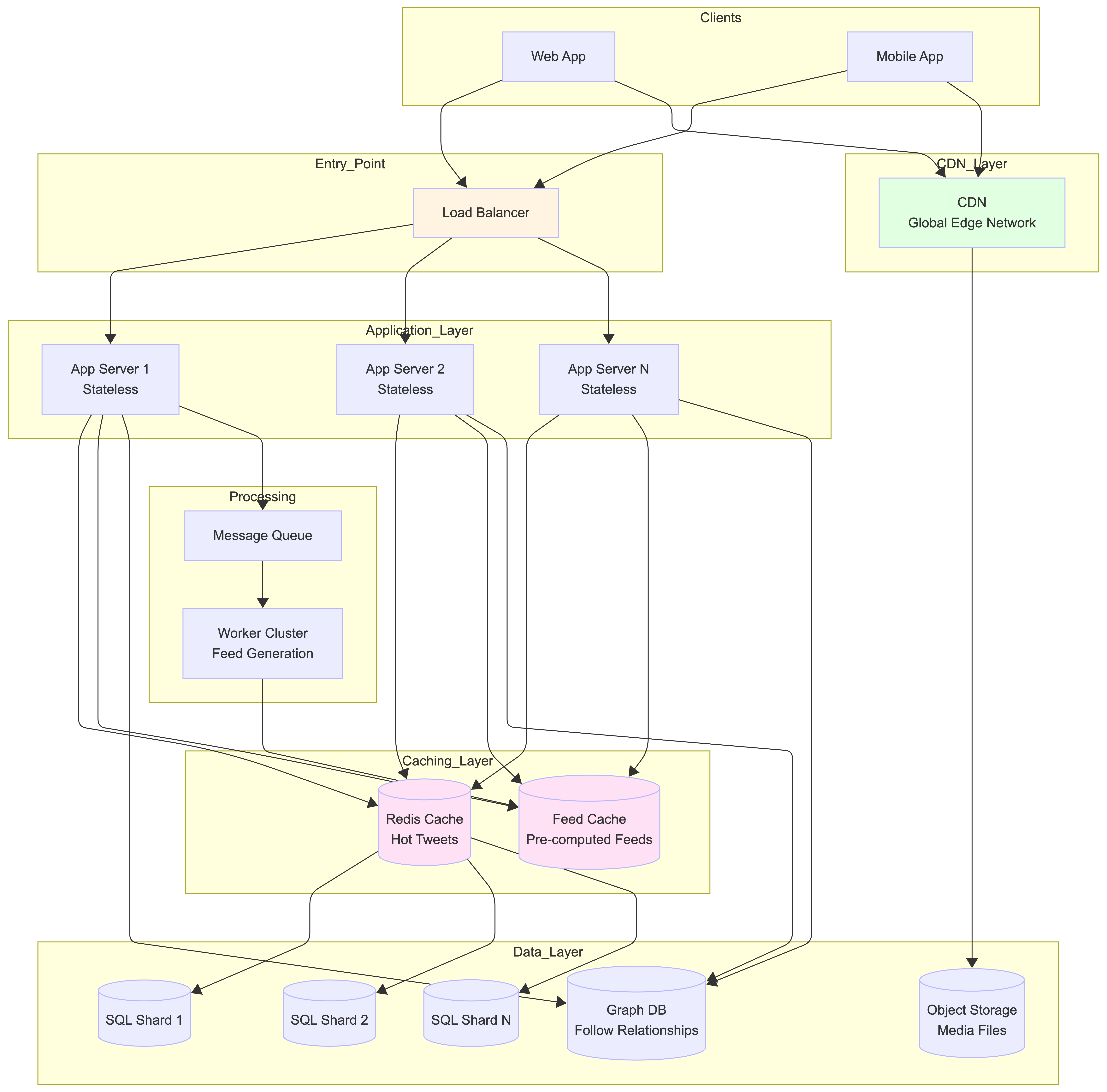
Our goal here is to peek behind the curtain and understand the high-level architecture of such a system. We won’t get lost in the weeds, but by the end, you’ll have a solid grasp of the core concepts.
Every complex system starts with a few core user promises. For our Twitter-like app, we’ll focus on the three big ones:
-
Following Users: The ability for one user to subscribe to another user’s content.
-
Creating Tweets: The ability for users to post their own content, which can include text, images, or even videos.
-
Viewing a News Feed: The ability for users to see a timeline of recent tweets from all the people they follow.
Building these features for a few friends is simple, but what happens when you need to support millions of people? That’s where the real challenge begins.
1. The Challenge of Scale: Why It’s a Hard Problem
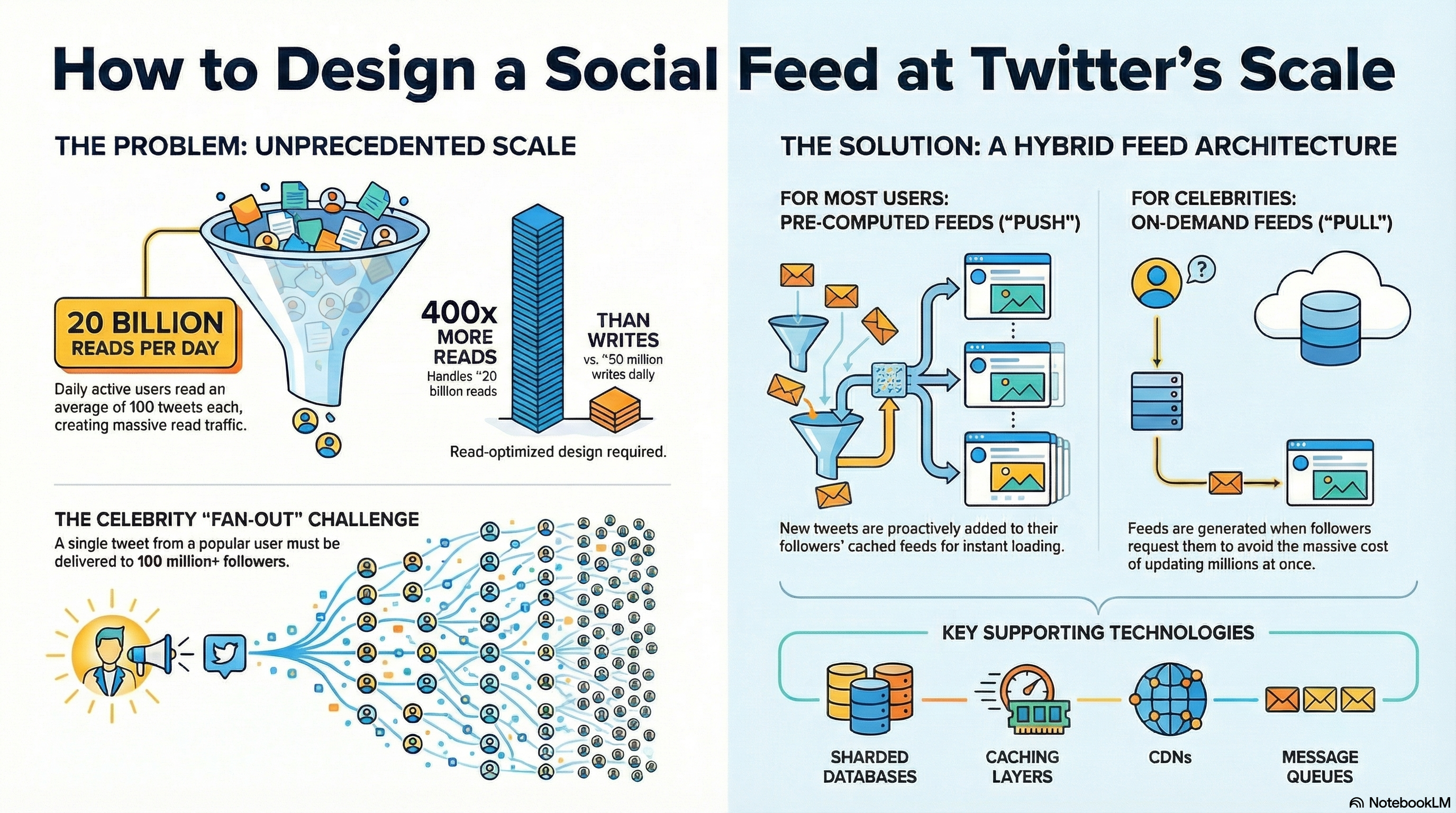
The main difficulty in designing a system like Twitter isn’t the features themselves—it’s the enormous scale at which they operate. This is a “read-heavy” system, which means users view content far more often than they create it.
To understand what we’re up against, let’s look at some daily numbers.
Twitter’s Daily Scale
| Metric | Daily Number |
|---|---|
| Active Users | 200 Million |
| Tweets Created | 50 Million |
| Tweets Read | 20 Billion |
| Data Read | 20 Petabytes |
The key insight from this data is clear: the system must be optimized for handling billions of reads, not just millions of writes. This read-heavy nature allows for a crucial design trade-off: we can accept eventual consistency. This means it’s okay if it takes five seconds after a tweet is created before some users see it. Tolerating this small delay simplifies the design and is a cornerstone of building scalable read-focused systems.
To handle this incredible scale, engineers use a set of special building blocks, each with a specific job.
2. The Core Building Blocks of the System
Let’s break down the essential components that power the backend of a large-scale social network.
2.1. The Front Door: Load Balancers & Application Servers
When you open the app and refresh your feed, your request doesn’t just go to a single computer.
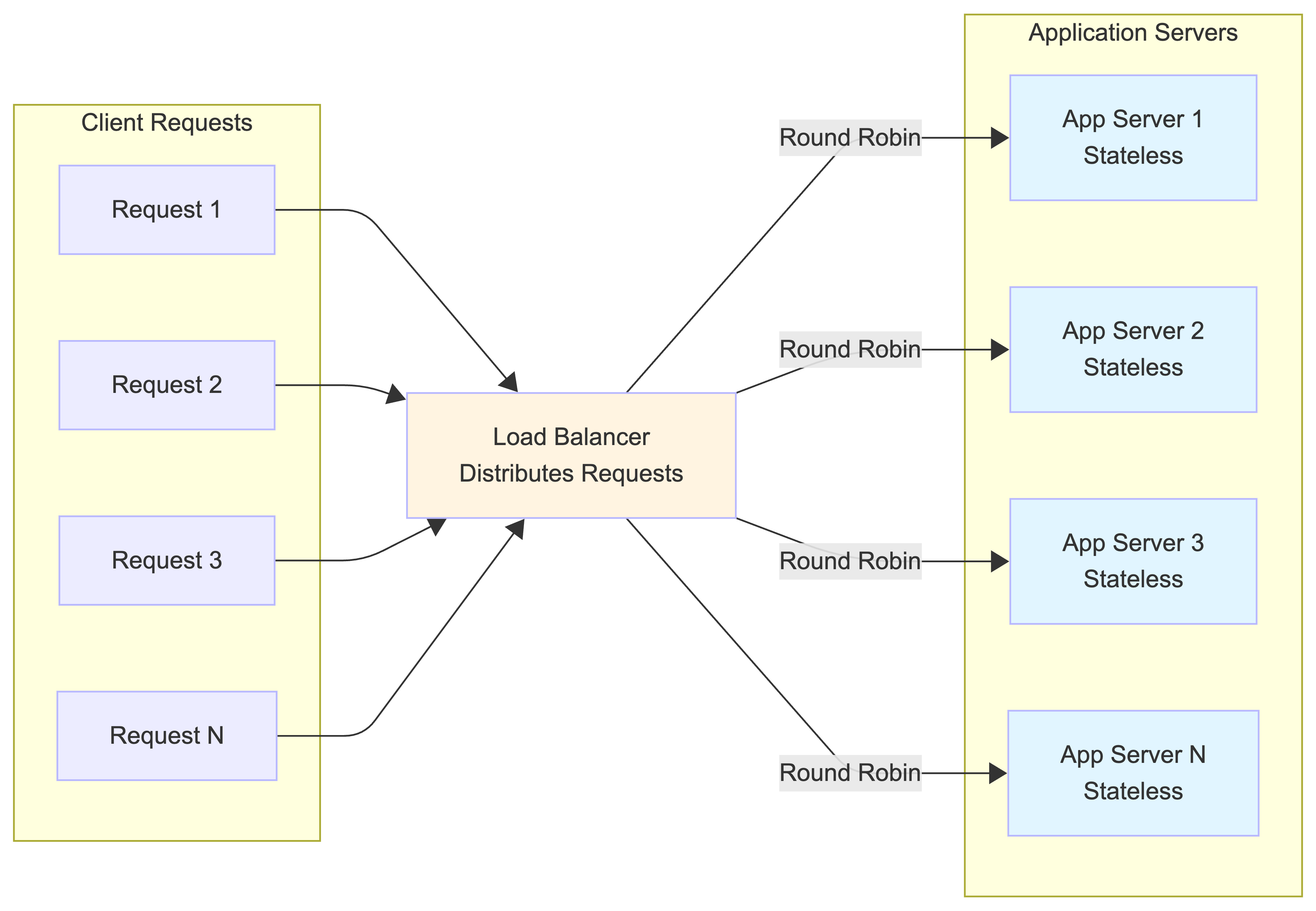
First, it hits a Load Balancer. Think of this as a traffic cop for the internet. Its only job is to distribute the millions of incoming requests evenly across a fleet of servers. This prevents any single server from getting overwhelmed and crashing.
The requests are then sent to Application Servers. These are the “brains” of the operation. They contain the business logic to handle your actions, like fetching your feed or posting a new tweet. A key characteristic is that they are stateless—they don’t store any data about your session. This is important because it allows the system to add more servers easily (a process called “horizontal scaling”) to handle more traffic.
2.2. The System’s Memory: Databases & Storage
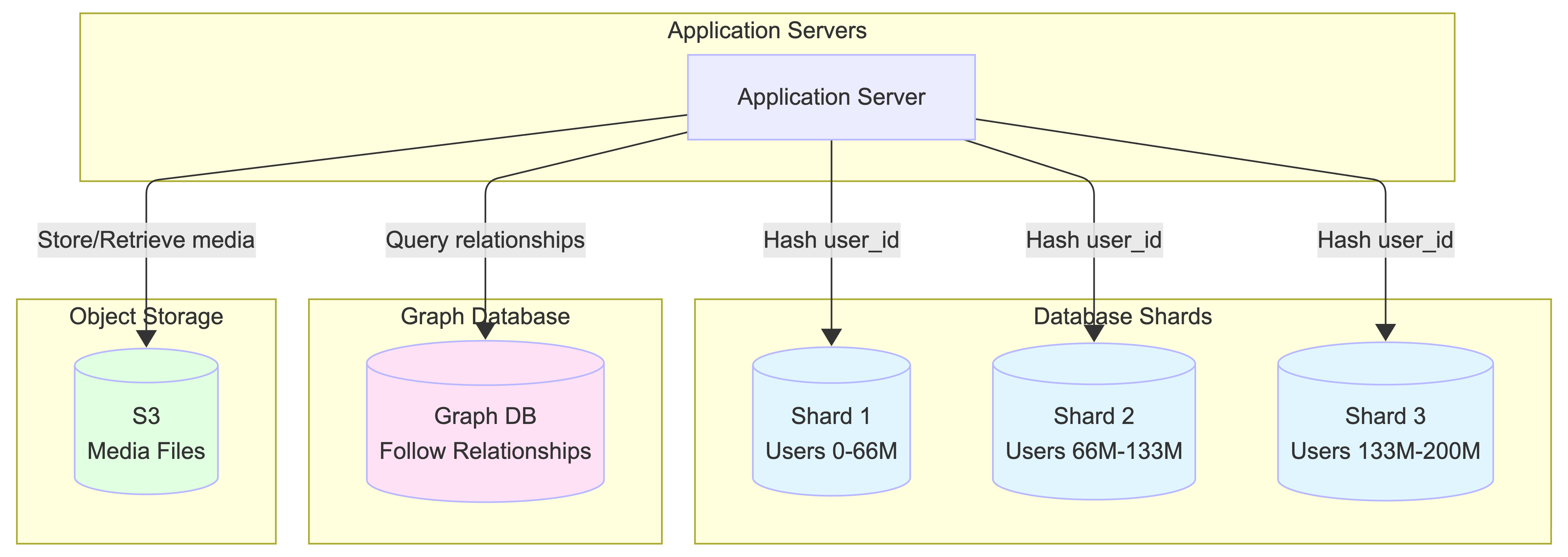
Once an application server gets a request, it needs to fetch or store data. This data lives in the system’s long-term memory. To handle the volume, these databases are typically broken into many smaller pieces, or “shards,” often based on the User ID.
-
Relational Database (SQL): This type of database is great for highly structured data. It’s a solid choice for storing the “follow” relationship because it allows for powerful joins, neatly linking every follower to the people they follow. Data is sharded across multiple database instances based on User ID to distribute the load.
-
Graph Database (GraphDB): This is another powerful option for managing relationships. A GraphDB thinks of the network like a social map, where every user is a “node.” Finding who someone follows is as simple as looking at their outgoing edges, and finding their followers means looking at the incoming edges. This makes these specific queries highly efficient.
What about large files like images and videos? You don’t want to clog up your main databases with that kind of data. For that, the system uses Object Storage (like Amazon S3). Think of it as a massive digital warehouse, specifically designed to store and serve huge amounts of media files efficiently.
2.3. The Speed Boosters: Caching & CDNs
Reading from a database, even a fast one, can be slow when you’re doing it billions of times a day. To solve this, we introduce layers of temporary, super-fast memory.
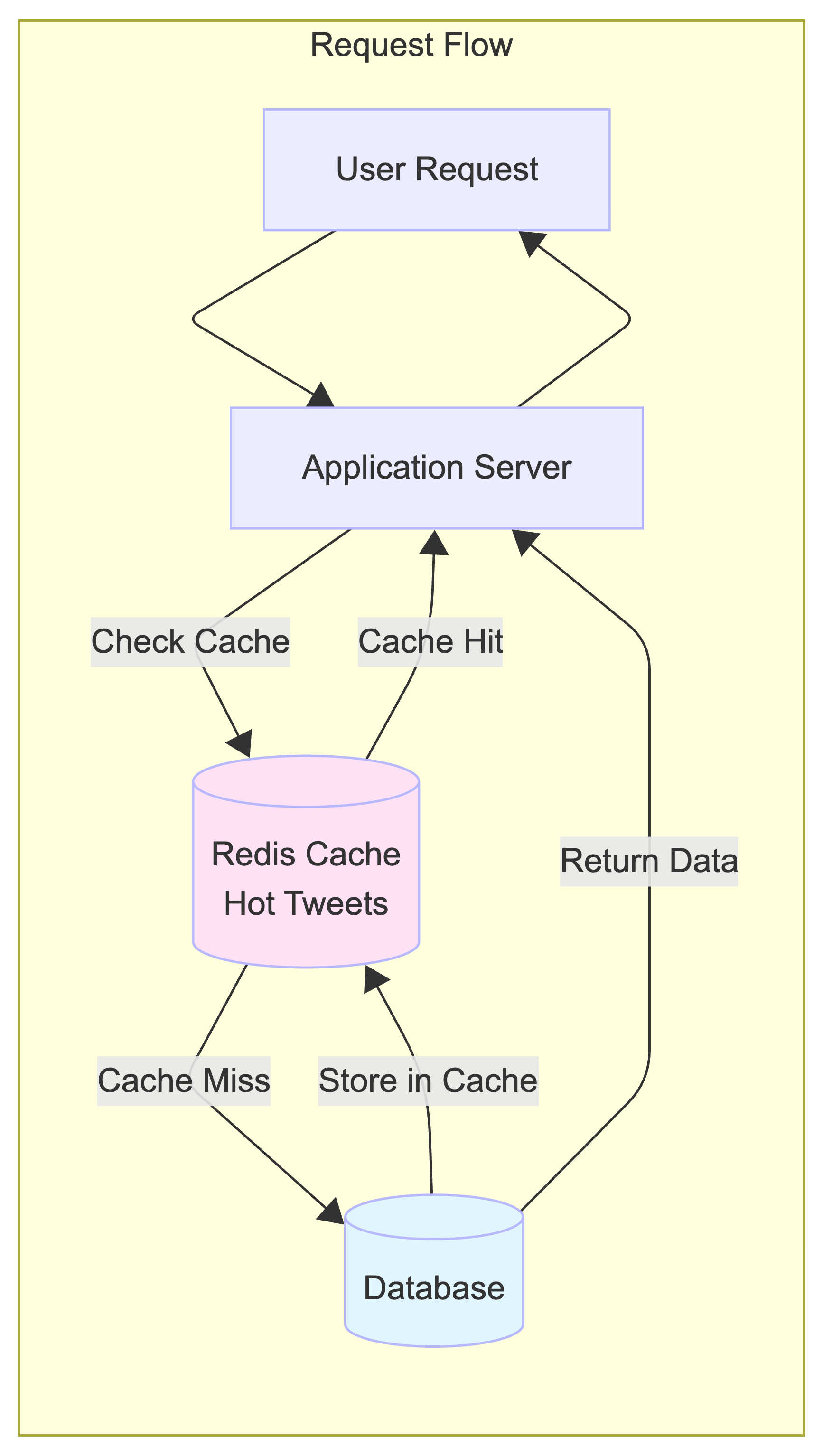
A Caching Layer sits between the application servers and the database. The cache stores frequently accessed data, like the most popular tweets of the hour. It’s like a library keeping the most popular books on the front counter instead of in the back aisles. When a request comes in for a popular tweet, the system grabs it from the fast cache instead of making a slow trip to the database.
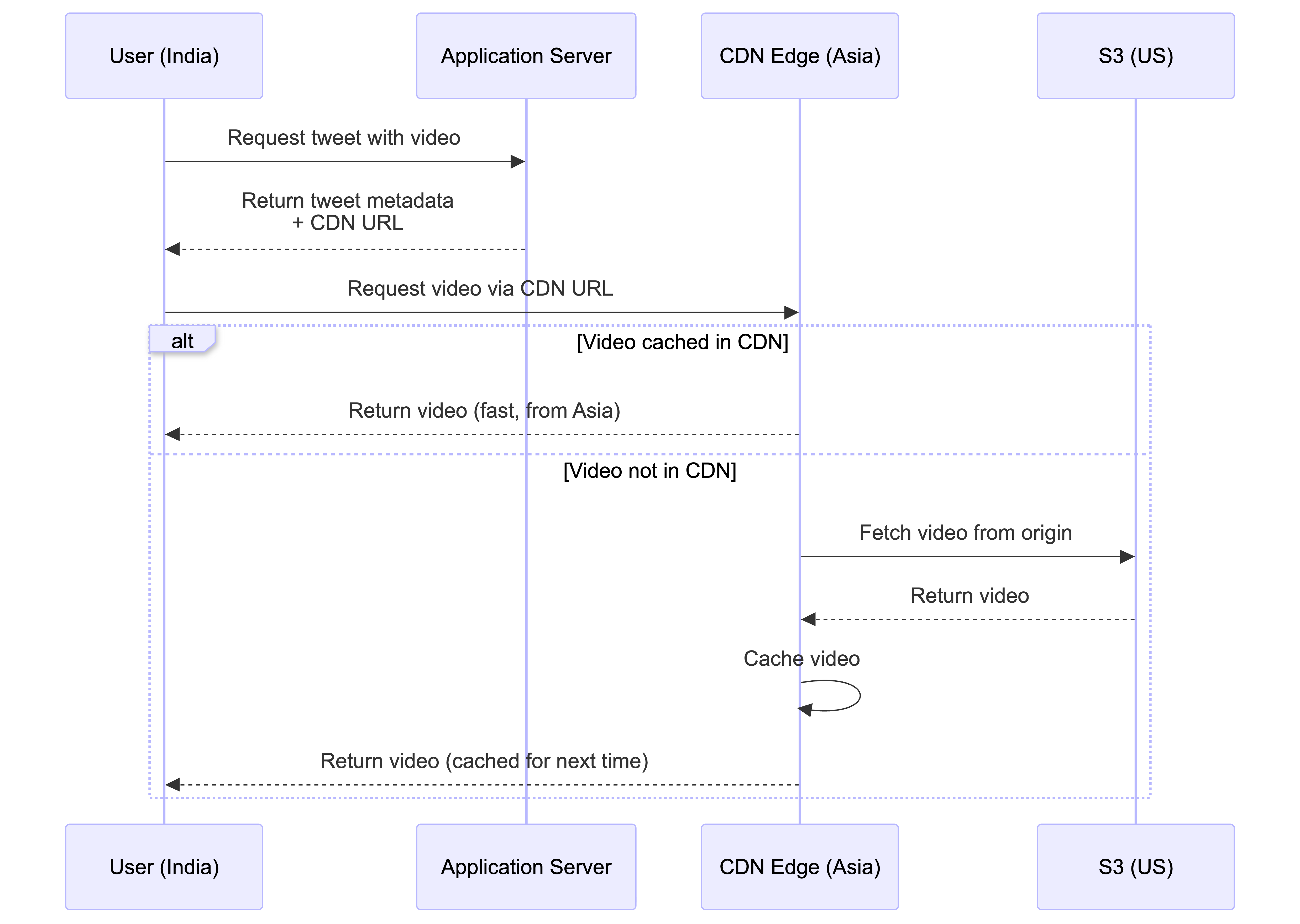
A Content Delivery Network (CDN) does a similar job, but for media files. Here’s how it works: the Application Server sends your device the tweet’s text and metadata, which includes a special URL for any images or videos. That URL points to the CDN. Your device then makes a separate request directly to that CDN URL to fetch the media. A CDN is a global network of servers, so when a user in India requests a video, they get it from a nearby server in Asia instead of one in the United States, drastically reducing loading times. The system uses a “pull-based” CDN, meaning only popular media gets automatically copied to these global servers.
What is a “Pull-Based” CDN?
The system uses a “pull-based” CDN, which means:
- On-demand caching: When a user requests media that isn’t in the CDN yet, the CDN edge server fetches it from the origin server (like S3), caches it locally, and then serves it to the user
- Automatic popularity detection: Only frequently requested media gets cached. If a video is rarely accessed, it won’t be stored in the CDN, saving storage costs
- Lazy loading: Content is cached only when needed, not pre-emptively uploaded
- Cost efficient: You only pay for CDN storage for content that’s actually being accessed
This is different from a “push-based” CDN, where you manually upload all content to the CDN ahead of time, regardless of whether it’s popular or not.
📝 Note: Types of CDN
There are two main approaches to CDN content distribution:
1. Pull-Based CDN (On-Demand Caching)
- Content is cached at edge locations only when users request it
- First request: CDN fetches from origin server, caches it, then serves to user
- Subsequent requests: Served directly from CDN cache (fast)
- Pros: Cost-efficient (only popular content is cached), automatic, no manual management
- Cons: First request may be slower (cache miss), requires origin server to be available
- Use case: User-generated content, dynamic content, when you can’t predict what will be popular
2. Push-Based CDN (Pre-Provisioned)
- Content is manually uploaded to CDN edge locations before users request it
- All content is pre-cached at all edge locations
- Pros: Guaranteed fast first request, no dependency on origin server for cached content
- Cons: Expensive (pay for storage of all content everywhere), requires manual upload/update process
- Use case: Static assets, known popular content, when you want guaranteed performance
Most modern systems use pull-based CDNs because they’re more cost-effective and automatically adapt to content popularity.
Now that we understand the individual parts, let’s see how they work together to perform the most common task: building your news feed.
3. Assembling the News Feed: Two Different Strategies
Generating a user’s news feed is the biggest performance bottleneck in the entire system. A slow feed means a bad user experience. Engineers use two main approaches to tackle this problem.
3.1. Strategy 1: The On-Demand Approach (Slow but Simple)
The naive approach would be to build the feed only when a user asks for it. When you open the app, the system performs a “pull”:
-
The application server finds the list of all the people you follow.
-
It then queries the database to get the most recent tweets for each of those people. This might involve talking to many different database shards.
-
Finally, it merges all these tweets together and sorts them by time before sending them to your device.
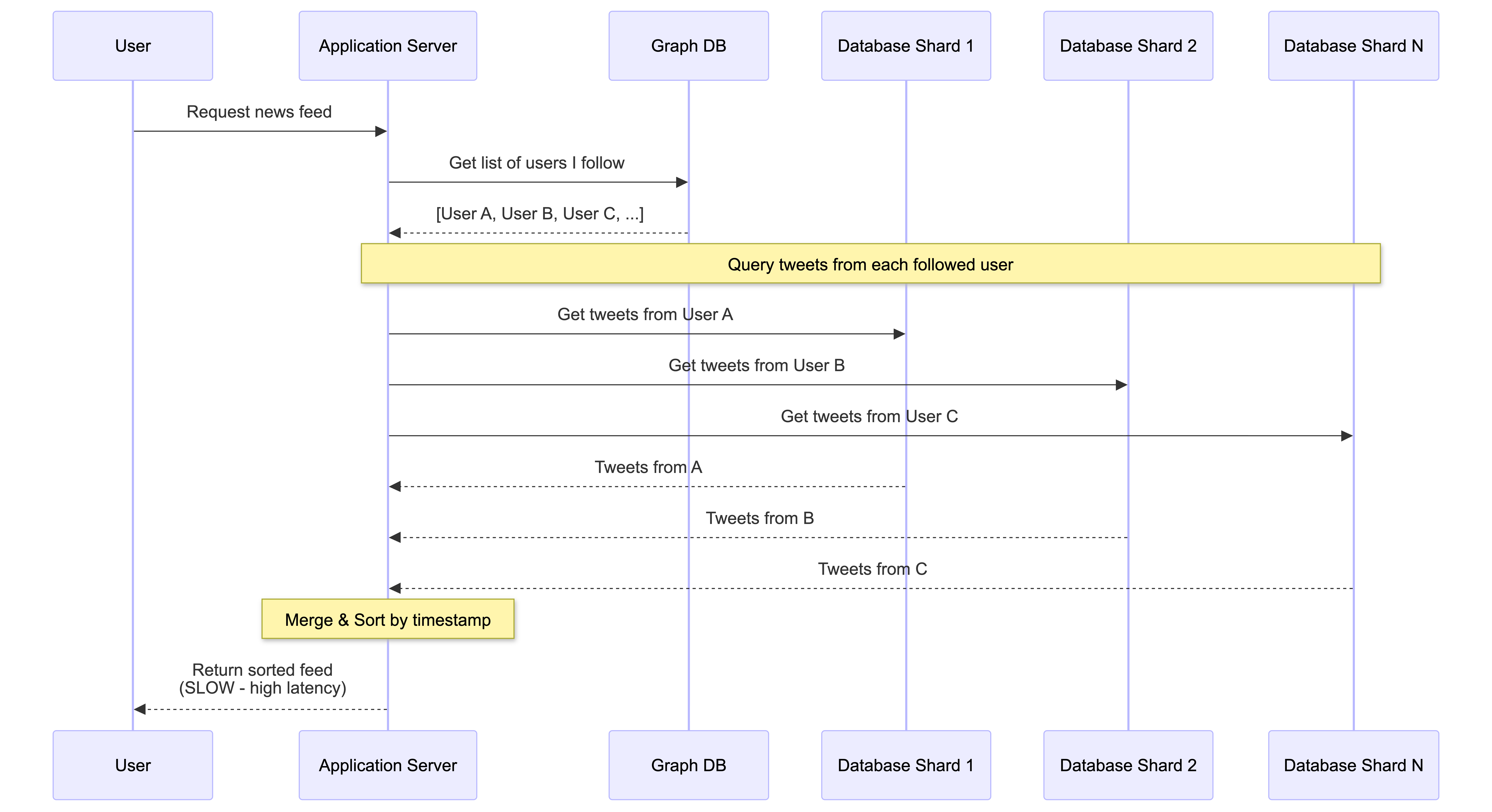
The downside is that this process can be very slow, leading to high latency. This creates a poor user experience—imagine scrolling through your feed where most tweets load instantly, but one tweet in the middle gets stuck on a loading spinner for a few extra seconds. At scale, this approach falls apart.
3.2. Strategy 2: The Pre-Computed Approach (Fast but Complex)
To make the user experience nearly instant, the system can do the work ahead of time. This “push” approach generates your news feed before you even open the app.
-
When a user posts a new tweet, the system sends it to a Message Queue.
-
A cluster of Workers (for example, a Spark cluster designed for parallel processing) constantly pulls tweets from this queue.
-
For each tweet, the workers find the complete list of followers for the user who tweeted.
-
The workers then “push” that new tweet into the pre-made news feed for each of those followers. These ready-made feeds are stored in a dedicated, super-fast Feed Cache.
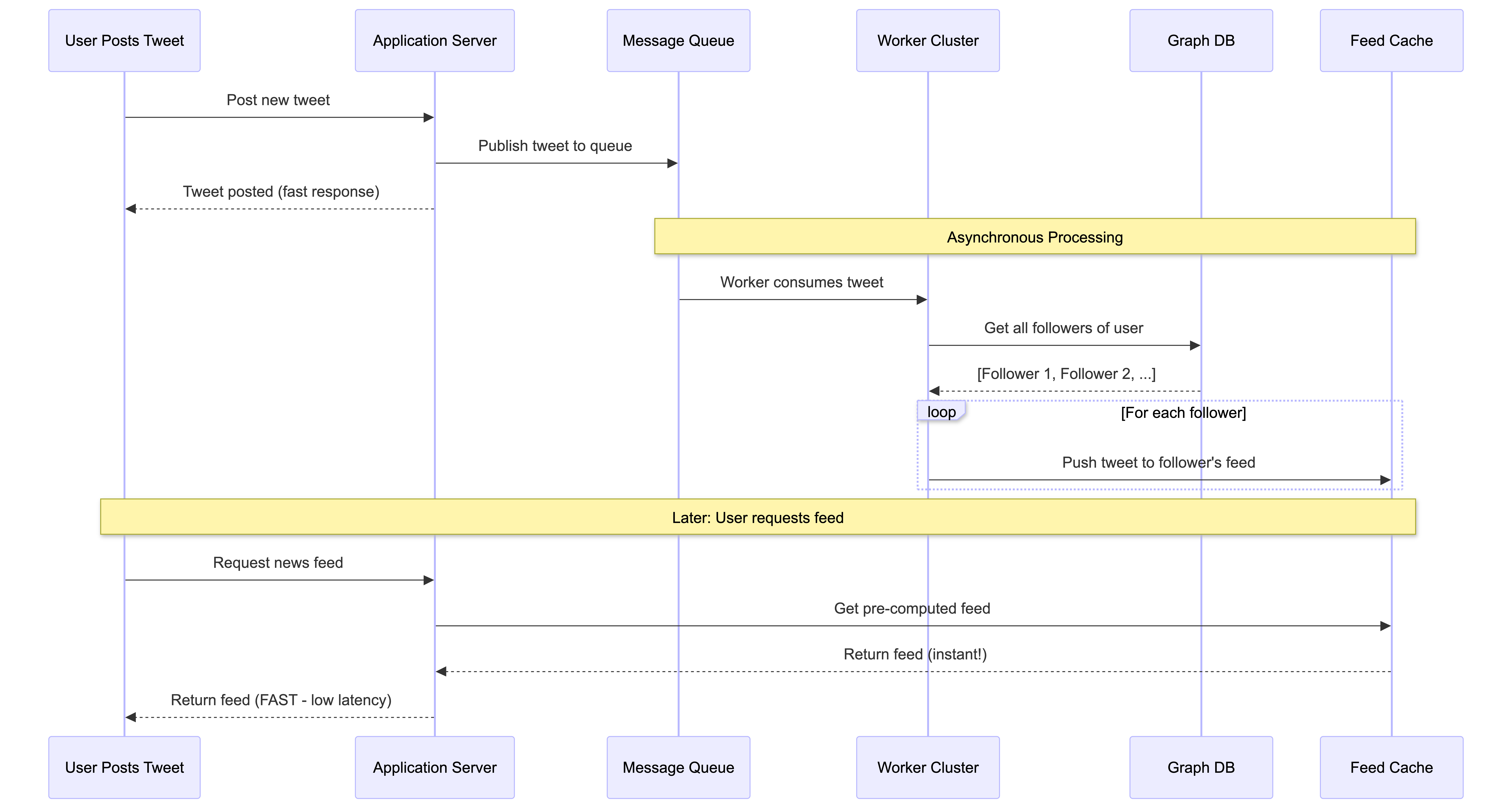
The benefit is immense: when you open your app, your feed is already built and waiting for you in the cache. The application server just has to grab it, resulting in a very fast, low-latency experience.
3.3. The “Celebrity Problem”: A Hybrid Solution
The pre-computed approach works great for most users. But what happens when a celebrity with 100 million followers sends a tweet? Here’s where a classic trade-off comes into play.
Under the pre-computed model, the system would have to perform 100 million separate write operations to update the feed cache for every single follower. This is “very, very expensive” and incredibly wasteful, because as the source notes, “…not all 100 million of those followers are even loading their feed every single day.”
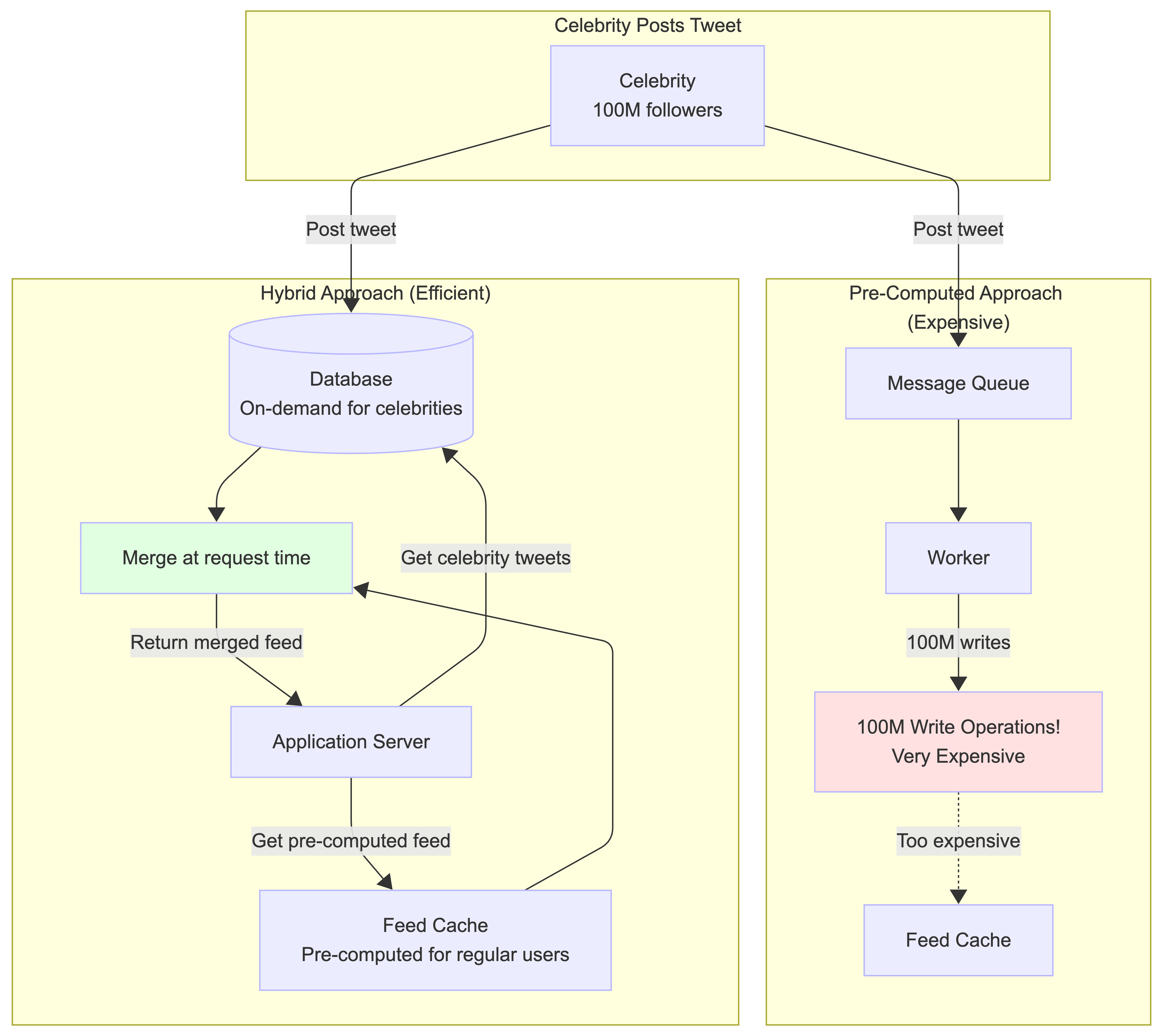
To solve this, the system uses a clever hybrid model that consciously trades a little latency for huge cost savings:
-
For most users, the system uses the fast pre-computed method.
-
For celebrities, the system reverts to the on-demand method. When you open your feed, the system first grabs your pre-computed timeline. Then, it makes a separate, quick request to fetch the latest tweets from any celebrities you follow and merges them into your feed right at that moment.
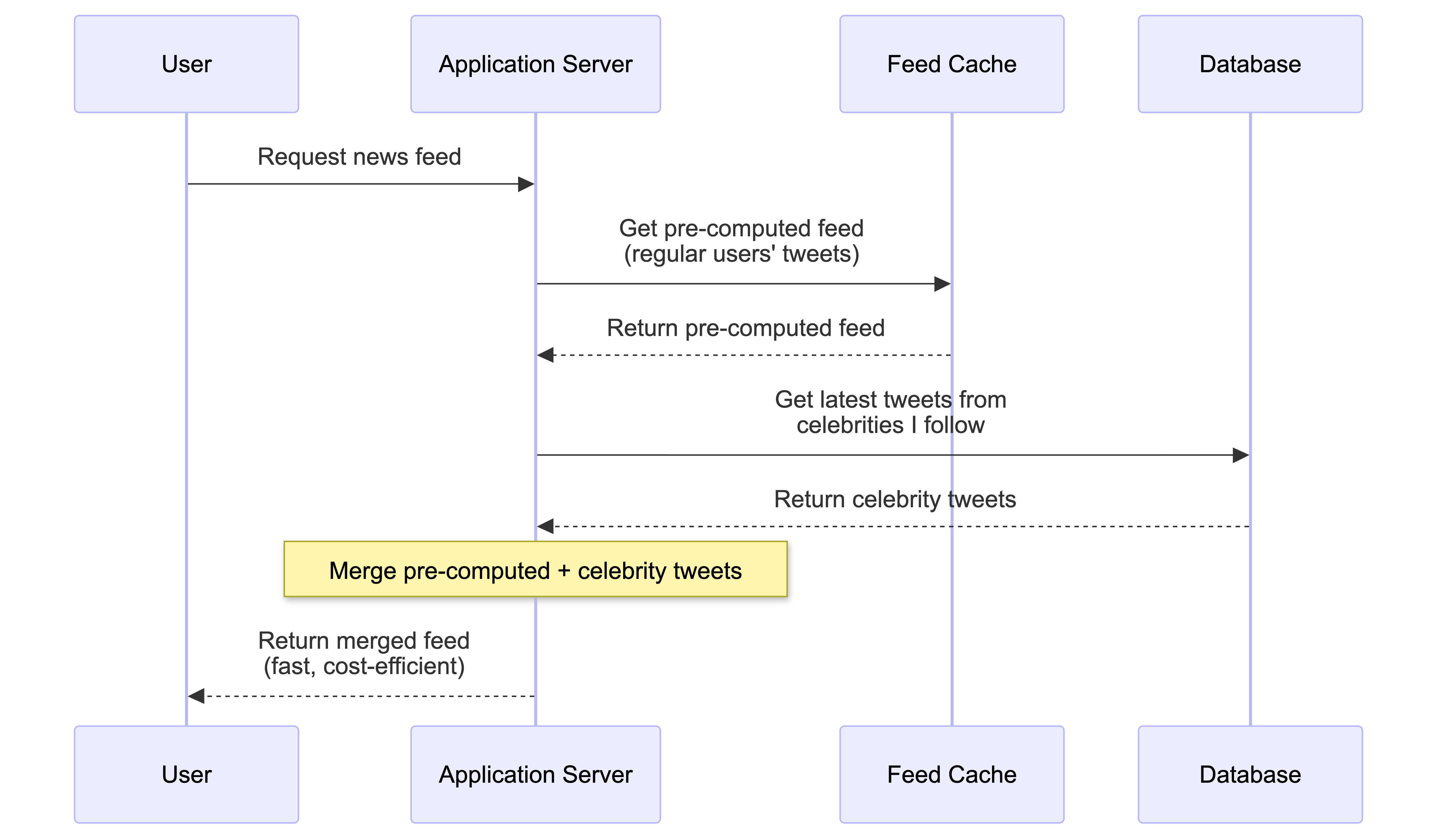
This hybrid approach shows how real-world systems balance trade-offs between speed, cost, and complexity.
4. Conclusion: A Complicated but Fascinating Puzzle
Designing a large-scale system like Twitter is a complex task focused on a single, primary goal: handling massive read volume while keeping latency as low as possible.
We’ve seen how this is achieved through a combination of core components: stateless Application Servers, specialized Databases, multi-layered Caching, global CDNs, and asynchronous systems for pre-computing news feeds.
This has been a high-level overview, and real-world systems are constantly evolving to solve new challenges. If you find this topic interesting, a great next step is to read some of the official engineering papers that companies like Twitter publish. They offer a deeper look into the elegant solutions behind the services you use every day.
Reference: This post is based on concepts from this YouTube video about system design. I highly recommend watching it for a more visual explanation of these concepts.
If you’re also preparing for system design interviews or working on building scalable systems, I’d love to hear about your experiences and learnings. Feel free to share your thoughts in the comments or reach out!