About this series
Build your own X: A minimal AI app builder is a 10-part tutorial. By the end you have a working Next.js application where you chat with an LLM, it edits files stored in SQLite, and you preview the running app inside your browser tab using WebContainer—no server-side sandboxing required.
Application source: github.com/minhmannh2001/simple-app-builder
| Part | Core idea |
|---|---|
| 1 (this post) | The four hard problems; scaffold + Project table |
| 2 | FileEntry as source of truth; atomic template seeding |
| 3 | System prompt = parser schema; Message model; history trimming |
| 4 | SSE streaming; the tee() trick; concurrent persistence |
| 5 | Parsing LLM output adversarially; path safety; upsert transactions |
| 6 | Workspace snapshot: what the model knows when it edits |
| 7 | File tree UI; REST API; CodeMirror without SSR |
| 8 | The sync problem: drafts vs AI vs server refresh simultaneously |
| 9 | Rendering code that is still being written; context observability |
| 10 | WebContainer: running Node.js in the browser tab |
What this series is not
No auth, billing, teams, hardened execution of untrusted code, or production deployment. Those are real product problems. Here you keep the core loop small enough that you can read every line and own every design decision.
The finished product (concrete)
Here is exactly what happens when you use the app:
- You open a project. The workspace shows a file tree (Vite + React template seeded on creation) and a chat panel.
- You type: “Make the App component render a counter.”
- The server persists your message, builds a payload—system prompt + a snapshot of all project files + chat history—and streams it to an LLM via OpenRouter.
-
The model replies with prose and one or more fenced code blocks that look like:
```src/App.tsx
import { useState } from "react";
export default function App() {
  const [count, setCount] = useState(0);
  return <button onClick={() => setCount(c => c + 1)}>{count}</button>;
}
```
- The client renders partial text as it arrives. When the stream ends, the server parses those fences and upserts
FileEntryrows in SQLite. - The workbench reloads file content. You click Deploy; the app boots inside a WebContainer and loads in an
<iframe>.
Each step above has a non-obvious engineering problem hiding inside it. Understanding those problems is what this series is about.
Below is a short demo video.
The four problems that make this non-trivial
Problem 1: Streaming and dual consumption
The server receives a streaming HTTP response from the LLM. It must:
- Send that stream to the browser so text appears token by token.
- Also accumulate the full text and persist it to the database when done.
You cannot read a stream twice. The solution is ReadableStream.prototype.tee(), which splits one stream into two independent consumers. Part 4 goes deep on this.
Problem 2: Parsing adversarial model output
The model can output anything. It might wrap a file fence inside a tutorial explanation. It might repeat a path twice. It might output a path like ../../.env. Your parser needs to:
- Correctly extract path-led fenced blocks from mixed prose.
- Reject unsafe paths without throwing.
- Apply the last occurrence when a path appears twice (last wins).
- Keep a failed parse from rolling back the already-saved assistant message.
Part 5 covers all of this.
Problem 3: Context engineering
On turn two the model has no memory of what files exist unless you tell it. You must inject the current project state into every request. But projects can have dozens of large files—you cannot send them all. You need a selection algorithm that:
- Always includes “spine” files (
package.json,vite.config.ts, …). - Fills remaining budget with the most recently edited files.
- Truncates gracefully when the character budget is exhausted.
- Records what it sent so the UI can display it for debugging.
Part 6 explains the selection logic. Part 9 shows the debug UI.
Problem 4: Three concurrent writers
After a chat turn completes, three things happen nearly simultaneously:
- The server finishes persisting the assistant message and applies file changes to the database.
- The client calls
router.refresh()to reload server props. - The user might already be typing into the editor.
If you router.refresh() too early, you read stale data before the file apply transaction commits. If you apply incoming server data naively, you wipe the user’s unsaved draft. Part 8 shows the 250 ms delay hack and the draft-merge algorithm that keeps all three in balance.
The full architecture in one diagram
Each arrow represents a step in the flow where issues can arise. This series breaks down the diagram step by step so you can understand how each part works before moving on to the next.
What you build in this post
- A Next.js App Router app with TypeScript, Tailwind, and ESLint.
- A Prisma schema with a single
Projectmodel. - A home page that lists projects (Server Component).
- A Server Action that creates a project and redirects.
- A workspace route
/project/[id]that will grow throughout the series.
You do not wire chat, files, or preview in this post. The goal is a working app you can navigate before any AI features exist.
Prerequisites
- Node.js (LTS) and npm installed.
- Basic React and TypeScript. No Prisma experience required.
Estimated time: 45–60 minutes.
Step 1 — Scaffold the Next.js app
Work in any directory you like; nothing here assumes the blog and the app share one tree. If you prefer to start from the published code instead of scaffolding, clone https://github.com/<OWNER>/<REPO> (same placeholder as above), install dependencies, and align the following steps with the paths shown in that repo’s README or file tree.
npx create-next-app@latest my-ai-app-builder \
  --typescript \
  --eslint \
  --tailwind \
  --app \
  --src-dir

cd my-ai-app-builder
npm run dev
Open http://localhost:3000. You should see the default Next.js welcome page. You will replace it in the next step.
Step 2 — Add Prisma and the Project model
SQLite is a file-based database that requires no server to run. Prisma generates type-safe query methods from a schema file.
npm install prisma @prisma/client
npx prisma init --datasource-provider sqlite
Edit prisma/schema.prisma:
datasource db {
  provider = "sqlite"
  url      = env("DATABASE_URL")
}

generator client {
  provider = "prisma-client-js"
}

model Project {
  id        String   @id @default(cuid())
  name      String
  createdAt DateTime @default(now())
  updatedAt DateTime @updatedAt
}
cuid() generates URL-safe collision-resistant ids like cm4x9z…. You will use this in /project/[id] routes throughout the series.
npx prisma migrate dev --name init
Note: The full
schema.prismain the application repository also declaresFileEntryandMessage. You will add those in Parts 2 and 3. For now, onlyProjectis needed.
Step 3 — Singleton Prisma client
During npm run dev, Next.js hot-reloads server modules frequently. Each reload would create a new PrismaClient and exhaust SQLite connections. The fix: store the client on globalThis and reuse it.
// src/lib/db.ts
export function getSingleton<T>(key: string, factory: () => T): T {
  const registry = getRegistry();
  if (!registry.has(key)) {
    registry.set(key, factory());
  }
  return registry.get(key) as T;
}
// src/server/db/prisma.ts
import { PrismaClient } from "@prisma/client";
import { getSingleton } from "@/lib/db";

export const prisma = getSingleton("prisma", () => {
  return new PrismaClient({
    log: process.env.NODE_ENV === "development" ? ["warn", "error"] : ["error"],
  });
});
Every server module imports prisma from this path. Never call new PrismaClient() inline elsewhere.
Step 4 — Home page: list projects
Server Components (the default in app/ page files) run on the server and can call the database directly. No REST layer needed for a simple read.
// src/app/page.tsx
import { HomePageView } from "@/components/home/HomePageView";
import { listProjects } from "@/server/projects/projectService";

export const dynamic = "force-dynamic";

export default async function Home() {
  const projects = await listProjects();
  return <HomePageView projects={projects} />;
}
export const dynamic = "force-dynamic" tells Next.js: run this page on every request and re-query the database. Without it, Next.js may cache the rendered HTML and show a stale project list after you create one. This config must live in the route file itself—not in a child component—for Next.js to pick it up.
Step 5 — Create a project with a Server Action
A Server Action is an async function marked "use server". You pass it to a form’s action attribute. On submit, Next.js POSTs to the server, runs your function, and can redirect.
// src/app/actions/projectActions.ts
"use server";

import { createProject } from "@/server/projects/projectService";
import { revalidatePath } from "next/cache";
import { redirect } from "next/navigation";

export async function createProjectAction(
  _prevState: { error?: string } | null,
  _formData: FormData,
): Promise<{ error?: string } | null> {
  let project: { id: string };
  try {
    project = await createProject();
  } catch (err) {
    console.error("[createProjectAction]", err);
    return { error: "Could not create project. Please try again." };
  }

  revalidatePath("/");
  redirect(`/project/${project.id}`);
}
Two things worth noting:
redirectthrows internally in Next.js. Yourtry/catchmust not swallow it—wrap onlycreateProject, not the whole function body.revalidatePath("/")marks the home page stale so the next visit re-fetches from the DB. Part 2 explains whyforce-dynamicalone is not enough in all cases.
The client form uses useActionState (React 19) and a nested SubmitButton that reads useFormStatus:
// src/components/home/CreateProjectForm.tsx (excerpt)
"use client";

import { createProjectAction } from "@/app/actions/projectActions";
import { useActionState } from "react";
import { useFormStatus } from "react-dom";

function SubmitButton() {
  const { pending } = useFormStatus();
  return (
    <button type="submit" disabled={pending}>
      {pending ? "Creating…" : "Create New Project"}
    </button>
  );
}

export function CreateProjectForm() {
  const [state, formAction] = useActionState(createProjectAction, null);
  return (
    <form action={formAction}>
      {state?.error ? <p role="alert">{state.error}</p> : null}
      <SubmitButton />
    </form>
  );
}
SubmitButton must be a child of the form element for useFormStatus() to see the correct pending state—it reads from the nearest ancestor form context.
Step 6 — Workspace route
// src/app/project/[id]/page.tsx
import { ProjectWorkspaceView } from "@/components/project/ProjectWorkspaceView";
import { listProjectFileEntriesForWorkbench } from "@/server/files/listProjectFileEntriesForWorkbench";
import { listMessagesByProjectId } from "@/server/messages/messageService";
import { getProjectById } from "@/server/projects/projectService";
import { notFound } from "next/navigation";

export const dynamic = "force-dynamic";

type PageProps = { params: Promise<{ id: string }> };

export default async function ProjectPage({ params }: PageProps) {
  const { id } = await params;
  const project = await getProjectById(id);
  if (!project) notFound();

  const [rows, workbenchFiles] = await Promise.all([
    listMessagesByProjectId(project.id),
    listProjectFileEntriesForWorkbench(project.id),
  ]);

  return (
    <ProjectWorkspaceView
      projectId={id}
      projectName={project.name}
      projectUpdatedAt={project.updatedAt.toISOString()}
      initialChatMessages={rows.map((m) => ({
        id: m.id,
        role: m.role,
        content: m.content,
        sentAt: m.createdAt.toISOString(),
      }))}
      workbenchFiles={workbenchFiles}
    />
  );
}
params is a Promise in current Next.js App Router typings—you await it before reading id. The page loads messages and files concurrently with Promise.all since neither query depends on the other.
At this point listMessagesByProjectId and listProjectFileEntriesForWorkbench will return empty arrays since no messages or files exist yet. You are setting up the data loading pattern that Parts 2–8 will fill in.
![workspace `/project/[id]` right after creating a project](/img/simple-app-builder/part-1/demo-pt1-01-workspace-after-create.png)
Check your work
After npm run dev:
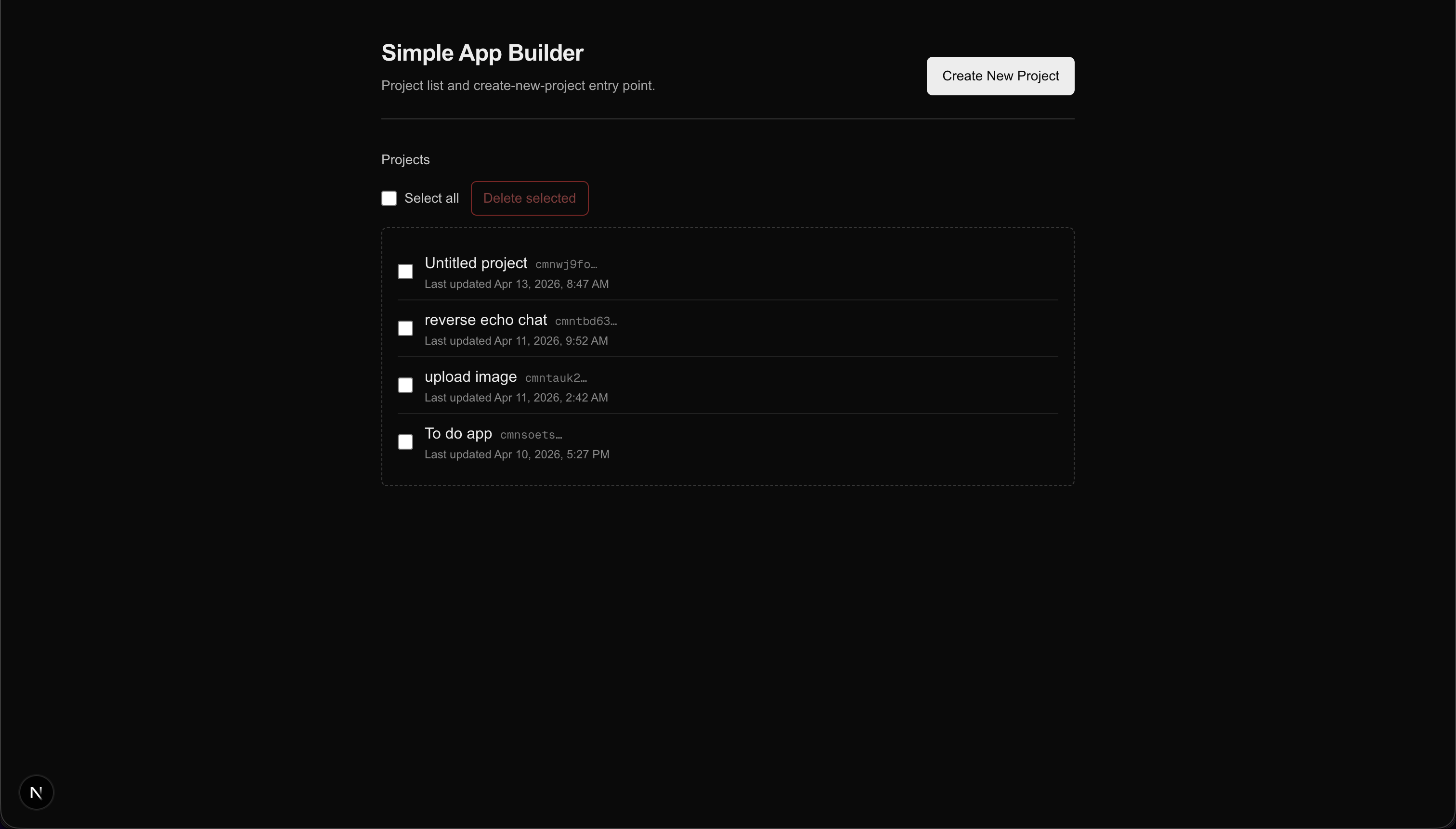
/loads without errors and shows an empty project list.- Create New Project navigates to
/project/…with a long cuid id. - Refreshing the workspace page: same id, no crash.
- Going back to
/: the project appears in the list.
Troubleshooting
| Problem | What to check |
|---|---|
PrismaClient errors |
Run npx prisma migrate dev after any schema change. |
| Database file missing | .env should contain DATABASE_URL="file:./dev.db". |
| Form never redirects | Read the terminal stack trace; check the Server Action catch block. |
params type error |
params is Promise<{ id: string }> in Next.js ≥ 15—you must await it. |
What the next nine parts build
You now have a skeleton: routes, a database, and a create flow. Here is the order in which the interesting problems appear:
- Part 2 — Why project creation must be a single atomic transaction and how
FileEntrybecomes the source of truth for everything else. - Part 3 — Why the system prompt is literally the schema that your parser reads, and what happens if they drift out of sync.
- Part 4 — The
tee()trick that lets you stream to the browser and persist to the database from one response body. - Part 5 — Why “just parse the fenced blocks” is a security problem without path normalization, and how to keep a failed parse from corrupting the chat history.
- Part 6 — How to decide which files to include in the model’s context when you cannot afford to send all of them.
- Part 7 — The CodeMirror SSR problem and the REST endpoints that enforce the same path rules as the parser.
- Part 8 — The hardest problem: three things write to the same data simultaneously, and you must keep all three consistent.
- Part 9 — Rendering code blocks that are still being written by a streaming model.
- Part 10 — Running a full Node.js dev server inside a browser tab.
Next: Part 2 — Files as source of truth: database schema and atomic project creation.