What’s in this post?
The core design decision of this project is that SQLite is the source of truth for project files—not the local filesystem, not model memory, not browser state. Everything else is a view of that data. This post explains the design and builds it:
- Why
FileEntry— the architectural argument for centralizing file state in the DB. - The schema —
FileEntrywith a compound unique constraint that enables safe upserts later. - The template — a small Vite + React app stored as a TypeScript map.
- The transaction — project + all template files created atomically or not at all.
- The bundler gotcha — one
next.config.tsline that prevents Prisma interactive transactions from silently failing.
Why the database is the source of truth
You might think “files are files—store them on disk.” Here is why that breaks:
- Preview (Part 10) runs inside a WebContainer in the browser. It cannot access the server filesystem; it needs files as a JSON payload.
- Model context (Part 6) must serialize files into the LLM prompt. Reading from disk requires knowing the project root, handling paths, managing permissions.
- The workbench (Part 7) needs to load, save, rename, and delete files from a REST endpoint. Database rows with a
(projectId, path)compound key are straightforward to address and update. - Concurrent writes: when the model updates files while the user has unsaved edits, you need transaction semantics to keep things consistent. SQLite gives you that.
The implication: any operation that changes project files—model output, manual edits, rename, delete—goes through FileEntry. Nothing writes to disk. Nothing reads from disk. When you export a zip in the future, you query the database.
Goal
After Part 1 you can create projects, but two problems remain:
- The home page can show stale data after creation (Next.js caching).
- Each new project has no files—nothing to show the model or display in the workbench.
This post fixes both. When you finish, every new project contains a runnable Vite + React app stored as FileEntry rows, and the home page always shows fresh data.
Prerequisites
Part 1 complete (Project table, create flow, workspace route).
Estimated time: about 60 minutes.
Fix 1 — Always-fresh home page
Next.js may treat the home route as static and cache the rendered HTML. You create a project, navigate back, and see “No projects yet.”
Two fixes work together:
export const dynamic = "force-dynamic"insrc/app/page.tsx— run this page on every request.revalidatePath("/")insidecreateProjectAction— mark the static cache stale immediately after creation.
Both are necessary because different Next.js rendering modes interact differently with each. In development force-dynamic is usually enough; in production builds revalidatePath ensures the CDN layer also sees the change.
Fix 2 — The FileEntry model
model FileEntry {
  id        String   @id @default(cuid())
  projectId String
  project   Project  @relation(fields: [projectId], references: [id], onDelete: Cascade)
  path      String
  content   String   @default("")
  createdAt DateTime @default(now())
  updatedAt DateTime @updatedAt

  @@unique([projectId, path])
}
Two design decisions here:
@@unique([projectId, path]) — This compound constraint does two things. First, it prevents the model from accidentally storing two versions of src/App.tsx for the same project. Second, Prisma generates a named key projectId_path from it, which you use as the where clause in every upsert later:
await tx.fileEntry.upsert({
  where: { projectId_path: { projectId, path: row.path } },
  create: { … },
  update: { content: row.content },
});
Without this unique constraint, upsert would not know which row to update.
onDelete: Cascade — When a project is deleted, SQLite automatically removes all its FileEntry rows. You never need a manual cleanup query.
Run the migration:
npx prisma migrate dev --name add-file-entry
Fix 3 — The Vite + React template
When a project is created, you want it to contain a real runnable app so:
- The workbench has something to show before the user chats.
- The model can see actual files in its context from the first turn.
- The preview can boot without generating any code.
Keep the template as a TypeScript module—a plain object where keys are relative paths and values are file content strings. This keeps it version-controlled, diffable, and testable.
// src/server/template/viteReactMinimal.ts (excerpt)
export const REQUIRED_VITE_REACT_MINIMAL_PATHS = [
  "package.json",
  "vite.config.ts",
  "tsconfig.json",
  "index.html",
  "README.md",
  "src/main.tsx",
  "src/App.tsx",
  "src/index.css",
  "src/vite-env.d.ts",
] as const;

const TEMPLATE: ViteReactMinimalTemplate = {
  "package.json": `{
  "name": "my-app",
  "private": true,
  "version": "0.0.0",
  "type": "module",
  "scripts": {
    "dev": "vite",
    "build": "tsc && vite build"
  },
  "dependencies": {
    "react": "^18.3.1",
    "react-dom": "^18.3.1"
  },
  "devDependencies": {
    "@types/react": "^18.3.12",
    "@types/react-dom": "^18.3.1",
    "@vitejs/plugin-react": "^4.3.4",
    "typescript": "^5.6.2",
    "vite": "^6.0.1"
  }
}`,
  "vite.config.ts": `import react from "@vitejs/plugin-react";
import { defineConfig } from "vite";
export default defineConfig({ plugins: [react()] });`,
  // … remaining paths in the repo …
};

export function getViteReactMinimalTemplate(): ViteReactMinimalTemplate {
  return TEMPLATE;
}
Before relying on this template: copy the content to a scratch folder, run npm install and npm run dev, and confirm the Vite dev server starts cleanly. A broken template silently breaks every new project. Lock dependency versions so the template stays reproducible.
Fix 4 — Atomic project creation
The naive approach:
const project = await prisma.project.create(…);
await prisma.fileEntry.createMany(…); // can fail after project exists
If createMany fails, you have a project with zero files. That is hard to detect and repair, and it will silently break the model’s context (Part 6 will find no files to include) and the preview (Part 10 will try to boot an empty container).
The correct approach: wrap both operations in one $transaction. Either both succeed or neither does.
// src/server/projects/projectService.ts (excerpt)
export async function createProject() {
  const template = getViteReactMinimalTemplate();
  const fileRows = Object.entries(template).map(([path, content]) => ({
    path,
    content,
  }));

  return prisma.$transaction(async (tx) => {
    const project = await tx.project.create({
      data: { name: DEFAULT_NAME },
      select: { id: true },
    });

    await tx.fileEntry.createMany({
      data: fileRows.map((row) => ({
        projectId: project.id,
        path: row.path,
        content: row.content,
      })),
    });

    return project;
  });
}
Inside the transaction callback, every query must use tx.*—not the global prisma object. Mixing them breaks the transaction boundary.
Fix 5 — The bundler gotcha: serverExternalPackages
Symptom: TypeError: Cannot read properties of undefined (reading 'create') when you call tx.fileEntry.createMany, even though tx.project.create in the same callback works. This often shows up only under npm run dev in Next.js, while a small standalone script that uses Prisma runs fine.
What Next is doing here
You can think of Next as running two different worlds:
- The browser — JavaScript must be packaged into files the browser can download, so a bundler (code that walks your imports and outputs fewer/larger files) is always involved.
- The server — your Server Actions and Server Components still go through Next’s dev toolchain (Turbopack). That toolchain can bundle server code too, not just copy every file verbatim from
node_modules.
Bundling is mostly good: it speeds up dev and lets Next trace which server files belong together. The catch is that a bundler also tree-shakes: it removes code it believes is unused so the bundle stays smaller. Prisma’s client is unusual: it wires up project, fileEntry, and every other model through generated glue that can look “unused” to static analysis, even though Prisma needs all of it at runtime. If part of that glue is dropped, you can end up with a client where tx.project still exists but tx.fileEntry is missing—hence undefined.create.
Interactive transactions (prisma.$transaction(async (tx) => { … })) stress that path because tx is a transaction-scoped view of the same client machinery; if the underlying registry is incomplete, the first model you touch might work while the next one is undefined.
Why serverExternalPackages fixes it
serverExternalPackages tells Next: for this package name, do not fold @prisma/client into the server bundle. Instead, when the running Node process needs Prisma, it should load the real package from node_modules the normal way—as if you had run a plain Node script.
That bypasses the risky step (bundling + tree-shaking Prisma) while keeping the rest of your app on the fast path. After you change next.config.ts, restart npm run dev so the server bundle is rebuilt with the new rule.
Add this to next.config.ts (merge with your existing nextConfig object):
const nextConfig: NextConfig = {
  serverExternalPackages: ["@prisma/client"],
  // … your existing options …
};
Tip: in Server Action catch blocks, log the real error (console.error(err)) before returning a generic message to the UI. The browser only sees the friendly string; the terminal shows the stack trace that confirms bundler vs logic bugs.
What you now have
Every createProject() call:
- Creates a
Projectrow. - Creates 9
FileEntryrows in the same transaction. - Returns
{ id }to the Server Action, which redirects to the workspace.
The workspace route already loads workbenchFiles via listProjectFileEntriesForWorkbench. After this post, that query returns the template files instead of an empty array.
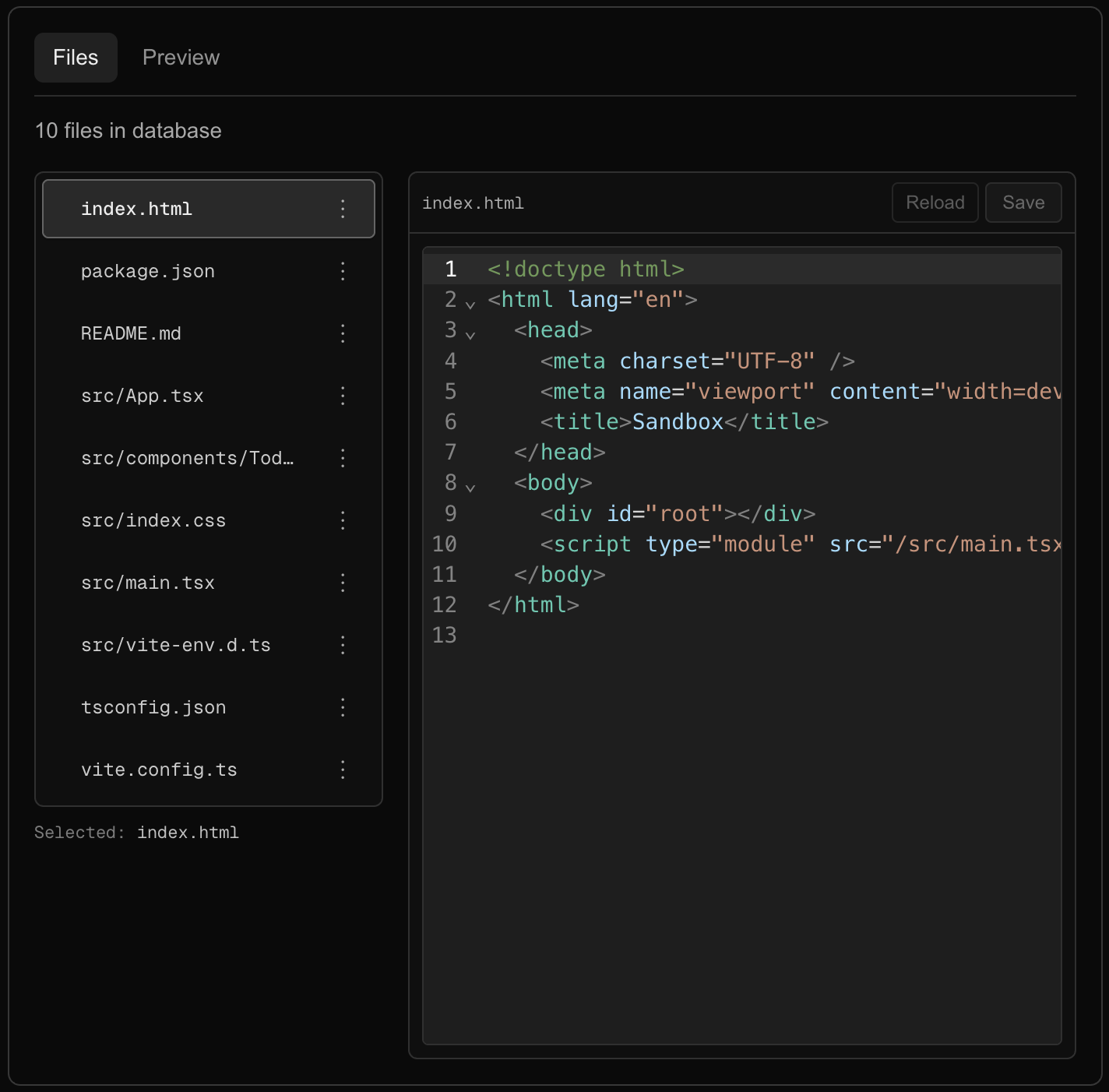
Check your work
- After creating a project, open Prisma Studio (
npx prisma studio) and confirmFileEntryrows exist forpackage.json,src/App.tsx, and the other template paths. - Hard refresh on
/still shows the new project (no stale cache). - Delete a project; its
FileEntryrows disappear automatically. - If you see
tx.fileEntry undefined: addserverExternalPackages: ["@prisma/client"]tonext.config.tsand restart the dev server.
Troubleshooting
| Problem | What to check |
|---|---|
tx.fileEntry undefined |
Add serverExternalPackages and restart npm run dev. |
| Migration fails | Close Prisma Studio before running migrations—it holds a SQLite lock. |
Template projects fail npm run dev |
Fix the template versions in viteReactMinimal.ts, then recreate projects. |
| Home page still stale | Confirm export const dynamic = "force-dynamic" is in src/app/page.tsx (the route file), not a child component. |
What comes next
Part 3 adds chat history persistence and the system prompt that defines the file fence format. The key insight: the system prompt is the schema that your parser reads. If one changes without the other, the whole pipeline breaks silently.
Next: Part 3 — The LLM contract: system prompt, Message model, and history trimming.