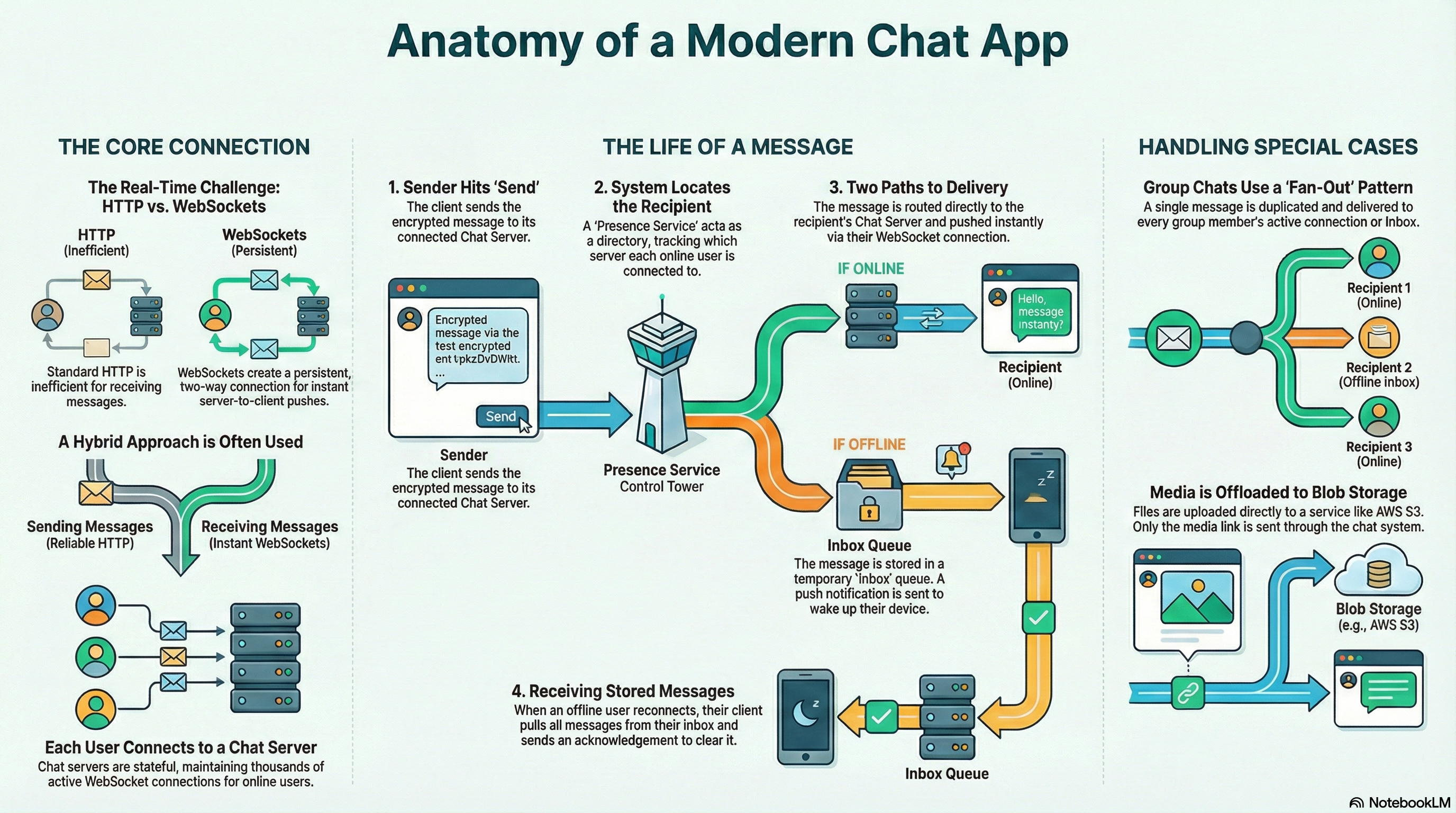
Have you ever sent a message on WhatsApp or Telegram and marveled at how it appears almost instantly on your friend’s phone, even if they’re halfway around the world? Or wondered how these apps manage to deliver messages reliably, even when you’re offline, while keeping everything encrypted end-to-end?
Building a real-time chat application that can handle millions of users and billions of messages per day is one of the most fascinating challenges in system design. It requires solving problems around low latency, high availability, message persistence, and security—all while maintaining a seamless user experience.
In this post, I’ll walk you through the architecture of a scalable real-time chat application. We’ll explore how modern messaging systems are designed, from the communication protocols that enable instant delivery to the data management strategies that ensure reliability at scale.
What Makes Chat Applications Unique?
Before diving into the architecture, let’s understand what makes chat applications different from other systems:
- Real-Time Requirements: Messages must be delivered in under 500 milliseconds to feel truly “instant”
- Bidirectional Communication: Unlike traditional request-response patterns, the server needs to push data to clients
- Stateful Connections: The system must maintain persistent connections with millions of concurrent users
- Reliability: Messages cannot be lost, even during network failures or server outages
- Security: End-to-end encryption is non-negotiable for user trust
These requirements shape every architectural decision we make.
System Requirements
Let’s start by defining what our system needs to do.
Functional Requirements
Our chat application should support:
- One-on-One and Group Messaging: Private conversations and group chats (up to 100 participants)
- Message Delivery Status: Indicators showing when messages are sent, delivered, and read
- Online Presence: Real-time status showing who’s online or offline
- Push Notifications: Alerts for offline users when new messages arrive
- Multimedia Sharing: Support for images, videos, and other file types
- Offline Message Storage: Messages stored for 30 days and delivered when users reconnect
- Multi-Device Support: Users can access chats from multiple devices simultaneously
Non-Functional Requirements
The system must meet these performance and reliability targets:
- Low Latency: Message delivery to online users in under 500ms
- Reliability: At-least-once message delivery guarantee
- High Availability: System remains operational even when individual components fail
- Scalability: Horizontal scaling to support a global user base
- Security: End-to-end encryption (E2EE) for all communications
Capacity Estimation
To understand the scale we’re dealing with, let’s estimate the system’s needs:
Assumptions:
- 500 million active users
- 30 messages per user per day on average
- 50 KB average message size (including metadata and media references)
Traffic:
- 15 billion messages per day
- ~174,000 messages per second at peak
Storage:
- 750 TB per day of new data
- With 30-day retention, we’re looking at petabytes of storage
These numbers highlight why we need a carefully designed, scalable architecture.
High-Level System Architecture
Our architecture follows a service-oriented design, where each component has a specific responsibility and can scale independently. Here’s the big picture:
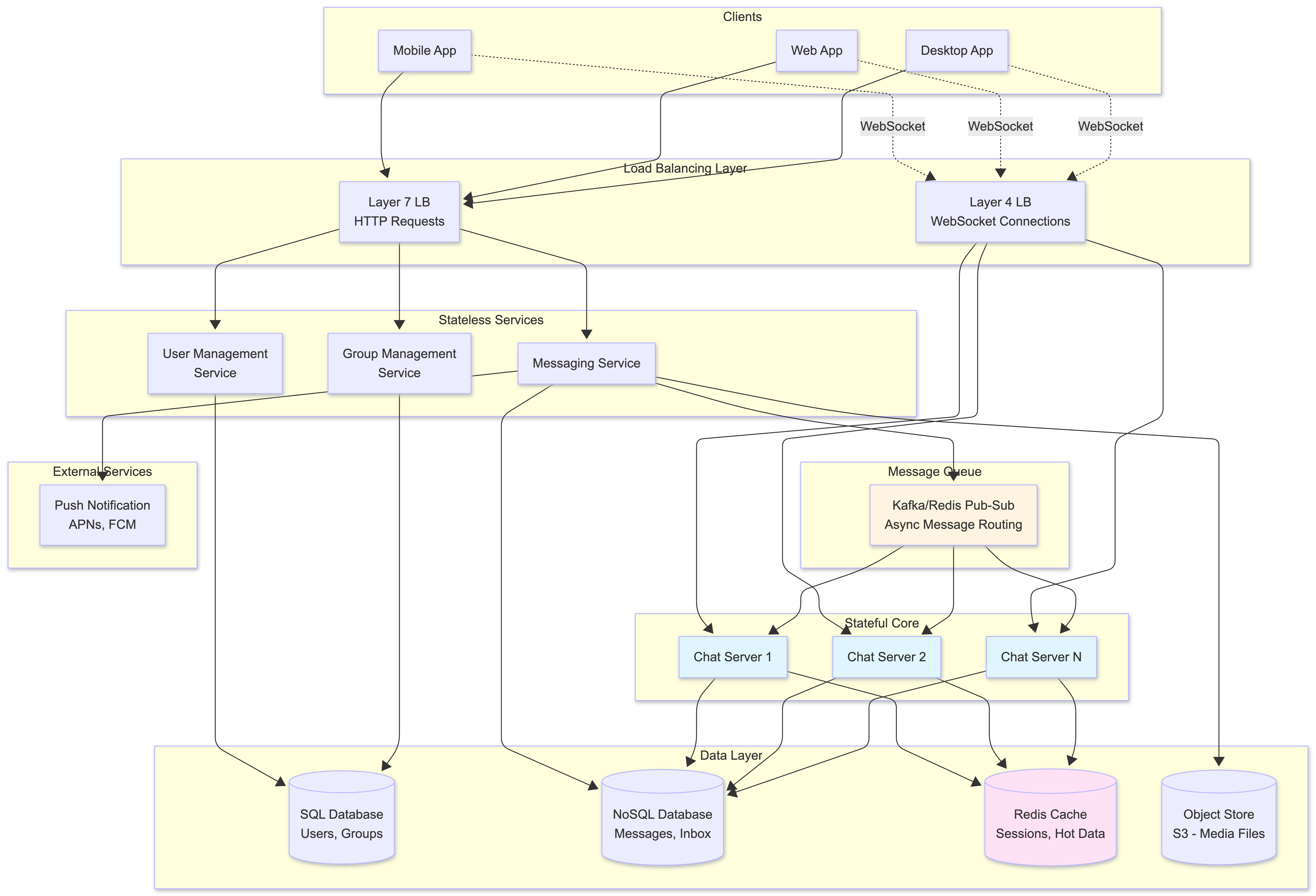
Key Components Explained
-
Clients: Mobile, web, and desktop applications that handle UI, local encryption/decryption, and maintain persistent connections
- Load Balancers:
- Layer 7 (HTTP): Routes stateless HTTP requests (sending messages, profile updates)
- Layer 4 (WebSocket): Distributes persistent WebSocket connections across Chat Servers
- Stateless Services: Microservices that don’t maintain client state:
- User Management: Registration, authentication, profiles
- Group Management: Group creation, memberships, permissions
- Messaging Service: Entry point for message ingestion
-
Chat Servers: The stateful heart of the system, maintaining WebSocket connections with thousands of users each, pushing real-time updates
- Data Layer: Hybrid storage:
- SQL Database: Structured data (users, groups)
- NoSQL Database: High-volume message data
- Cache: Fast access to hot data
- Object Store: Media files
-
Message Queue: Pub-sub system (Kafka/Redis) for asynchronous message routing and fan-out
- External Services: Push notification providers (APNs, FCM)
Real-Time Communication Protocols
The choice of communication protocol is crucial for achieving low latency. Traditional HTTP isn’t optimized for real-time, server-initiated updates.
Why Not Just HTTP?
Standard HTTP uses a request-response model. For real-time messaging, this would mean the client constantly polling the server: “Any new messages? Any new messages? Any new messages?” This creates:
- High latency (messages only arrive when the client asks)
- Wasted bandwidth (most requests return empty)
- Server load (handling millions of polling requests)
HTTP Long Polling improves this slightly—the server holds the connection open until a message arrives or times out. But it’s still resource-intensive and doesn’t provide true bidirectional communication.
WebSockets: The Real-Time Solution
WebSockets solve this elegantly. After an initial HTTP handshake, the connection “upgrades” to a persistent, full-duplex TCP connection. Both client and server can send data at any time, enabling true real-time communication.
Our Hybrid Approach
We use a hybrid model that leverages the strengths of both protocols:
sequenceDiagram
    participant C as Client
    participant MS as Messaging Service
    participant CS as Chat Server
    participant R as Recipient Client

    Note over C,R: Sending Messages (HTTP)
    C->>MS: HTTP POST /messages
    MS->>MS: Process & Route Message

    Note over C,R: Receiving Messages (WebSocket)
    MS->>CS: Forward Message (RPC)
    CS->>R: Push via WebSocket
    R-->>CS: ACK
HTTP for Sending: Clients send messages via HTTP POST. This is ideal because:
- HTTP services are stateless and easy to load balance
- Simple horizontal scaling
- Reliable delivery with standard HTTP guarantees
WebSockets for Receiving: Clients maintain persistent WebSocket connections for:
- Instant message delivery (server pushes directly)
- Real-time presence updates
- Delivery confirmations
- Low latency (no polling overhead)
This hybrid approach gives us the scalability of stateless HTTP for writes and the low-latency push capabilities of WebSockets for reads.
Core Service Components
Now let’s dive deeper into how the key services work together to deliver messages reliably and efficiently.
Chat Servers and Session Management
Chat Servers are the stateful core, each maintaining WebSocket connections with tens of thousands of users. But here’s the challenge: when Alice (connected to Server 1) sends a message to Bob (connected to Server 2), how does Server 1 know where Bob is?
This is where the Session Service (also called Connected Clients Registry) comes in. It maintains a real-time map of user_id → chat_server_id for all online users.
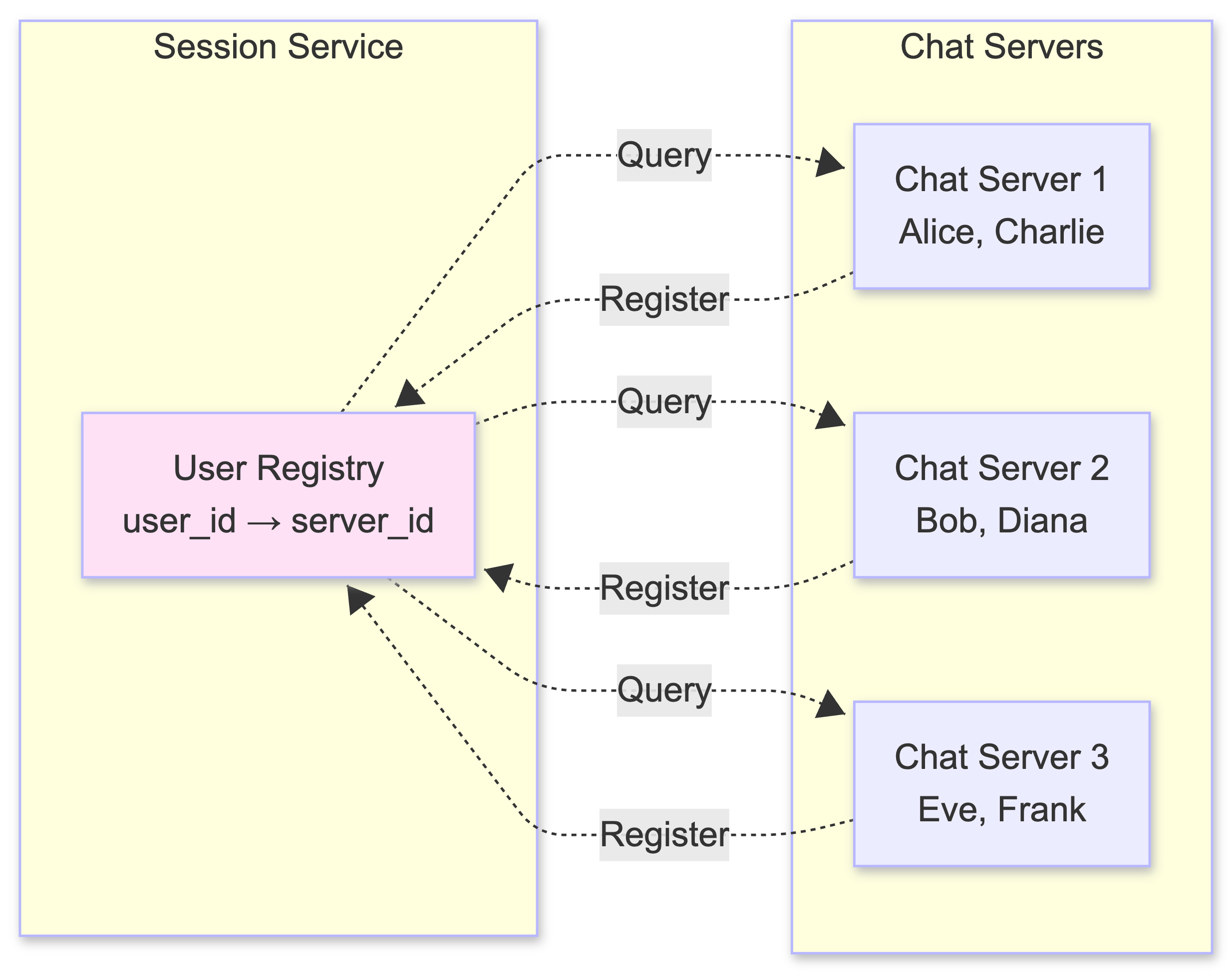
When a user connects:
- Their client establishes a WebSocket with a Chat Server
- The Chat Server registers the user in the Session Service
- When the user disconnects, the server removes them from the registry
Message Routing: Online Delivery
When a message needs to be delivered to an online recipient, here’s the flow:
sequenceDiagram
    participant S as Sender Client
    participant MS as Messaging Service
    participant SS as Session Service
    participant CS as Chat Server (Recipient)
    participant R as Recipient Client
    participant DB as Database

    S->>MS: HTTP POST /messages
    MS->>SS: Query recipient's server
    SS-->>MS: Server ID: CS-2
    MS->>CS: RPC: Forward Message
    CS->>R: Push via WebSocket
    R-->>CS: Delivery ACK
    CS-->>MS: Delivery Confirmed
    MS->>DB: Store Message (for history)
    MS-->>S: Success Response
Steps:
- Sender’s client sends message via HTTP to Messaging Service
- Messaging Service queries Session Service to find recipient’s Chat Server
- Messaging Service makes an RPC call to the recipient’s Chat Server
- Chat Server pushes message to recipient via WebSocket
- Recipient sends delivery ACK
- Message is stored in database for history
This path is optimized for speed—messages to online users are delivered in milliseconds.
Message Routing: Offline Delivery (The Inbox Pattern)
What happens when the recipient is offline? We can’t lose the message. This is where the Inbox Pattern comes in:
sequenceDiagram
    participant S as Sender Client
    participant MS as Messaging Service
    participant SS as Session Service
    participant DB as Database (Inbox)
    participant PN as Push Notification
    participant R as Recipient Client (Offline)

    S->>MS: HTTP POST /messages
    MS->>SS: Check if recipient online
    SS-->>MS: Offline
    MS->>DB: Store in Inbox Table<br/>(indexed by recipient_id)
    MS->>PN: Send Push Notification
    PN->>R: Alert: New Message

    Note over R: User comes online later

    R->>MS: HTTP GET /inbox
    MS->>DB: Fetch undelivered messages
    DB-->>MS: Return messages
    MS->>R: Deliver Messages
    R->>MS: ACK for each message
    MS->>DB: Delete from Inbox
The Inbox Pattern:
- When Session Service indicates recipient is offline, message is stored in an Inbox table (indexed by
recipient_id) - Push notification is sent to alert the user
- When user reconnects, client fetches all undelivered messages from their inbox
- After successful delivery, client sends ACK, and server deletes message from inbox
This guarantees at-least-once delivery—messages are never lost, even during network failures.
Group Messaging and Fan-Out
Group messaging introduces a challenge: delivering one message to potentially 100 recipients. A synchronous approach would be a bottleneck. Instead, we use a publish-subscribe model with Kafka:
graph TB
    subgraph Message Flow
        S[Sender Client]
        MS[Messaging Service]
        MQ[Kafka Topic<br/>group-messages]
    end

    subgraph Consumer Pool
        GMH1[Group Message<br/>Handler 1]
        GMH2[Group Message<br/>Handler 2]
        GMH3[Group Message<br/>Handler N]
    end

    subgraph Delivery
        CS1[Chat Server 1]
        CS2[Chat Server 2]
        CS3[Chat Server 3]
        Inbox[(Inbox DB)]
    end

    S -->|HTTP POST| MS
    MS -->|Publish| MQ
    MQ -->|Subscribe| GMH1
    MQ -->|Subscribe| GMH2
    MQ -->|Subscribe| GMH3

    GMH1 -->|For each online member| CS1
    GMH1 -->|For each online member| CS2
    GMH2 -->|For each online member| CS3
    GMH3 -->|For each offline member| Inbox

    style MQ fill:#fff4e1
    style GMH1 fill:#e1f5ff
    style GMH2 fill:#e1f5ff
    style GMH3 fill:#e1f5ff
How Kafka Topics Work for Group Messaging:
There are several strategies for organizing Kafka topics. We’ll use a single shared topic with partitioning approach:
- Topic Structure:
- Single topic:
group-messages(all group messages go to one topic) - Partitioning: Messages are partitioned by
group_idusing a hash function - This ensures all messages for the same group go to the same partition, maintaining message order per group
- Single topic:
- Topic Creation:
- The topic is created once during system setup (not per group)
- Kafka automatically distributes messages across partitions based on the partition key (group_id)
- Partitions can be scaled independently as traffic grows
- Consumer Subscription:
- Group Message Handler services subscribe to the entire
group-messagestopic - Each handler instance consumes from one or more partitions
- Kafka automatically balances partitions across available consumers
- When a handler picks up a message, it reads the
group_idfrom the message payload
- Group Message Handler services subscribe to the entire
-
Message Processing Flow:
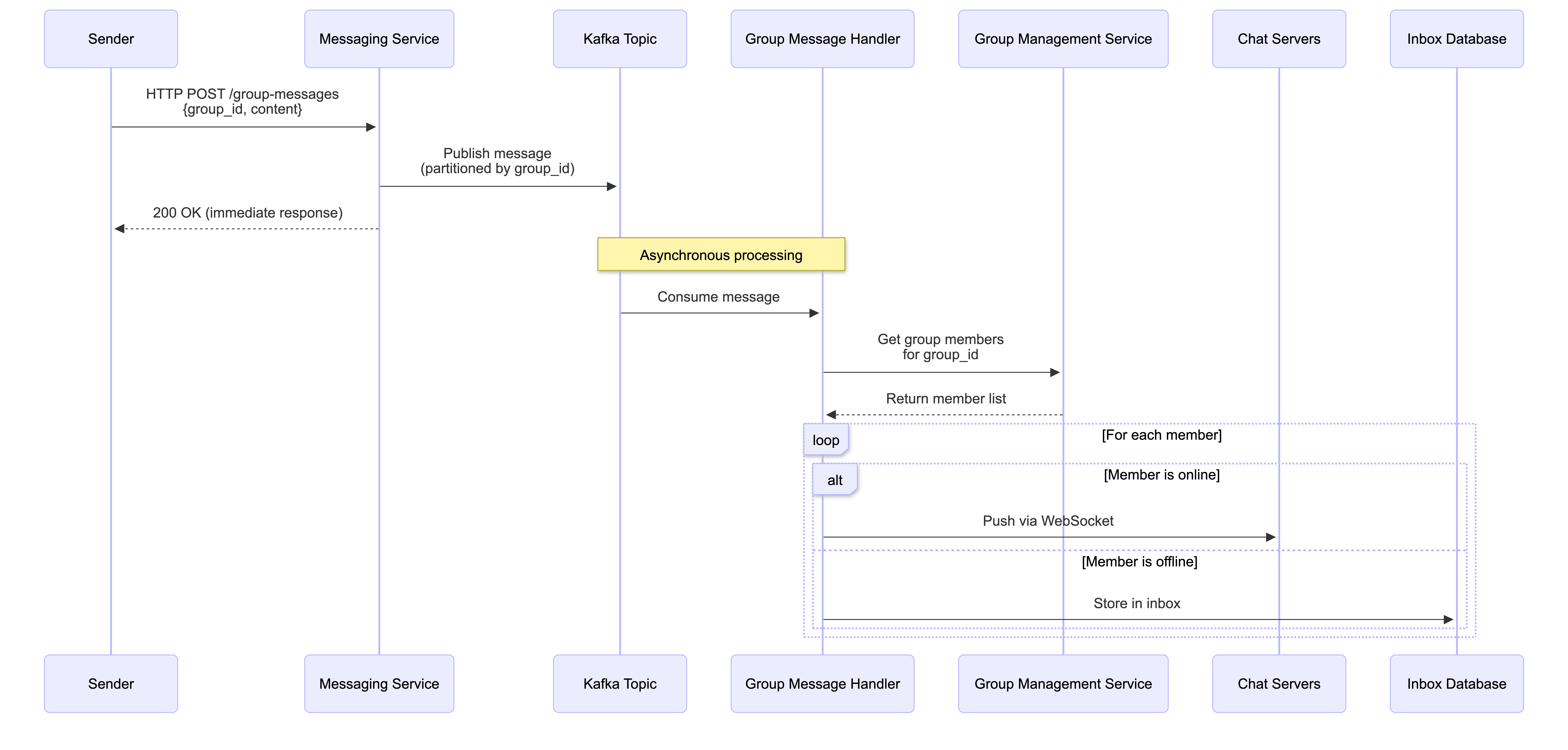
- Why This Approach?
- Scalability: Single topic is easier to manage than thousands of group-specific topics
- Load Balancing: Kafka automatically distributes partitions across consumers
- Ordering: Messages for the same group stay in order (same partition)
- Flexibility: Handlers can process any group message, making the system resilient to failures
Alternative Approach (For Very Large Groups):
For systems with extremely high group message volume, you could use group-specific topics (group-messages-{group_id}), but this requires:
- Dynamic topic creation when groups are created
- More complex subscription management
- Higher operational overhead
For most use cases, the single-topic-with-partitioning approach provides the best balance of simplicity, scalability, and performance.
Understanding Decoupling: Fast Ingestion vs. Slow Fan-Out
What does “decoupling fast message ingestion from slower fan-out” actually mean? Let’s visualize the difference:
❌ Coupled Approach (Synchronous - What We DON’T Do):
sequenceDiagram
    participant S as Sender
    participant MS as Messaging Service
    participant GMS as Group Management
    participant CS1 as Chat Server 1
    participant CS2 as Chat Server 2
    participant CS3 as Chat Server 3
    participant DB as Inbox DB

    S->>MS: Send group message<br/>(100 members)
    Note over MS: Blocked until ALL deliveries complete
    MS->>GMS: Get member list
    GMS-->>MS: 100 members

    loop For each of 100 members
        alt Online
            MS->>CS1: Push message
            MS->>CS2: Push message
            MS->>CS3: Push message
        else Offline
            MS->>DB: Store in inbox
        end
    end

    Note over MS: All 100 deliveries complete
    MS-->>S: Response (after 2-5 seconds!)

    Note over S: Sender waits... and waits...
Problems with this approach:
- Sender waits for ALL 100 deliveries to complete (could take seconds)
- If one delivery is slow, the entire request is blocked
- Messaging Service is tied up during fan-out
- Poor user experience (slow response time)
- Doesn’t scale well under load
✅ Decoupled Approach (Asynchronous - What We DO):
sequenceDiagram
    participant S as Sender
    participant MS as Messaging Service
    participant K as Kafka Topic
    participant GMH as Group Message Handler
    participant GMS as Group Management
    participant CS as Chat Servers
    participant DB as Inbox DB

    S->>MS: Send group message<br/>(100 members)
    MS->>K: Publish to topic<br/>(takes ~10ms)
    MS-->>S: 200 OK (immediate!)

    Note over S: Sender gets instant response

    Note over K,DB: Asynchronous processing (happens in background)
    K->>GMH: Consume message
    GMH->>GMS: Get member list
    GMS-->>GMH: 100 members

    loop For each of 100 members
        alt Online
            GMH->>CS: Push via WebSocket
        else Offline
            GMH->>DB: Store in inbox
        end
    end

    Note over GMH: Fan-out happens in background<br/>(doesn't block sender)
Benefits of decoupling:
- Fast response: Sender gets immediate response (~10ms) after publishing to Kafka
- Non-blocking: Messaging Service is free to handle other requests immediately
- Resilient: If fan-out fails, message stays in Kafka and can be retried
- Scalable: Multiple handlers can process messages in parallel
- Better UX: User sees “message sent” instantly, even though delivery to 100 people happens in background
The Key Insight:
The “fast ingestion” is publishing the message to Kafka (milliseconds). The “slower fan-out” is delivering to 100 recipients (could take seconds). By decoupling them:
- We acknowledge the message quickly (fast ingestion ✅)
- We process deliveries asynchronously (slow fan-out happens in background ✅)
- The sender doesn’t wait for the slow part
This decouples the fast message ingestion from the slower fan-out process, ensuring the sender gets an immediate response while delivery happens asynchronously.
Media and Asset Management
Multimedia files (images, videos) are handled separately to avoid bloating the message database. We use a pre-signed URL strategy:
sequenceDiagram
    participant C as Client
    participant AS as Asset Service
    participant S3 as S3/Object Store
    participant CDN as CDN
    participant MS as Messaging Service

    C->>AS: Request upload URL
    AS->>S3: Generate pre-signed URL
    S3-->>AS: Pre-signed URL (expires in 5 min)
    AS-->>C: Return pre-signed URL

    C->>S3: Upload media directly<br/>(bypasses app servers)
    S3-->>C: Upload success

    C->>MS: Send message with media URL
    MS->>MS: Store message metadata

    Note over C,CDN: When recipient downloads

    C->>CDN: Request media via URL
    CDN->>S3: Cache miss: fetch from S3
    S3-->>CDN: Return media
    CDN-->>C: Deliver media (cached)
Benefits:
- Direct upload: Client uploads directly to S3, reducing load on application servers
- CDN caching: Media is cached at edge locations globally for fast downloads
- Cost efficient: Only metadata stored in message database, not actual files
Presence and Notification Services
Online Status Tracking:
- Clients send lightweight WebSocket ping frames every 30 seconds
- If no ping received within 60 seconds, Chat Server marks user as offline
- Session Service is updated accordingly
Push Notifications:
- When offline user receives a message, Notification Service sends push via APNs (iOS) or FCM (Android)
- Push contains minimal metadata (sender, message preview)
- User opens app, which then fetches full message from inbox
Data Management and Persistence
With billions of messages daily, data management is critical. We use a hybrid database approach:
Database Selection
Relational Database (PostgreSQL) for:
- User profiles and authentication
- Group memberships and permissions
- Structured data requiring ACID guarantees
NoSQL Database (Cassandra/DynamoDB) for:
- Messages and inbox entries
- High write throughput
- Horizontal scalability
- Fault tolerance
Database Schema
erDiagram
    USERS ||--o{ CHAT_PARTICIPANTS : "participates in"
    GROUPS ||--o{ CHAT_PARTICIPANTS : "contains"
    USERS ||--o{ MESSAGES : "sends"
    CHAT_PARTICIPANTS ||--o{ MESSAGES : "receives"
    USERS ||--o{ INBOX : "has"
    USERS ||--o{ SESSIONS : "has"

    USERS {
        string user_id PK
        string username
        string public_key
        timestamp created_at
    }

    GROUPS {
        string group_id PK
        string name
        int max_members
        timestamp created_at
    }

    CHAT_PARTICIPANTS {
        string chat_id PK
        string user_id FK
        string group_id FK
        timestamp joined_at
    }

    MESSAGES {
        string message_id PK
        string chat_id FK
        string sender_id FK
        string content
        string media_url
        timestamp created_at
    }

    INBOX {
        string recipient_id PK
        string message_id PK
        timestamp stored_at
    }

    SESSIONS {
        string user_id PK
        string server_id
        timestamp last_seen
    }
Data Partitioning and Caching
Sharding Strategy:
- Data partitioned by
user_idorgroup_idusing consistent hashing - Distributes load across multiple database nodes
- Enables horizontal scaling
Caching Layer (Redis):
- Hot data cached in memory:
- User sessions (Session Service data)
- User profiles and contact lists
- Recent message history
- Reduces database load and improves read latency
graph LR
    subgraph Application
        AS[Application Server]
    end

    subgraph Cache Layer
        Redis[(Redis Cache<br/>Hot Data)]
    end

    subgraph Database Layer
        DB1[(Shard 1)]
        DB2[(Shard 2)]
        DB3[(Shard N)]
    end

    AS -->|Check Cache| Redis
    Redis -->|Cache Hit| AS
    Redis -->|Cache Miss| DB1
    AS -->|Write/Read| DB1
    AS -->|Write/Read| DB2
    AS -->|Write/Read| DB3

    style Redis fill:#ffe1f5
    style DB1 fill:#e1f5ff
    style DB2 fill:#e1f5ff
    style DB3 fill:#e1f5ff
Security Architecture: End-to-End Encryption
End-to-end encryption (E2EE) is not optional—it’s a core requirement. E2EE ensures only the sender and recipient(s) can read messages, not even the platform provider.
How E2EE Works
E2EE is built on public-key cryptography (similar to the Signal Protocol):
sequenceDiagram
    participant A as Alice's Device
    participant S as Server
    participant B as Bob's Device

    Note over A,B: Key Exchange (Initial Setup)
    A->>S: Upload public key
    B->>S: Upload public key
    S->>A: Bob's public key
    S->>B: Alice's public key

    Note over A,B: Message Encryption & Delivery
    A->>A: Encrypt message with<br/>Bob's public key
    A->>S: Send encrypted message<br/>(ciphertext)
    S->>S: Store & route ciphertext<br/>(cannot decrypt)
    S->>B: Forward encrypted message
    B->>B: Decrypt with<br/>Bob's private key
    B->>A: Read plaintext message

    Note over A,B: Forward Secrecy
    A->>A: Rotate session keys
    B->>B: Rotate session keys
Key Principles:
- Public/Private Key Pairs: Each device generates unique keys
- Private key: Never leaves the device (secret)
- Public key: Shared with server, distributed to contacts
- Message Encryption:
- Sender encrypts message using recipient’s public key
- For groups: message encrypted separately for each member
- Server Role:
- Servers only receive, store, and route ciphertext (encrypted data)
- Servers cannot decrypt messages (don’t have private keys)
- Message Decryption:
- Recipient’s device decrypts using its private key
- Only point where message is readable
- Session Keys and Forward Secrecy:
- What are session keys? While public/private keys establish the initial secure channel, actual messages are encrypted using temporary symmetric session keys (like AES keys). These are derived from the long-term key pairs but are much faster for encrypting/decrypting messages.
- How they work: When Alice and Bob first communicate, they perform a key exchange (using their public keys) to derive a shared session key. This session key is then used to encrypt all messages in that conversation session.
- How users read old messages: Session keys are stored securely on each user’s device (in encrypted storage). When a user wants to read old messages, their device uses the stored session keys to decrypt them. The keys remain on the device as long as needed to access message history.
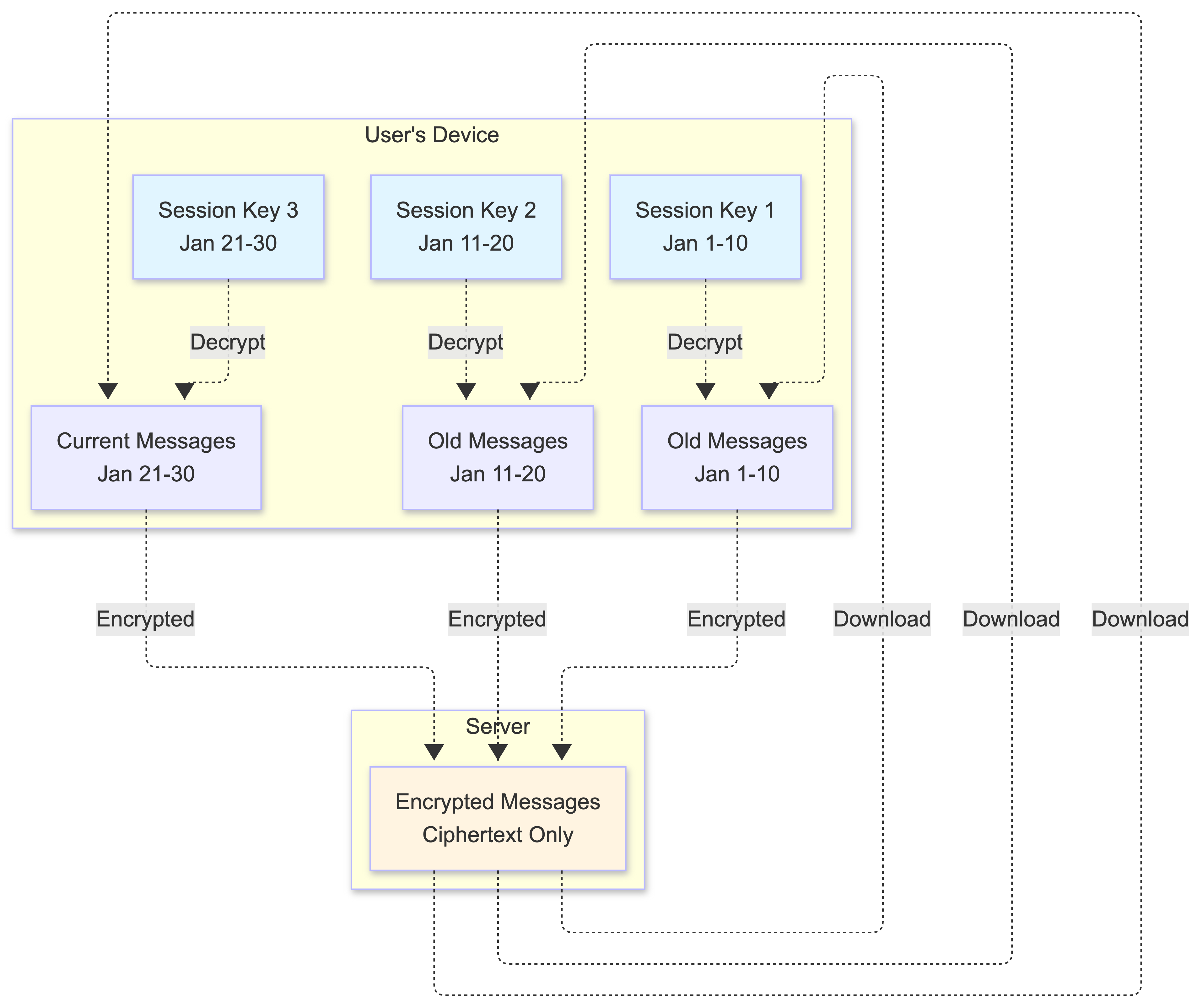
Here’s how it works:
- When you scroll up to read old messages, your device downloads the encrypted messages from the server
- Your device looks up the session key that was active during that time period
- It uses that session key to decrypt the messages, making them readable
-
Each time period has its own session key, so your device keeps multiple keys to access your full message history
- Forward Secrecy: Session keys rotate periodically (e.g., every 100 messages or every 24 hours). When keys rotate:
- Old session keys are kept on your device (so you can still read your message history)
- New messages use the new session key
- This provides “forward secrecy”—if your device is compromised in the future, only future messages (and current session) are at risk, not your entire message history
- Past conversations remain secure because they were encrypted with session keys derived from ephemeral keys that were deleted after use
This architecture provides the highest level of communication security, forming the foundation of user trust.
Advanced Topics
The following sections cover advanced architectural considerations that significantly increase system complexity. The core architecture described above assumes single-device-per-user and uses fan-out on write for simplicity. These topics are optional enhancements that many production systems implement, but they require substantial architectural changes. Feel free to skip these sections if you’re focusing on the fundamental architecture.
Advanced Topic: Multi-Device Support (Optional)
Handling a user with multiple devices (such as a phone, tablet, and laptop) significantly increases the complexity of a chat system. The focus shifts from simple user-to-user delivery to device-to-device synchronization. To effectively support this, the system must undergo several architectural and data model changes.
The Challenge:
To visualize this, imagine your user identity is a mailing address, but each device is a specific person living in that house. In a single-device world, the mailman just drops the letter at the door. In a multi-device world, the mailman must make a copy of that letter for every person in the house to ensure everyone stays informed, regardless of who was home when the mail arrived.
1. Architectural and Data Model Shifts
To support multiple devices, the system can no longer treat a “user” as a single endpoint. Instead, it must introduce a Client or Device entity.
New Data Structures:
erDiagram
    USERS ||--o{ CLIENTS : "has"
    CLIENTS ||--o{ SESSIONS : "connects to"
    CLIENTS ||--o{ INBOX : "has"
    USERS ||--o{ MESSAGES : "sends"

    USERS {
        string user_id PK
        string username
        string public_key
    }

    CLIENTS {
        string client_id PK
        string user_id FK
        string device_type
        string device_name
        timestamp last_seen
    }

    SESSIONS {
        string client_id PK
        string user_id FK
        string server_id
        timestamp connected_at
    }

    INBOX {
        string client_id PK
        string message_id PK
        string recipient_id FK
        timestamp stored_at
    }
Key Changes:
- New Mapping Table: A
Clientstable maintains a record of all active devices (client IDs) associated with a singleuser_id - Per-Client Inbox: The Inbox pattern must be updated to be per-client. If a user has three devices, a single message results in three separate entries in the Inbox table to ensure each device eventually receives it
- Session Management: The Connected Clients Registry Service must track which specific messaging server shard each individual device is currently connected to, mapping
device_id → user_id → server_id
2. The Delivery and Synchronization Flow
When a user sends a message, the system must ensure it reaches all devices belonging to the recipient, as well as the sender’s own other devices.
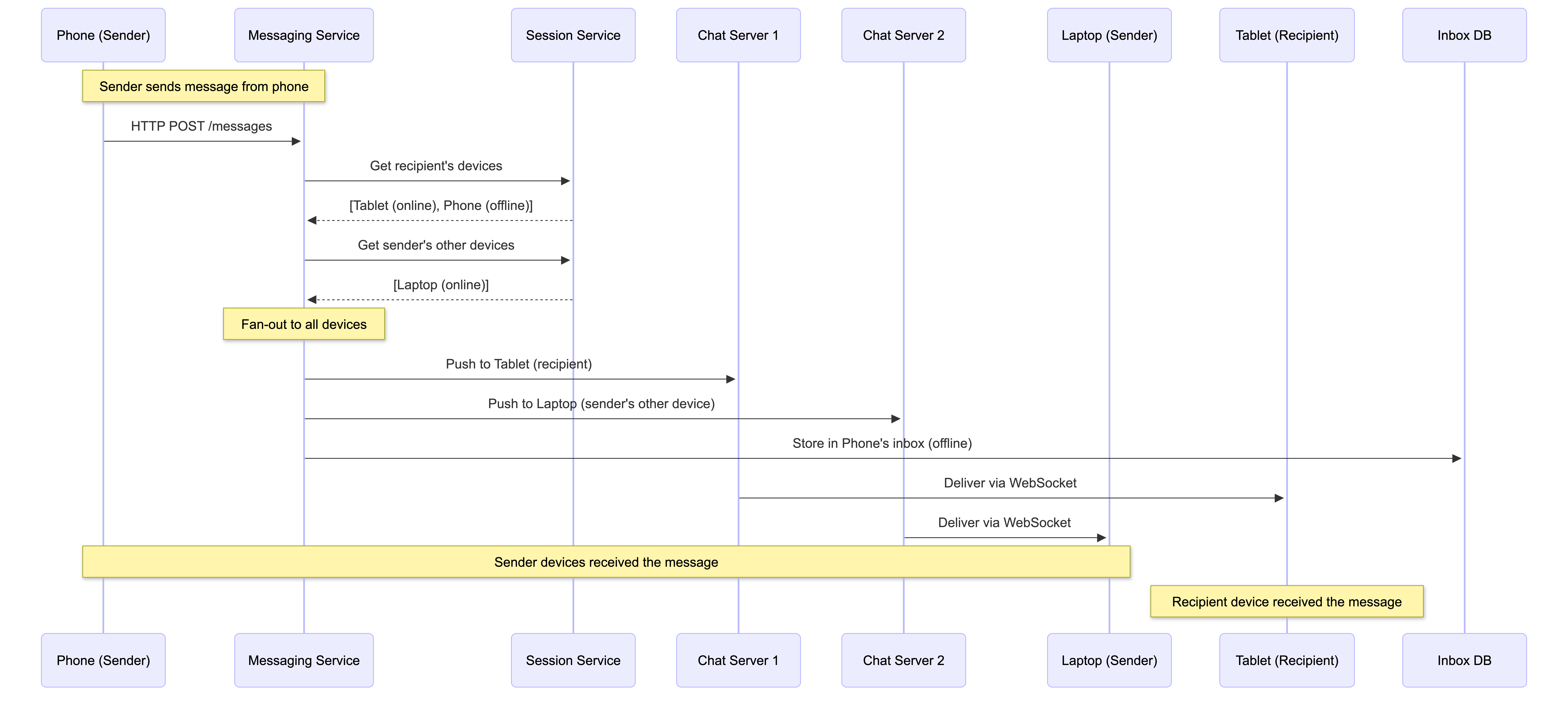
Message Fan-out Process:
- When a message is sent, the server looks up all participants in the chat
- For each participant, it then looks up all their active clients (devices)
- The message is pushed to all currently online devices via WebSockets
- For offline devices, the message is stored in their specific client-level inboxes
Self-Synchronization:
A major challenge is “sending my own messages to myself”. When you send a message from your phone:
- The server must route that same message to your laptop and tablet
- This ensures conversation history remains consistent across all your screens
- Each of your devices receives the message as if it came from another user
Read Receipts Synchronization:
Status updates must also be synchronized across devices:
sequenceDiagram
    participant T as Tablet
    participant MS as Messaging Service
    participant SS as Session Service
    participant P as Phone
    participant L as Laptop

    Note over T: User reads message on tablet
    T->>MS: Mark message as read
    MS->>SS: Get user's other devices
    SS-->>MS: [Phone, Laptop]

    MS->>P: Sync read status
    MS->>L: Sync read status

    Note over P,L: "Blue ticks" now appear<br/>on all devices
- If you read a message on your tablet, the “blue ticks” or read status must be synchronized to your phone and laptop
- All devices show the same read/unread status
3. Constraints and Scaling Challenges
Managing multiple devices introduces significant overhead regarding storage and processing.
Transaction Limits:
Using multiple devices exponentially increases the number of database rows. For example:
- A group chat with 100 members
- Each member has 5 devices
- A single message requires 500 rows to be inserted into the inbox table (100 members × 5 devices)
- This can exceed database constraints, such as the 100-record limit for DynamoDB transactions
Solutions:
graph TB
    subgraph "Problem"
        MSG[Single Message]
        M1[Member 1<br/>5 devices]
        M2[Member 2<br/>5 devices]
        M100[Member 100<br/>5 devices]
        INBOX[500 Inbox Entries<br/>Required!]
    end

    subgraph "Solutions"
        S1[Batch Processing<br/>Split into chunks]
        S2[Device Limits<br/>2-3 devices per user]
        S3[Lazy Loading<br/>Sync on demand]
    end

    MSG --> M1
    MSG --> M2
    MSG --> M100
    M1 --> INBOX
    M2 --> INBOX
    M100 --> INBOX

    INBOX --> S1
    INBOX --> S2
    INBOX --> S3

    style INBOX fill:#ffe1e1
    style S1 fill:#e1f5ff
    style S2 fill:#e1f5ff
    style S3 fill:#e1f5ff
- Batch Processing: Split inbox insertions into smaller chunks that fit within transaction limits
- Device Limits: Systems often impose a limit on active clients (e.g., 2–3 devices per account) to prevent storage bloat
- Lazy Loading: Only sync messages to devices when they come online, rather than pre-creating all inbox entries
Security (Encryption) Complexity:
For end-to-end encryption (E2EE), each device typically generates its own unique public/private key pair:
sequenceDiagram
    participant A1 as Alice's Phone
    participant A2 as Alice's Laptop
    participant MS as Messaging Service
    participant B1 as Bob's Phone
    participant B2 as Bob's Tablet

    Note over A1,B2: Bob has 2 devices
    A1->>A1: Encrypt message for Bob's Phone<br/>(using Phone's public key)
    A1->>A1: Encrypt message for Bob's Tablet<br/>(using Tablet's public key)

    A1->>MS: Send 2 encrypted versions
    MS->>B1: Deliver to Phone
    MS->>B2: Deliver to Tablet

    Note over A1: Alice must encrypt separately<br/>for EACH of Bob's devices
- The sender must encrypt the message separately for every single device the recipient owns
- This increases computational load on the client side
- For a group chat with 100 members, each with 3 devices, a single message requires 300 separate encryptions
4. History Retrieval
When a user adds a new device, the system must facilitate “Cold History” retrieval:
sequenceDiagram
    participant ND as New Device
    participant MS as Messaging Service
    participant S3 as S3 Archive
    participant DB as Database
    participant OD as Old Device

    Note over ND: User adds new device
    ND->>MS: Request chat history
    MS->>DB: Check recent messages<br/>(last 30 days)
    DB-->>MS: Return recent messages

    alt Recent messages available
        MS->>ND: Deliver recent messages
    else Need older messages
        MS->>S3: Fetch archived messages
        S3-->>MS: Return archived batch
        MS->>ND: Deliver historical messages
    end

    Note over ND: User scrolls up
    ND->>MS: Request more history
    MS->>S3: Fetch next batch
    S3-->>MS: Return batch
    MS->>ND: Deliver older messages
How It Works:
- If servers store chat history (as WhatsApp does to make connecting new devices easier), the new device can scroll up and pull batches of historical messages
- Messages are typically stored in long-term storage (e.g., S3 archives) after a certain period
- The new device requests history in batches as the user scrolls
- Each device maintains its own local cache of message history
Benefits:
- New devices can quickly sync recent conversations
- Full history is available on-demand
- Reduces initial sync time (only loads what’s needed)
Trade-offs:
- Requires additional storage for archived messages
- Increases complexity of history retrieval logic
- Must handle pagination and batch loading efficiently
Advanced Topic: Fan-Out on Write vs. Fan-Out on Read (Optional)
In the context of group messaging within a chat system, the choice between fan-out on write and fan-out on read involves balancing system performance against user experience, specifically regarding write costs and delivery latency.
The Analogy:
To think of it simply: Fan-out on write is like a mail carrier making a copy of a flyer for every house in a neighborhood and putting it in every mailbox immediately; it’s a lot of work for the mail carrier, but the residents find it right away. Fan-out on read is like putting a single flyer on a community bulletin board; it’s much easier for the mail carrier, but each resident has to take the extra step of going to the board to see it.
Fan-Out on Write (Push Model)
In this model, the server duplicates the message for every recipient at the moment the message is sent. This is the approach we described in the core architecture.
sequenceDiagram
    participant S as Sender
    participant MS as Messaging Service
    participant DB as Database
    participant R1 as Recipient 1
    participant R2 as Recipient 2
    participant R100 as Recipient 100

    S->>MS: Send group message<br/>(100 members)

    Note over MS,DB: Fan-out on Write (Push)
    MS->>DB: Write to Inbox 1
    MS->>DB: Write to Inbox 2
    MS->>DB: Write to Inbox 3
    MS->>DB: ... (100 writes total)
    MS->>DB: Write to Inbox 100

    Note over MS: All writes complete
    MS-->>S: Message sent

    Note over R1,R100: When recipients come online
    R1->>DB: Read from Inbox 1<br/>(instant - already there)
    R2->>DB: Read from Inbox 2<br/>(instant - already there)
    R100->>DB: Read from Inbox 100<br/>(instant - already there)
Pros:
- ✅ Fast delivery for recipients: Because the message is pre-duplicated into each recipient’s specific inbox or pushed immediately to their active session, the recipient does not experience delays when retrieving the message later
- ✅ Better user experience: Messages appear instantly when users open the app
- ✅ Predictable performance: Write cost is known upfront, read operations are simple lookups
Cons:
- ❌ Very high write cost: For large groups, a single message can trigger a massive spike in database writes. For instance, if a group has 100 members, the system must perform 100 write operations to different inboxes
- ❌ Write-heavy systems struggle: Systems that are write-heavy may struggle with this model as groups grow in size
- ❌ Transaction limits: Can exceed database transaction limits (e.g., DynamoDB’s 100-record limit per transaction)
Fan-Out on Read (Pull Model)
In this model, the server stores only a single copy of the message. Each recipient fetches that single copy only when they come online or open the chat.
sequenceDiagram
    participant S as Sender
    participant MS as Messaging Service
    participant DB as Database
    participant R1 as Recipient 1
    participant R2 as Recipient 2
    participant R100 as Recipient 100

    S->>MS: Send group message<br/>(100 members)

    Note over MS,DB: Fan-out on Read (Pull)
    MS->>DB: Write single message<br/>(1 write only!)
    MS-->>S: Message sent (fast!)

    Note over R1,R100: When recipients come online
    R1->>MS: Open chat
    MS->>DB: Query: Get messages for<br/>this group since last read
    DB-->>MS: Return messages
    MS-->>R1: Deliver messages<br/>(slight delay)

    R2->>MS: Open chat
    MS->>DB: Query: Get messages for<br/>this group since last read
    DB-->>MS: Return messages
    MS-->>R2: Deliver messages<br/>(slight delay)

    Note over R100: Same for all recipients
Pros:
- ✅ Significantly lower write costs: Only one write operation per message, regardless of group size
- ✅ Prevents write overload: The system doesn’t get overloaded during the initial sending phase
- ✅ Scales better for large groups: Often used as a scaling strategy for very large groups (thousands of members)
- ✅ Simpler write path: Sender gets immediate response
Cons:
- ❌ Higher read latency: When a user opens their app, the system must then perform the work of identifying which messages are missing and fetching them, which can lead to a slight delay in the messages appearing on the screen
- ❌ More complex read logic: Must track what each user has read, query for new messages, and merge results
- ❌ Worse user experience: Users may see a loading spinner when opening group chats
Comparison Table
| Aspect | Fan-Out on Write (Push) | Fan-Out on Read (Pull) |
|---|---|---|
| Write Cost | High (N writes for N members) | Low (1 write per message) |
| Read Cost | Low (simple inbox lookup) | Higher (query + filtering) |
| Delivery Latency | Low (pre-delivered) | Higher (on-demand fetch) |
| User Experience | Better (instant messages) | Worse (loading delays) |
| Scalability | Limited by write capacity | Better for very large groups |
| Complexity | Simpler read path | More complex read logic |
Scaling and Practical Application
Real-world systems use several strategies to manage these trade-offs:
1. Decoupling with Pub-Sub:
To manage the complexity of fanning out to hundreds of users, it’s often recommended to move the delivery logic to the consumer side of a pub-sub bus (as we described in the core architecture). This decouples the sender from the heavy lifting required to identify every participant and their respective connection shards.
graph LR
    subgraph "Fan-Out on Write with Pub-Sub"
        S[Sender] --> MS[Messaging Service]
        MS --> K[Kafka Topic]
        K --> GMH1[Group Message Handler 1]
        K --> GMH2[Group Message Handler 2]
        K --> GMH3[Group Message Handler N]

        GMH1 --> DB1[(Write to Inboxes)]
        GMH2 --> DB2[(Write to Inboxes)]
        GMH3 --> DB3[(Write to Inboxes)]
    end

    style K fill:#fff4e1
    style GMH1 fill:#e1f5ff
    style GMH2 fill:#e1f5ff
    style GMH3 fill:#e1f5ff
2. Group Size Constraints:
Because of the overhead of fan-out on write, many systems (like WhatsApp) impose limits on group size—often capped at 100 to 256 participants—to ensure that the transaction limits of databases like DynamoDB (which supports up to 100 records per transaction) are not exceeded.
3. Hybrid Approaches:
While not explicitly a single “hybrid” step, systems can use strategies like:
- Separate media storage: By storing large binary files (media) in object storage and only fanning out a tiny URL or ID, the system mitigates some of the performance penalties of fan-out on write
- Selective fan-out: Use fan-out on write for small groups (< 50 members) and fan-out on read for larger groups
- Lazy fan-out: Write immediately to online users’ inboxes, but defer writes for offline users until they come online
Which Approach Should You Use?
Use Fan-Out on Write (Push) when:
- Group sizes are moderate (typically < 256 members)
- Low latency is critical for user experience
- You have sufficient write capacity
- Most users are frequently online
Use Fan-Out on Read (Pull) when:
- Group sizes are very large (thousands of members)
- Write capacity is a bottleneck
- Users can tolerate slight delays when opening chats
- Most users are frequently offline
Our Architecture Choice:
The architecture described in this post uses fan-out on write because:
- It provides the best user experience (instant message delivery)
- Group sizes are limited (up to 100 members)
- The pub-sub decoupling mitigates write bottlenecks
- It’s the standard approach for consumer messaging apps
For enterprise or very large group scenarios, a hybrid or pull-based approach might be more appropriate.
Design Trade-Offs and Decisions
Every architectural decision involves trade-offs. Here are the key ones we made:
| Decision | Justification / Trade-Off |
|---|---|
| Hybrid Protocols (HTTP for send, WebSocket for receive) | Balances stateless HTTP scalability with WebSocket’s low-latency push. Optimizes resource usage but requires managing two connection types. |
| Pub/Sub for Group Chats | Decouples fast message ingestion from slower fan-out. Enhances resilience but introduces slight latency vs. direct RPC. |
| Hybrid Database Model (SQL + NoSQL) | Leverages SQL for structured data and NoSQL for high-volume messages. Adds operational complexity but essential for scale. |
| Centralized Inbox for Offline Delivery | Guarantees at-least-once delivery with server-side storage. Costs storage and has privacy implications (mitigated by 30-day retention and E2EE). |
Conclusion
Building a scalable real-time chat application is a complex engineering challenge that requires careful consideration of latency, reliability, scalability, and security. The architecture we’ve explored demonstrates how modern systems handle these challenges through:
- Hybrid communication protocols that optimize for both sending and receiving
- Service-oriented architecture that enables independent scaling
- Asynchronous message routing for complex workflows like group chats
- Hybrid data storage that matches the right tool to each data type
- End-to-end encryption that protects user privacy
The key takeaway is that there’s no one-size-fits-all solution. Each component is chosen based on specific requirements, and the overall system balances multiple trade-offs to deliver a world-class user experience.
If you’re working on building scalable systems or preparing for system design interviews, I hope this deep dive has been helpful. The principles here apply to many real-time, high-throughput systems beyond just chat applications.
What’s Next?
If you found this interesting, you might also enjoy:
- System Design: Twitter Architecture
- System Design: YouTube Architecture
- System Design: Web Search Engine Architecture
Feel free to share your thoughts or questions in the comments!