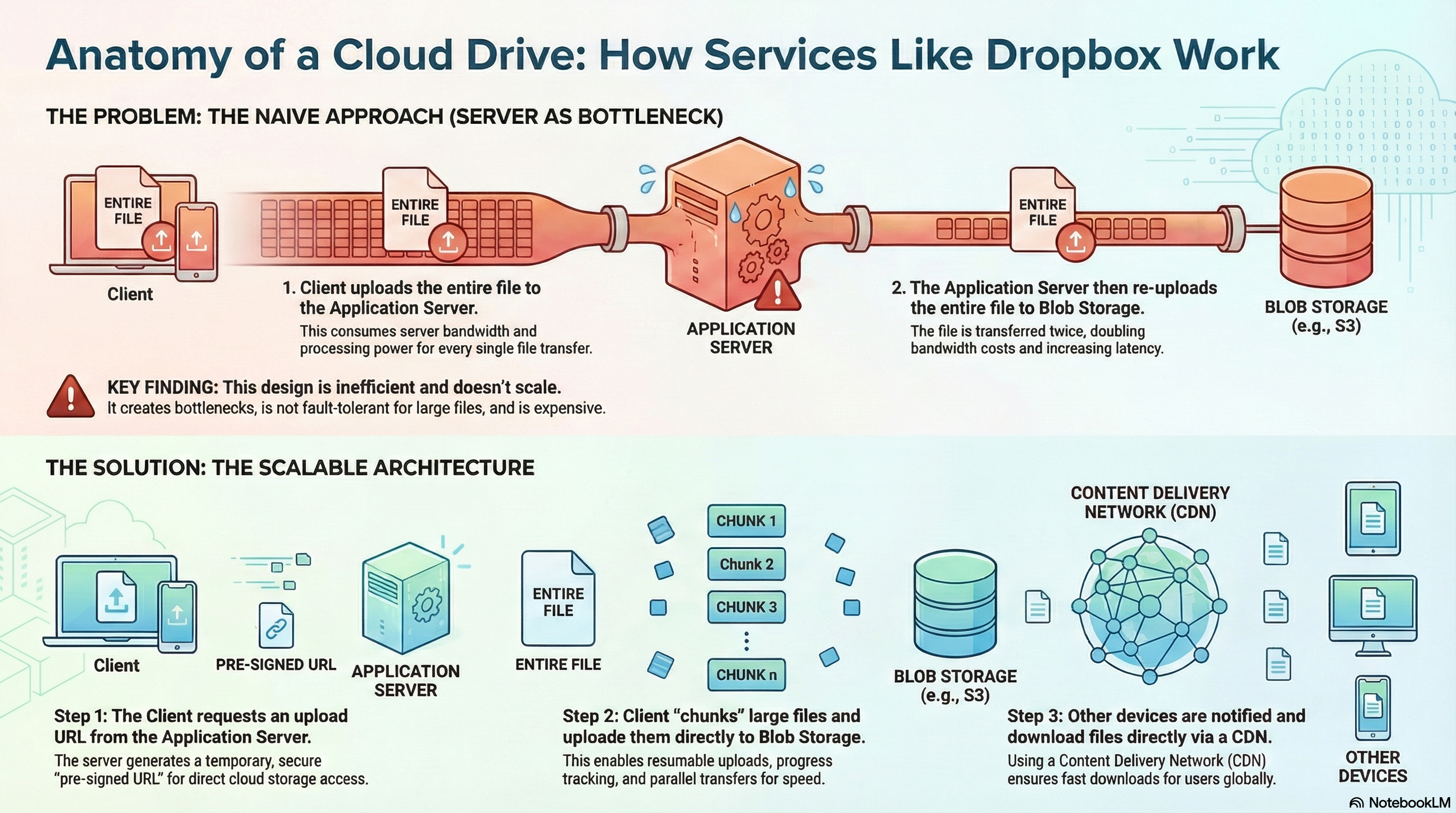
Have you ever uploaded a large file to Dropbox or Google Drive and wondered how it seamlessly appears on all your devices almost instantly? Or how these services manage to store petabytes of user data while maintaining fast upload and download speeds for millions of users worldwide?
Building a cloud file storage and synchronization service is one of the most complex challenges in distributed systems. It requires solving problems around massive scale storage, real-time synchronization, fault tolerance, and data durability—all while ensuring users can access their files from anywhere, at any time.
In this post, I’ll walk you through the architecture of a scalable cloud file storage service. We’ll explore how modern file storage systems are designed, from the separation of control and data planes to the chunking strategies that enable efficient file transfers and synchronization.
What Makes Cloud File Storage Unique?
Before diving into the architecture, let’s understand what makes cloud file storage systems different from other distributed systems:
- Massive Storage Requirements: Systems must handle petabytes of data across millions of users
- Bidirectional Synchronization: Changes made locally must sync to the cloud, and cloud changes must sync to all devices
- Large File Handling: Files can be gigabytes in size, requiring special strategies to handle uploads efficiently
- Real-Time Updates: Users expect near-instant synchronization when files change on other devices
- Durability Guarantees: Data loss is catastrophic—the system must guarantee that files are never lost or corrupted
These requirements shape every architectural decision we make.
System Requirements
Let’s start by defining what our system needs to do.
Functional Requirements
Our cloud file storage service should support:
- File Upload and Download: Users must be able to upload and download files from any supported client (desktop, web, mobile)
- Cross-Device Synchronization: The system must automatically synchronize file additions, modifications, and deletions across all of a user’s registered devices
- File Sharing: Users must have the ability to share files with other specific users of the service
Non-Functional Requirements
The system must meet these critical performance and reliability targets:
- High Availability: The system must gracefully tolerate server failures and network partitions without interrupting user access
- Reliability & Durability: Data integrity is paramount—no data should ever be lost or corrupted
- Low Latency: All file operations (upload, download, synchronization) must execute with the lowest possible latency for a globally distributed user base
- Scalability: The architecture must horizontally scale to support 100 million users and accommodate petabytes of data storage
- Security: User files must be rigorously protected from unauthorized access, with encryption both in transit and at rest
Scope of Design
To maintain focus on core architectural challenges, the following features are considered out of scope:
- File Previews: Generating thumbnails or in-app previews for images and videos
- Real-Time File Editing: Collaborative, in-app editing of documents (like Google Docs)
- File Versioning: The ability to store and restore previous versions of a file
Capacity Planning and Performance Estimates
Back-of-the-envelope calculations are essential for grounding our architectural decisions in the reality of the system’s operational scale. These estimates help inform critical choices regarding storage technology, database scaling strategies, and network infrastructure.
Assumptions
| Metric | Assumed Value |
|---|---|
| Total Users | 100 Million |
| Daily Active Users (DAU) | 1 Million |
| Average Files per User | 10 |
| Average File Size | 10 MB |
Derived Estimates
Based on these assumptions, we can calculate the system’s requirements:
1. Total File Storage
The total required capacity for user files in our blob storage system:
100 Million Users × 10 Files/User × 10 MB/File = 10 Petabytes (PB)
2. Total Metadata Storage
Assuming approximately 500 bytes of metadata per file (for attributes like name, creation timestamp, and chunk information):
100 Million Users × 10 Files/User × 500 Bytes/File = 500 Gigabytes (GB)
3. Daily Bandwidth Usage
Assuming each of the 1 million daily active users makes 100 edits per day and the average size of a modified file chunk is 2 KB:
- Upload: 1M DAU × 100 Edits/Day × 2 KB/Chunk = 200 GB/Day
- Download: For every file change uploaded by one client, other clients must download that same change to remain synchronized. This results in an equivalent download traffic volume of 200 GB/Day
4. Database I/O Operations per Second (IOPS)
The database must handle writes for both file metadata updates and subscription management. It’s important to understand that IOPS here refers to database operations (metadata writes), not blob storage operations. Each file edit results in metadata updates in the database, regardless of how many chunks are involved in the actual file transfer.
Understanding the Calculation:
When a user edits a file:
- The client uploads the changed chunks directly to blob storage (S3) - this doesn’t count as database IOPS
- The client notifies the backend that the edit is complete
- The backend performs one database write to update the file’s metadata (e.g.,
updated_attimestamp, file hash, chunk list)
So even if an edit involves uploading 10 chunks to S3, it still results in 1 database write operation to update the metadata.
File Management IOPS:
This represents database writes for file metadata operations (create, update, delete):
1M DAU × 100 Edits/Day / 86,400 Seconds/Day ≈ 115,000 IOPS
However, this is an average. In reality, traffic is not evenly distributed throughout the day. Peak traffic can be 2-3x higher than average. Additionally, we need to account for:
- File creation operations (new uploads)
- File deletion operations
- Metadata reads (checking permissions, listing files)
Accounting for peak traffic and read operations, we estimate:
- File Management: ~250k IOPS
Subscription Management IOPS:
“Subscription Management” refers to database operations related to:
- User storage quota tracking (updating used storage when files are uploaded/deleted)
- Billing information updates
- Subscription plan changes
- Storage limit enforcement checks
These operations happen alongside file operations. For example, when a user uploads a file, the system must:
- Update file metadata (counted in File Management IOPS)
- Update the user’s storage quota (counted in Subscription Management IOPS)
Assuming similar write patterns and accounting for peak traffic:
- Subscription Management: ~250k IOPS
Combined Load:
- File Management: ~250k IOPS
- Subscription Management: ~250k IOPS
- Combined Load: ~500,000 IOPS
The key takeaway from these calculations is clear: the system must be architected for petabyte-scale storage and designed to sustain hundreds of thousands of concurrent database operations per second. This necessitates a distributed, horizontally scalable architecture from the outset.
High-Level System Architecture
The system’s high-level design philosophy is centered on the strategic decoupling of the control plane (handling metadata, user authentication, and application logic) from the data plane (handling the storage and transfer of the actual file objects). This separation allows each plane to scale independently, achieving maximum performance, scalability, and cost-efficiency.
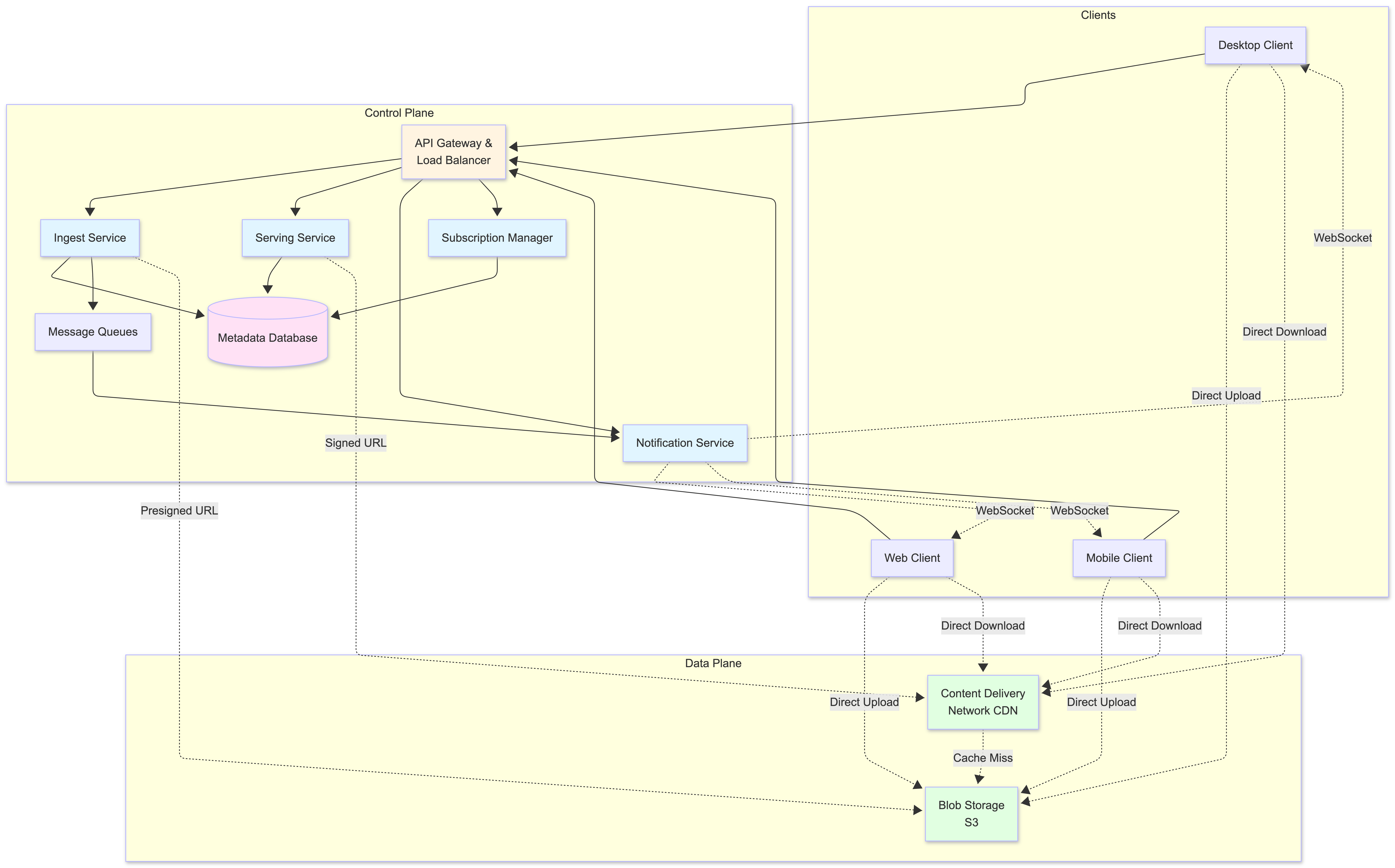
Architectural Components
The architecture is composed of several core components, each with a distinct responsibility:
1. Client
The user-facing application (desktop, web, mobile) responsible for the “heavy lifting” on the user’s device. Its duties include:
- Chunking large files into smaller pieces
- Compressing data before upload
- Performing client-side encryption (optional)
- Interacting directly with both the backend APIs and the object storage system
2. API Gateway & Load Balancer
Serves as the single, managed entry point for all client requests. It handles:
- Request routing to the appropriate microservice
- Rate limiting to prevent abuse
- SSL termination to offload cryptographic work
3. Ingest Service
A horizontally scalable service dedicated to the file upload workflow:
- Authenticates requests
- Generates secure presigned URLs for direct-to-storage uploads
- Creates initial file metadata records
4. Serving Service
A horizontally scalable service that manages the file download workflow:
- Verifies user permissions against the metadata database
- Generates temporary signed URLs for secure content delivery
5. Notification Service
Manages persistent connections (e.g., WebSockets) with online clients:
- Pushes real-time notifications about file changes
- Triggers immediate synchronization on other connected devices
6. Subscription Manager
A dedicated service that manages:
- User storage quotas
- Billing information
- Ensures users operate within their subscribed storage limits
7. Message Queues
Asynchronous message queues used to decouple services and buffer requests:
- Queue between Ingest and Notification services allows the system to absorb sudden spikes in upload activity
- Improves overall fault tolerance
8. Metadata Database
The authoritative source of truth for all system metadata, including:
- User information
- File attributes (name, size, chunks)
- File sharing permissions
9. Blob Storage (S3)
The highly durable, scalable, and cost-effective object storage system that serves as the primary data plane for all user file chunks.
10. Content Delivery Network (CDN)
A globally distributed network of edge servers that caches frequently accessed files:
- Dramatically reduces download latency for users
- Serves content from a location geographically close to them
Core Workflows
The interaction of these components is best understood by examining the primary system workflows.
File Upload Workflow
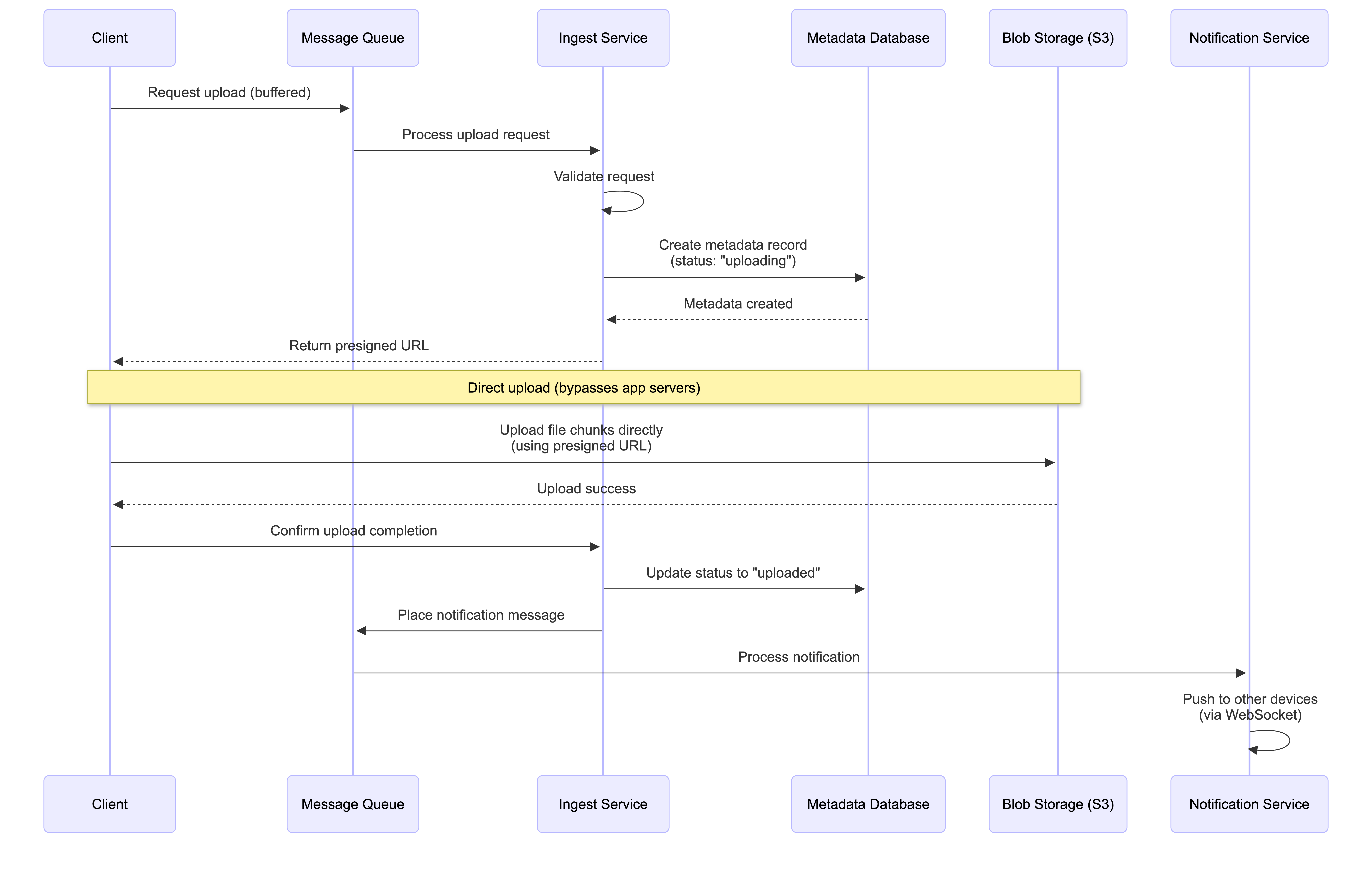
Steps:
- The client’s request to initiate an upload is placed in a Message Queue to buffer load before being processed by the Ingest Service
- The Ingest Service validates the request, creates a new record in the Metadata Database with a status of “uploading”, and returns a secure, presigned URL to the client
- The client uses this URL to upload the file’s data (or its individual chunks) directly to Blob Storage (S3), bypassing the application servers
- Upon successful upload, the client informs the backend, which confirms the final state of the object in storage
- The backend finalizes the metadata record by updating its status to “uploaded” and places a message into a separate Message Queue for the Notification Service to inform other clients of the change
Key Benefits:
- Direct Upload: File data never passes through application servers, reducing load
- Scalability: Application servers only handle metadata operations
- Resilience: Message queues buffer requests during traffic spikes
File Download Workflow
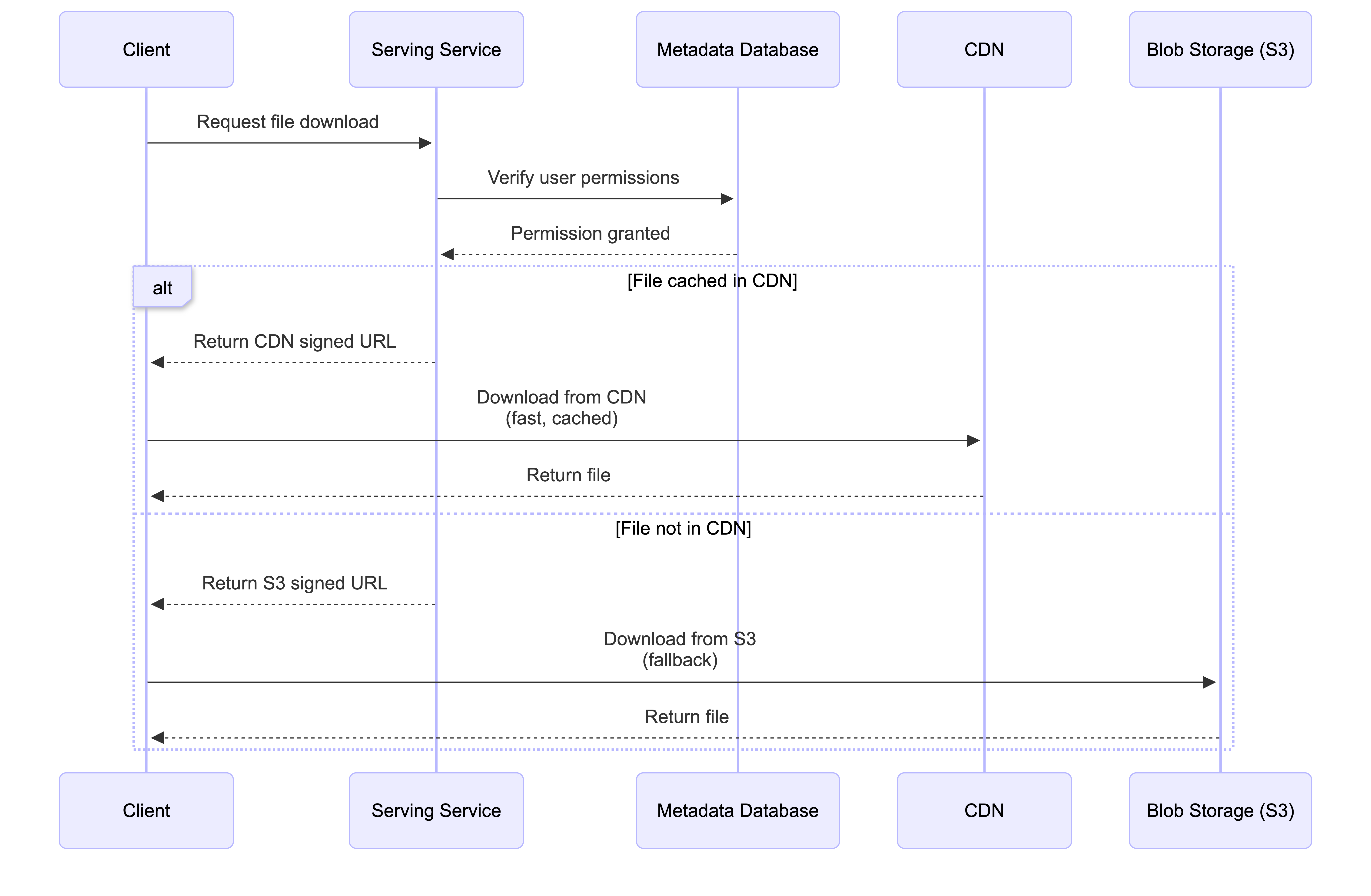
Steps:
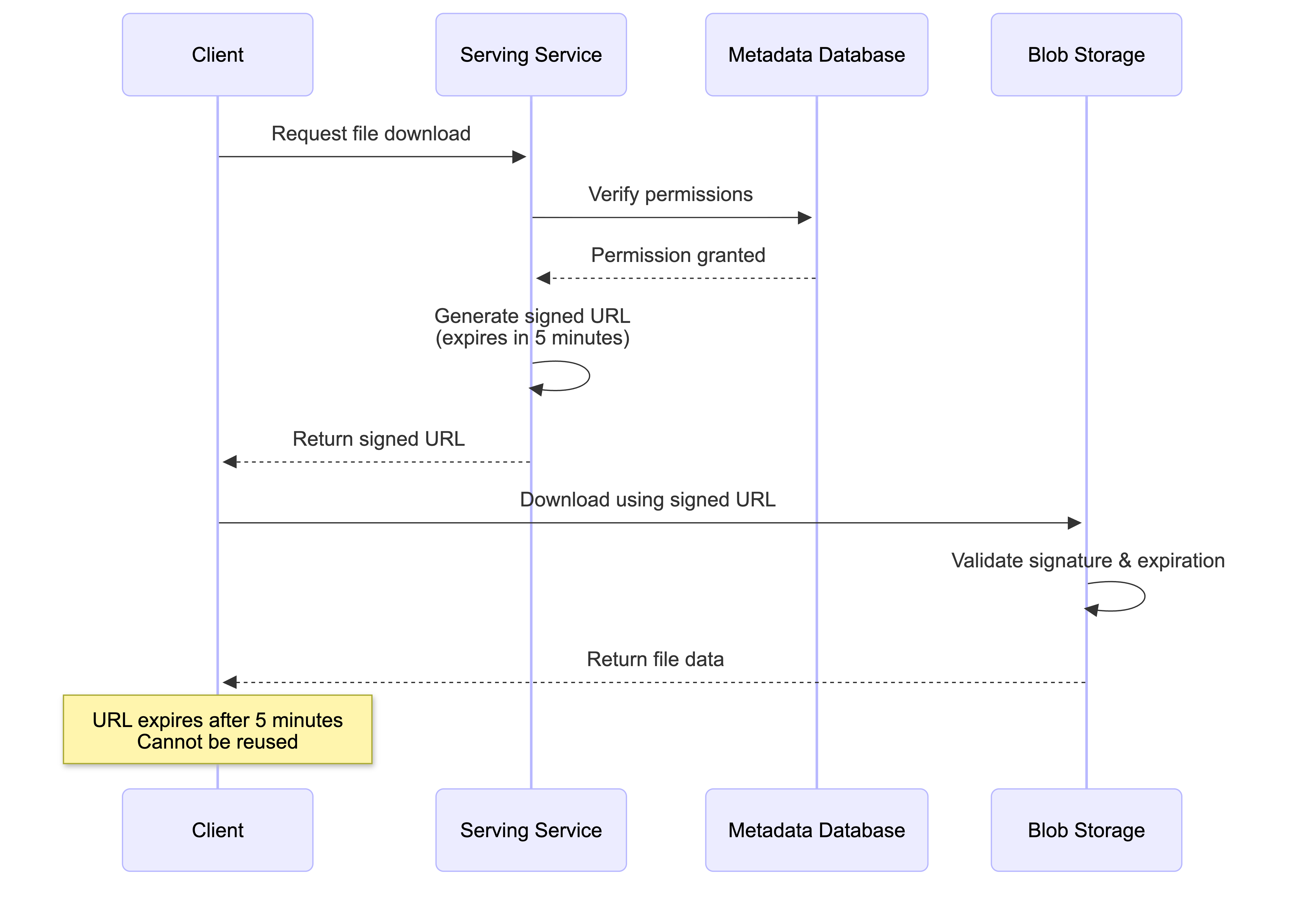
- The client requests to download a specific file from the Serving Service
- The Serving Service queries the Metadata Database to verify the user’s permissions for that file
- If the user is authorized, the Serving Service generates a temporary signed URL for the file, pointing to the CDN (or directly to S3 as a fallback)
- The client receives the signed URL and uses it to download the file directly from the nearest CDN edge server
How CDN Cache Misses Work:
An important architectural detail is how the CDN handles files it doesn’t have cached. The user only receives a signed URL for the CDN—they never get a direct S3 presigned URL. Here’s what happens:
When CDN has the file cached (Cache Hit):
- The CDN edge server immediately serves the file from its cache
- Fast response time, no S3 access needed
When CDN doesn’t have the file cached (Cache Miss):
- The CDN edge server acts as a proxy on behalf of the user
- The CDN is pre-configured with its own credentials/permissions to access S3 (separate from user permissions)
- The CDN fetches the file from S3 using its own S3 access configuration
- The CDN serves the file to the user while simultaneously caching it for future requests
- The user never needs direct S3 access—they only interact with the CDN URL
This architecture provides several benefits:
- Transparent to users: Users only need one URL (CDN), regardless of cache status
- Automatic caching: Popular files are automatically cached after the first request
- Security: User permissions are validated by the Serving Service before generating the CDN URL; the CDN’s S3 access is a separate, system-level configuration
- Performance: Subsequent requests for the same file are served from cache without hitting S3
Note: Signed URLs vs Signed Cookies
While both Signed URLs and Signed Cookies use the same underlying cryptographic verification to control access to private content via a CDN (like CloudFront), they solve different problems. The main difference lies in how many files you want to protect and how much control you need over the user’s browser.
Signed URL (Individual Key): A single, specific URL that contains authentication data as query parameters. Grants access to one specific file. The signature is visible in the address bar (e.g.,
.../file.pdf?Policy=...&Signature=...). Perfect for file storage services where users download individual files. Each file download gets its own signed URL with a short expiration time (e.g., 5 minutes).Signed Cookie (Master Key): A piece of data stored in the user’s browser that automatically sends with every request. Grants access to multiple files simultaneously without changing their URLs. The signature is hidden in HTTP headers. Ideal for streaming scenarios (HLS/DASH) that consist of hundreds of tiny segments. One-time authentication, then seamless access to all related files. (See System Design: A Scalable Architecture for a Music Streaming Service for a detailed implementation example.)
For cloud file storage services, Signed URLs are the preferred approach because users typically download individual files (not streams of hundreds of segments), each file access can have its own expiration time and permissions, and it’s simpler to implement per-file access control. For streaming services, Signed Cookies are preferred because a single song/video requires fetching hundreds of small segments, and generating hundreds of signed URLs would be inefficient.
Key Benefits:
- Low Latency: CDN serves files from geographically close locations
- Security: Signed URLs provide temporary, permission-scoped access; users never need direct S3 credentials
- Cost Efficiency: CDN reduces bandwidth costs by caching popular files and reducing S3 egress traffic
- Transparency: Cache hits and misses are handled automatically without user intervention
Technical Deep Dive
This section explores the specific implementation details and design patterns chosen to address the most critical engineering challenges within the system.
Data Model and Management
A relational database is well-suited for storing the structured metadata and managing the relationships between users, files, and devices. The core schema includes the following tables:
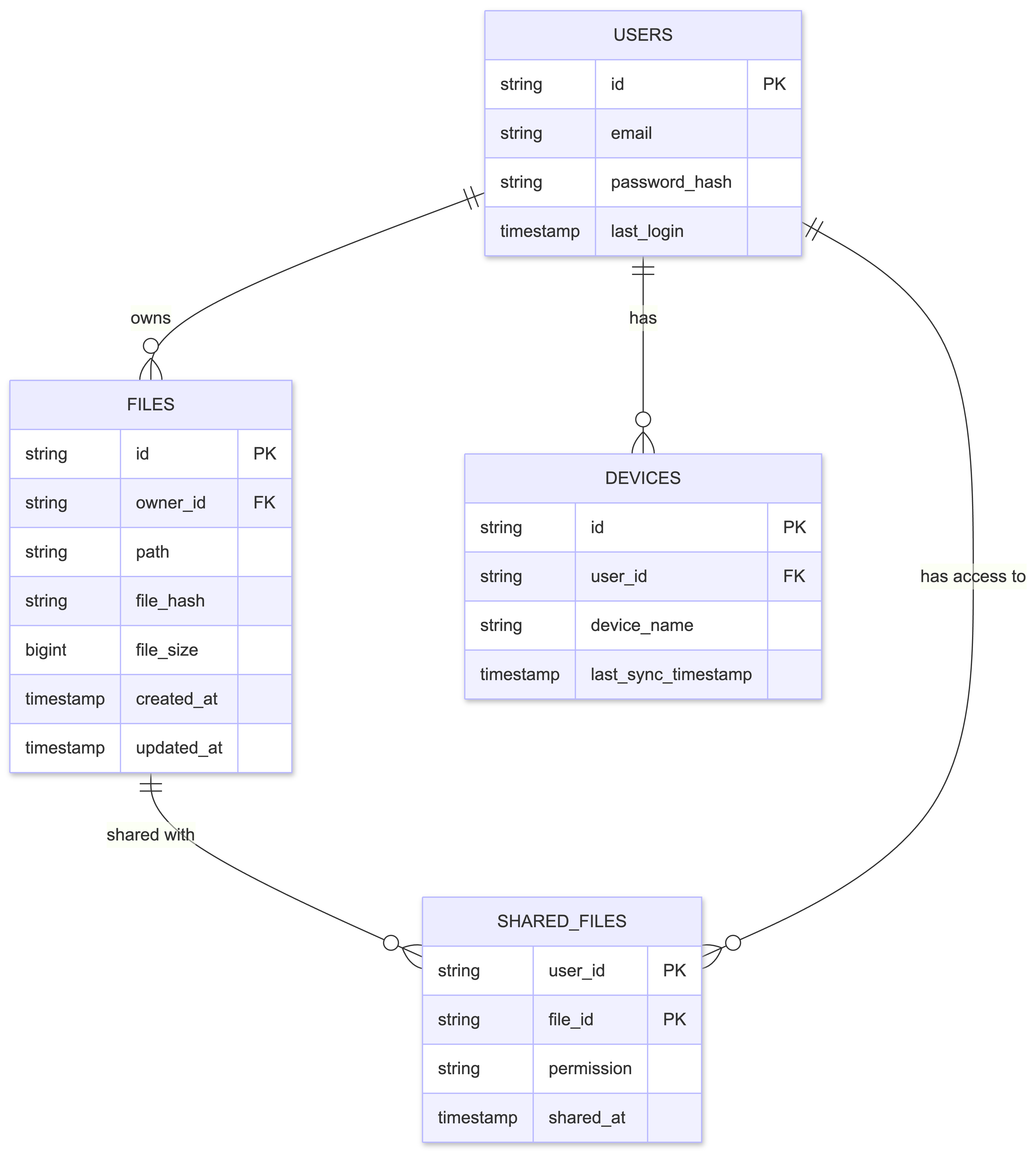
Key Design Decisions:
- File Hash for Deduplication: The
file_hashfield stores a content-derived fingerprint (e.g., SHA-256), used for:- Deduplication (same file content = same hash)
- Uniquely identifying file content
- Enabling efficient chunking and resumable upload strategies
How it’s obtained: The client application calculates the SHA-256 hash of the entire file content before uploading. This hash is sent along with the file metadata to the Ingest Service, which stores it in the database. When a user uploads a file that already exists (same hash), the system can detect this and avoid storing duplicate chunks in blob storage, instead creating a new metadata record that references the existing chunks.
- File Size and Logical Chunk Boundaries: While S3 multipart upload merges chunks into a single file after upload, we maintain logical chunk boundaries (e.g., fixed 5MB chunks) for tracking changes. The file size is stored to calculate these boundaries:
- File Size: Stored in bytes, used to calculate logical chunk boundaries
- Logical Chunks: Fixed-size segments (e.g., 5MB each) used for change detection, regardless of how the file was originally uploaded
- Byte Offsets: Used to identify which parts of a file changed (e.g., “bytes 10MB-15MB changed”)
How it’s obtained: The client calculates the file size and sends it to the server. The backend uses this to establish fixed logical chunk boundaries (e.g., Chunk 1 = bytes 0-5MB, Chunk 2 = bytes 5MB-10MB) for efficient partial updates.
- Normalized Sharing Model: File sharing is implemented using a fully normalized approach with a dedicated
SharedFilestable:- Instead of storing a list of shared users within a file’s metadata (inefficient to query)
- We create a dedicated table with
user_idandfile_idas composite primary key - To find all files shared with a specific user, the system performs an efficient indexed query using
user_id - This avoids costly full-table scans that would be required if shared users were embedded as a list in each file record
Large File Handling: The Chunking Strategy
Uploading large files (e.g., several gigabytes) as a single, monolithic transfer presents significant challenges:
- Server timeouts
- Sensitivity to network interruptions
- Poor user experience (if connection drops after 99% upload, user must start over)
The Solution: Client-Side Chunking with S3 Multipart Upload
The client application breaks large files into smaller chunks for upload. However, there’s an important distinction between upload chunks (adaptive, for efficient transfer) and logical chunks (fixed boundaries, for change tracking):
- Upload Chunks: The client adaptively chunks files based on network conditions and client capabilities. Chunk sizes may vary (5-10 MB) and are optimized for parallel uploads and resumability.
- S3 Multipart Upload: After all chunks are uploaded, S3 merges them into a single immutable file object. The individual chunks no longer exist as separate entities.
- Logical Chunks: For change tracking, we use fixed-size logical boundaries (e.g., 5MB chunks) regardless of how the file was originally uploaded. These boundaries are calculated using byte offsets.
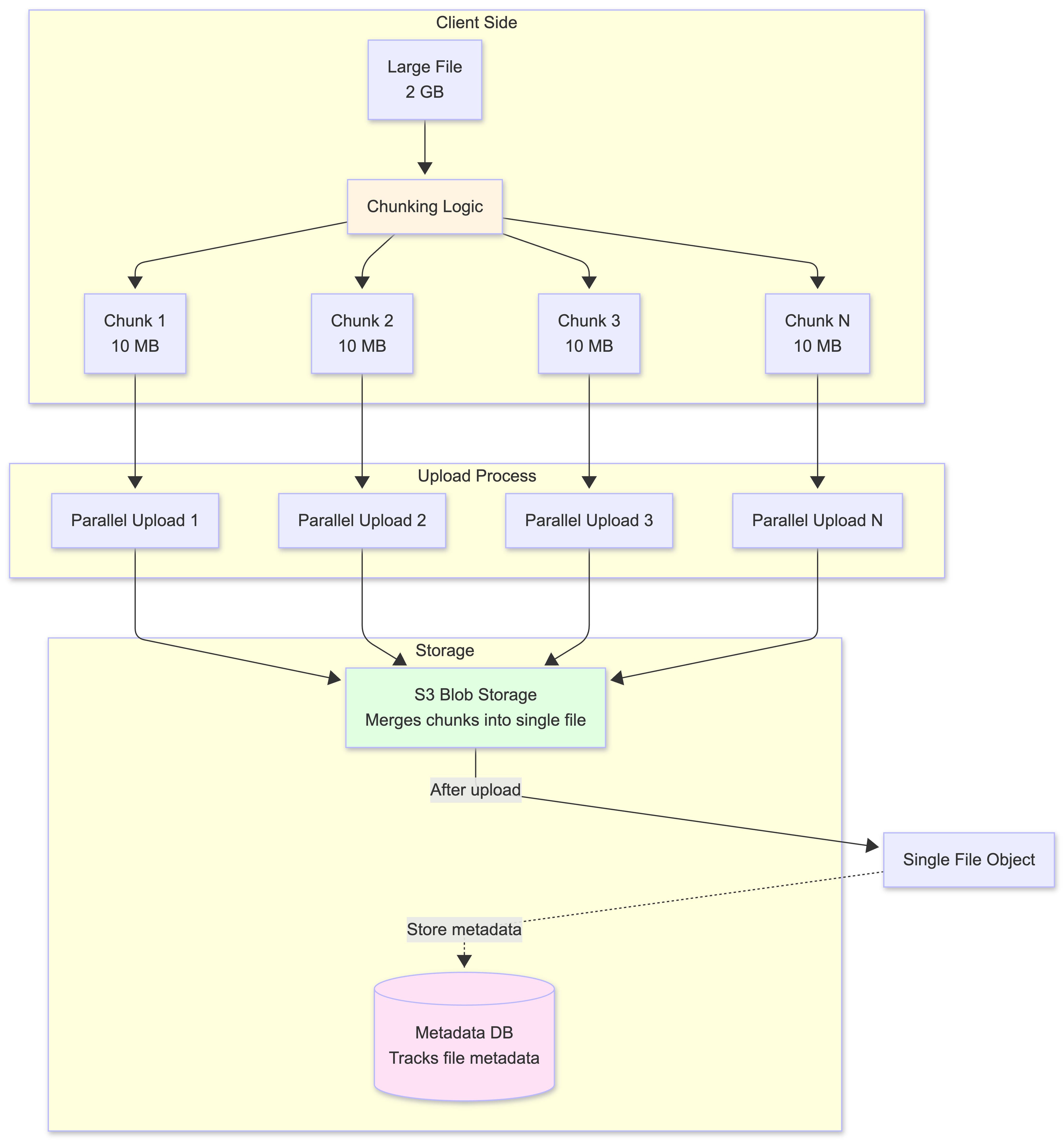
Benefits of Chunking:
- Resumable Uploads
- S3 multipart upload maintains upload state for each part in the upload session
- If an upload is interrupted, the client can query S3 (via the backend) to determine which parts were successfully uploaded
- The client resumes uploading only the missing parts, saving time and bandwidth
- Once all parts are uploaded, S3 merges them into a single file object
- Parallel Uploads
- With the file broken into independent chunks, the client can upload multiple chunks in parallel
- This fully utilizes the user’s available network bandwidth
- Significantly speeds up the total transfer time
-
Efficient Partial Updates (Delta Sync)
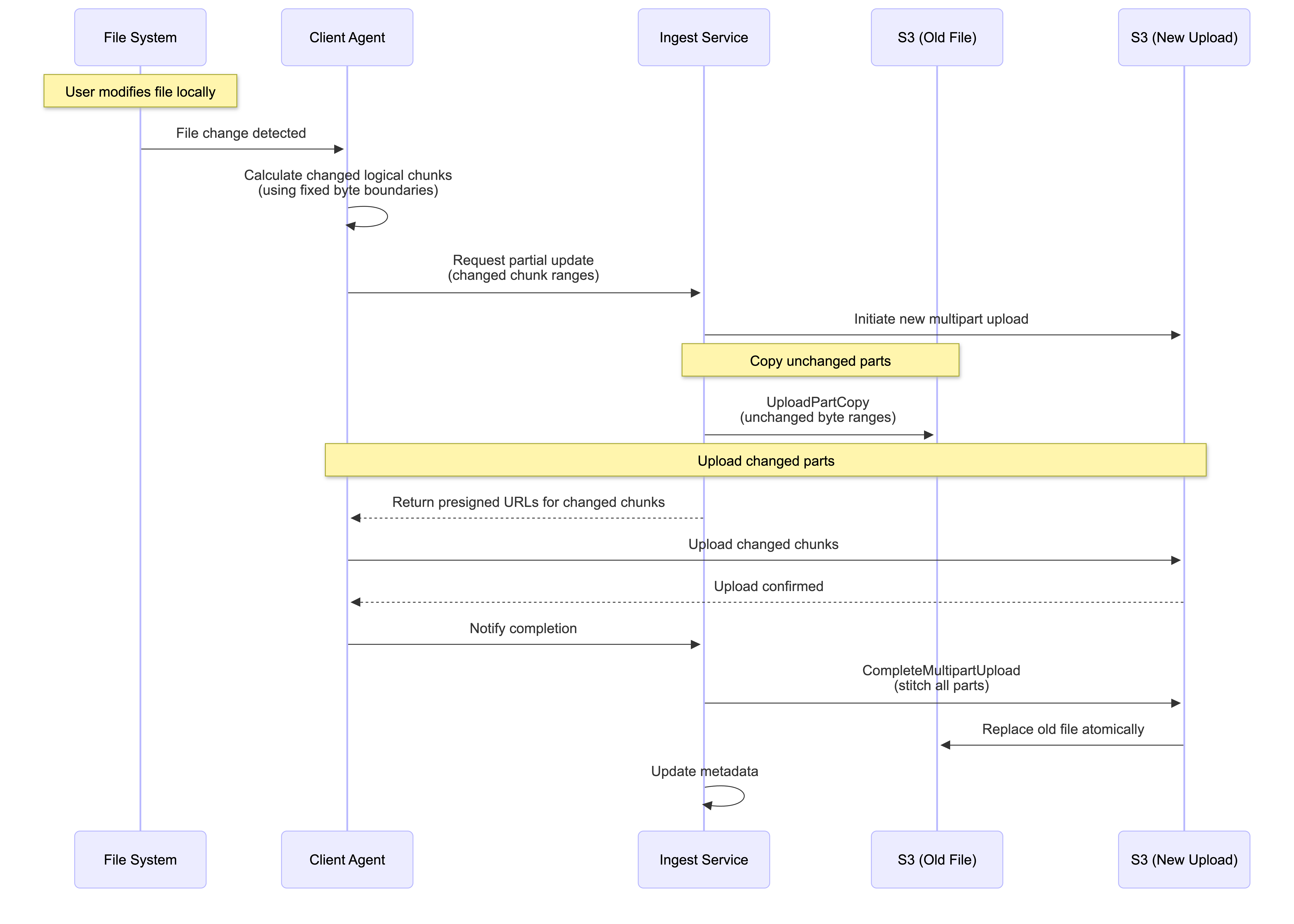
When a user edits a file, the client calculates which logical chunks (based on fixed byte boundaries) have been modified. However, since S3 objects are immutable and chunks are merged after upload, we use S3’s UploadPartCopy feature to efficiently “patch” files:
The Partial Update Workflow:
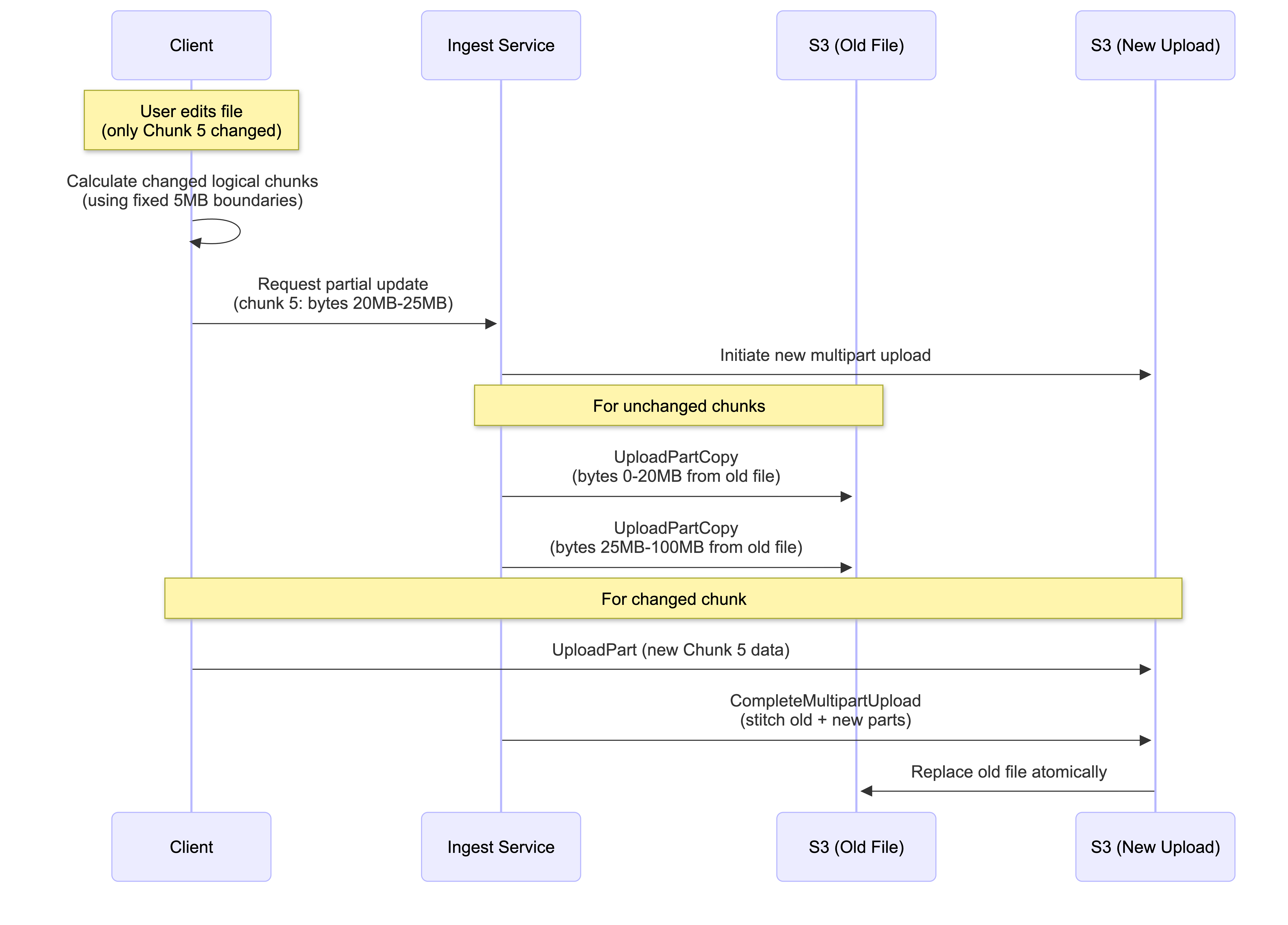
How It Works:
- Client identifies changed logical chunks using fixed byte boundaries (e.g., “Chunk 5: bytes 20MB-25MB changed”)
- Backend initiates a new S3 multipart upload session
- For unchanged chunks: Backend uses
UploadPartCopyto copy byte ranges from the old file (no client upload needed, happens internally in S3) - For changed chunks: Client uploads only the modified data
- Backend completes the multipart upload, creating a new file that replaces the old one atomically
Key Benefits:
- Minimal bandwidth: Only changed chunks are uploaded from client
- S3 efficiency: Unchanged parts are copied internally within S3 (no external bandwidth)
- Atomic updates: Old file remains intact until new version is complete
- Constraint: S3 requires minimum 5MB per part (except last), so edits smaller than 5MB still require copying a 5MB range
This approach is exactly how services like Dropbox and Google Drive handle partial file updates efficiently.
This pattern is an industry standard, exemplified by the Amazon S3 Multipart Upload API with UploadPartCopy, which provides a robust and managed implementation of this chunking and partial update strategy.
Alternative Chunking Strategy: Persistent Chunks with Chunk-Level Deduplication
While our architecture uses merged chunks (where S3 combines chunks into a single file), there’s an alternative approach that stores chunks as separate, persistent objects. This approach offers different trade-offs and is worth understanding.
Key Difference: Chunk Storage Model
In the persistent chunks approach:
- Each chunk is stored as a separate object in blob storage
- Files are reconstructed from chunks on download
- Chunks can be shared across multiple files (chunk-level deduplication)
- Client maintains a chunk database tracking which chunks belong to which files
Chunking Algorithms for Change Detection
The persistent chunks approach relies on chunking algorithms to detect which parts of a file have changed. Two main algorithms are used:
1. Fixed-Size Chunking
This is the simplest approach: files are split into fixed-size chunks (e.g., 5MB each).
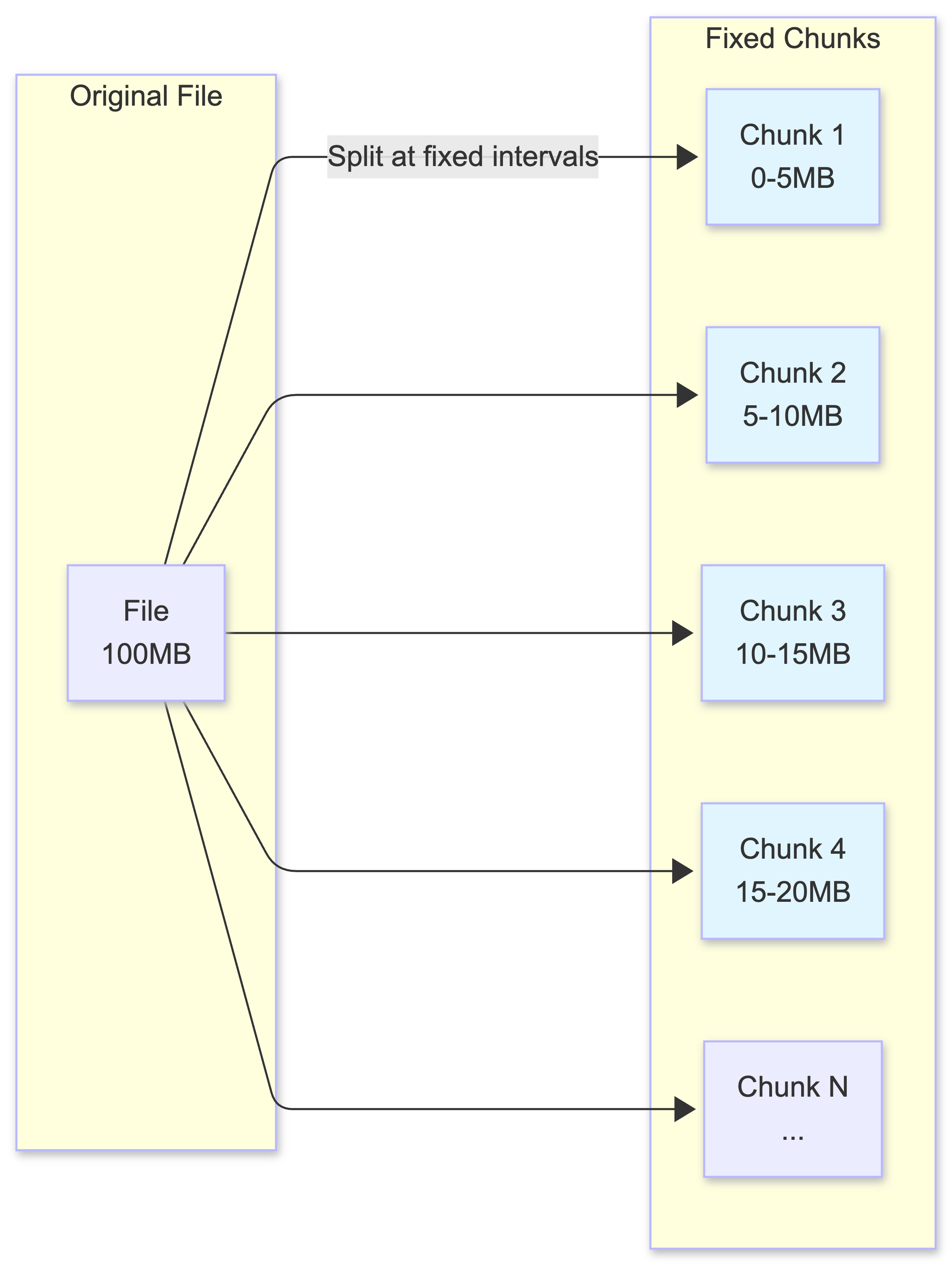
How Change Detection Works:
- Client calculates hash (e.g., SHA-256) for each chunk
- Compares chunk hashes between old and new file versions
- Only chunks with different hashes are uploaded
The Problem: Boundary Shift
Fixed-size chunking has a critical flaw when files are edited:
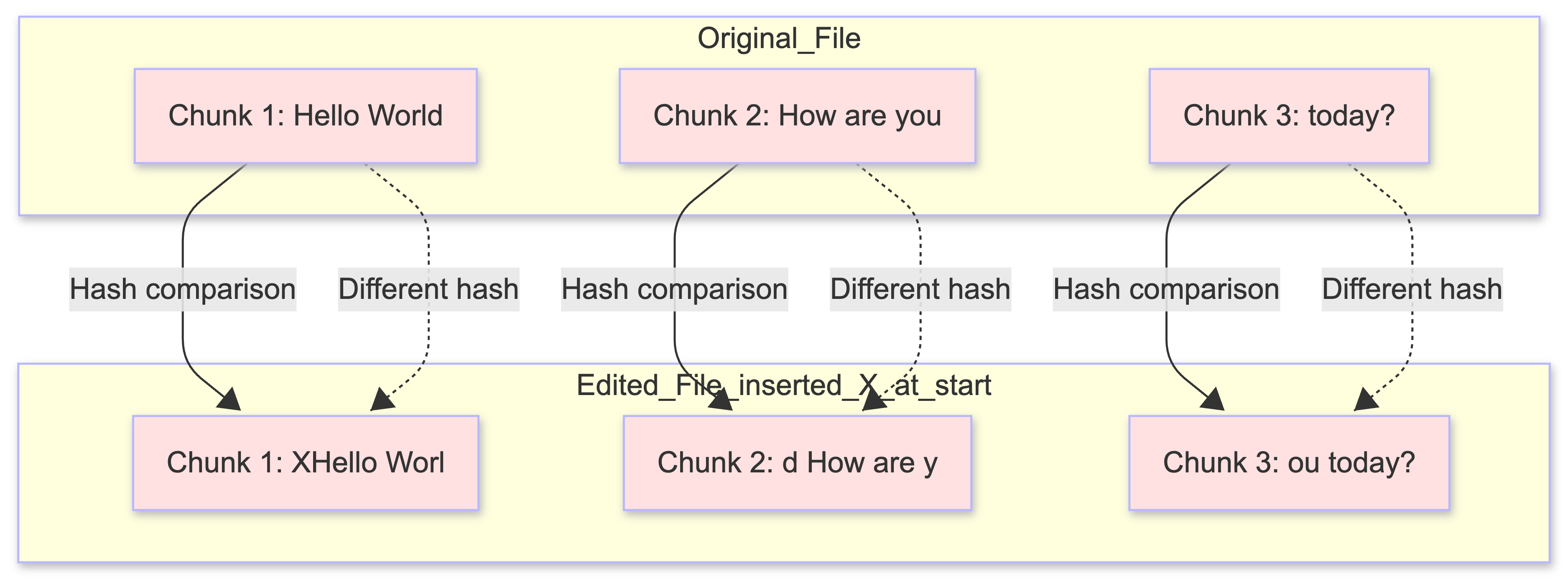
The Challenge:
- Inserting a single character at the beginning shifts all chunk boundaries
- Even though 99% of content is unchanged, all chunks have different hashes
- System must re-upload entire file, defeating the purpose of chunking
2. Content-Defined Chunking (CDC)
CDC uses content-based boundaries instead of fixed positions. Chunks are split at content-defined markers (e.g., when a rolling hash matches a specific pattern).
Understanding Rolling Hash and Rabin Fingerprint
To understand how CDC works, let’s use a simple analogy that makes these concepts easy to grasp.
1. The Simple Analogy: Using a Sentence
Let’s use a simple sentence to understand the difference:
Original sentence: "Hello World How are you today?"
Fixed-Size Chunking (The Old Way):
- Split every 5 characters (fixed size)
- Chunk 1:
"Hello" - Chunk 2:
" Worl" - Chunk 3:
"d How" - Chunk 4:
" are " - Chunk 5:
"you t" - Chunk 6:
"oday?"
The Problem: If you add one word at the beginning:
- New sentence:
"Hi Hello World How are you today?" - Chunk 1:
"Hi He"- completely different! - Chunk 2:
"llo W"- different! (was “ Worl”) - Chunk 3:
"orld "- different! (was “d How”) - Chunk 4:
"How a"- different! (was “ are “) - All chunks shifted, all are different → must re-upload everything
CDC (The Smart Way):
- Split at content markers (e.g., whenever you see a space followed by a capital letter)
- Chunk 1:
"Hello" - Chunk 2:
" World"(split at “ W”) - Chunk 3:
" How are you today?"(split at “ H”)
Why this is better: If you add one word at the beginning:
- New sentence:
"Hi Hello World How are you today?" - Chunk 1:
"Hi Hello"- only this chunk changed! - Chunk 2:
" World"- same! (still starts with “ W”) - Chunk 3:
" How are you today?"- same! (still starts with “ H”) - Only 1 chunk changed → only upload 1 chunk, not the whole sentence
The boundaries are determined by the content (patterns in the text), not fixed positions.
2. How the “Rolling Hash” Works (The Sliding Magnifying Glass)
A Rolling Hash is like holding a magnifying glass that can only see 5 letters at a time. You slide it across a sentence:
- You look at “Hello” → You give it a score (Hash)
- You slide one letter right. Now you see “ello “ → Instead of re-reading everything, you just forget the ‘H’ and add the space
- You get a new score instantly
This is what makes it “rolling” - you efficiently update the hash as you slide forward, without recalculating everything from scratch.
3. How the “Rabin Fingerprint” Works (The Boundary Rule)
The Rabin Fingerprint is just the “Math Rule” used to decide if the current window is a “shiny purple stone” (a boundary).
It uses a simple math trick: Is the current Hash divisible by 10? (In technical terms: hash % 10 == 0)
Important: Which Character is the Marker?
When the hash is divisible by 10, the boundary marker is placed at the END of the sliding window (the rightmost character). This is where the current chunk ends and the next chunk begins.
Example:
Sentence: "Hello World How are you"
Window size: 5 characters

Position 0: Window = "Hello", Hash = 123, 123 % 10 = 3 (not a boundary, keep sliding)
Position 1: Window = "ello ", Hash = 234, 234 % 10 = 4 (not a boundary, keep sliding)
Position 2: Window = "llo W", Hash = 345, 345 % 10 = 5 (not a boundary, keep sliding)
Position 3: Window = "lo Wo", Hash = 456, 456 % 10 = 6 (not a boundary, keep sliding)
Position 4: Window = "o Wor", Hash = 550, 550 % 10 = 0 (BINGO! Boundary found!)
Where is the marker? At position 4, the window is “o Wor” (characters at positions 4-8). Since the hash is divisible by 10, we place the boundary marker after the ‘r’ (at position 8). This means:
- Chunk 1 ends at position 8:
"Hello Wor" - Chunk 2 starts at position 9:
"ld How are you"
The boundary is always placed at the right edge of the window when the condition is met.
4. Why is This Useful for File Storage?
If you are building a file-syncing service (like Dropbox), CDC is your best friend:
- The “Byte-Shift” Fix: If a user adds one word at the start of a 1GB file, a normal system thinks the entire file changed. CDC realizes that 99% of the “shiny purple stones” are still in the same place
- Save Money: You only upload the one new chunk at the beginning. You “verify” that the rest of the chunks already exist on S3 and skip them
How Change Detection Works:
- Client uses a rolling hash (Rabin fingerprint algorithm) to identify chunk boundaries
- Chunk boundaries are determined by content (where “shiny purple stones” appear), not position
- When the rolling hash matches a pattern (e.g.,
hash % divisor == 0), a boundary is created - Chunks are identified by their content hash, not position
- When a file is edited, only the content that changed will produce different hash values, so only those chunks get new boundaries
The Advantage:
- Inserting content at the beginning only affects the first chunk (because boundaries are content-based)
- Unchanged content maintains the same chunk boundaries (same content = same hash = same boundaries)
- Only modified chunks need to be re-uploaded
The Challenge:
- CPU Intensive: Rolling hash calculation requires processing every byte of the file (though it’s efficient per byte, it still needs to touch every byte)
- Complexity: Selecting the right hash function parameters (window size, divisor) is non-trivial and requires tuning
- Variable Chunk Sizes: Chunks can vary significantly in size (e.g., 2MB to 10MB) depending on where boundaries naturally occur
- Boundary Selection: Poor divisor choice can create too many small chunks (wasting storage overhead) or too few large chunks (defeating the purpose of chunking)
Summary Comparison
| Feature | Fixed-Size Chunking | Content-Defined Chunking (CDC) |
|---|---|---|
| Boundary Rule | Every X bytes (e.g., 5MB) | When a “pattern” is found (hash % divisor == 0) |
| If you add 1 byte | All subsequent chunks change | Only 1-2 chunks change |
| Speed | Extremely fast (Simple math) | Slower (Must scan every byte) |
| Efficiency | Low (Lots of re-uploads) | High (Great for deduplication) |
| CPU Usage | ✅ Low (simple splitting) | ❌ High (rolling hash) |
| Predictability | ✅ Fixed sizes, easy to manage | ❌ Variable sizes, complex |
Why Our Architecture Uses Merged Chunks
Our architecture uses the merged chunks approach (S3 multipart upload) because:
- Simplicity: No need for complex chunking algorithms or client-side chunk databases
- S3 Native Features: Leverages S3’s built-in multipart upload and UploadPartCopy
- File-Level Deduplication: Sufficient for most use cases (detected via
file_hash) - Efficient Partial Updates: UploadPartCopy handles unchanged regions efficiently
- Lower Complexity: No chunk reconstruction or chunk metadata management needed
The persistent chunks approach is better suited for systems requiring:
- Extremely high storage efficiency (chunk-level deduplication across many files)
- Systems where 60%+ of content is duplicate across different files
- Willingness to trade complexity for storage savings
File Synchronization Mechanism
Synchronization must be bidirectional: changes made locally need to be reflected in the cloud (and on other devices), and changes made in the cloud must be reflected locally.
Local-to-Remote Sync
The Local-to-Remote sync process is driven by a client-side agent:
- The agent continuously monitors the user’s local file system for changes
- When a file is created, modified, or deleted, the agent queues the operation
- Uses the chunking strategy to efficiently upload only the necessary changes to the server
Remote-to-Local Sync
The Remote-to-Local sync mechanism uses WebSocket as the primary method for all files, with polling as a backup when the WebSocket connection is lost.
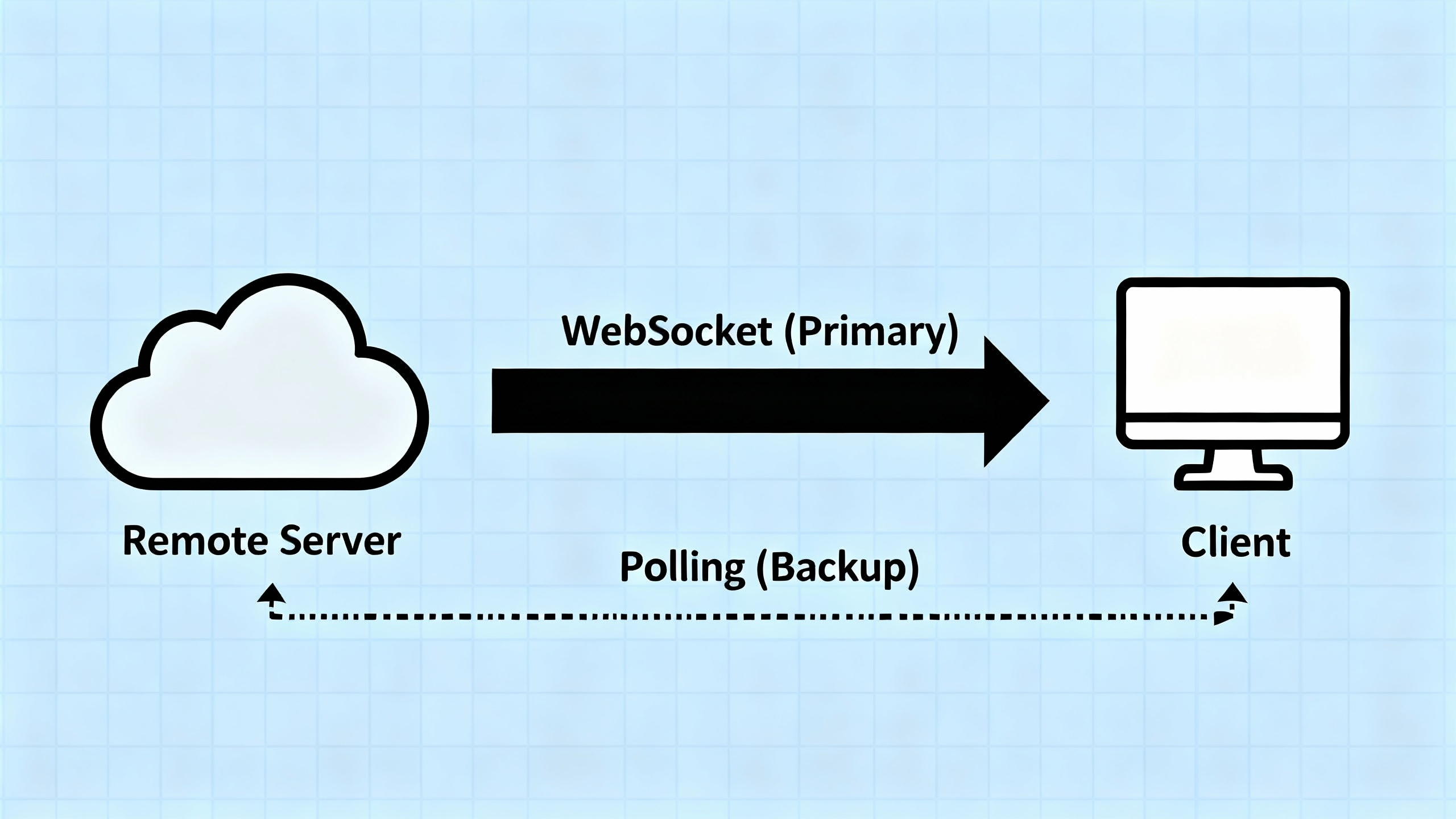
Primary Method: WebSocket Push (for All Files)
The Notification Service maintains a persistent WebSocket connection with each client. When any file (fresh or stale) changes:
- The server immediately pushes a notification to the client
- The client receives the notification and downloads the updated chunks
- If no files change, nothing is sent → the client knows nothing changed
- No server-side tracking needed - the server simply pushes when changes occur
Backup Method: Periodic Polling (Only When WebSocket Disconnects)
Polling is not used for stale files while WebSocket is connected. Instead, it serves as a backup mechanism:
- When WebSocket is Connected:
- Polling is disabled or runs very infrequently (e.g., once per hour) as a health check
- All file changes (fresh and stale) are delivered via WebSocket push
- No need to poll - the client receives notifications in real-time
- When WebSocket Disconnects:
- The client detects the disconnection
- Polling is activated as a fallback mechanism
- Client periodically polls the server (e.g., every few minutes) to check for missed updates
- This ensures the client eventually catches up on any changes that occurred during the disconnection
- When WebSocket Reconnects:
- Polling is deactivated again
- WebSocket resumes as the primary method
- Client may do one final poll to catch any changes between the last poll and reconnection
Why This Approach?
You might wonder: “If WebSocket works for all files, why do we need polling at all?”
The answer is connection reliability:
- WebSocket connections can drop due to network issues, WiFi disconnections, or server restarts
- When disconnected, the client loses all notifications that occurred during the disconnection period
- Polling ensures the client can still synchronize files even when WebSocket is unavailable
- It’s a safety net, not a parallel mechanism
Benefits:
- Real-time sync for all files when WebSocket is connected (no distinction between fresh and stale)
- Reliable fallback when WebSocket fails (polling ensures eventual consistency)
- Efficient: No unnecessary polling when WebSocket is working
- Simple: Server doesn’t need to track which files each client cares about - it just pushes when changes occur
Session Management Challenge When Scaling Notification Service
As the system scales, the Notification Service must also scale horizontally across multiple instances. This introduces a session management challenge similar to what we see in real-time chat systems:
The Problem:
- When a file changes, the Ingest Service needs to notify all devices of the user
- But which Notification Service instance is each device connected to?
- If Device A is connected to Notification Service 1, and Device B is connected to Notification Service 2, how does the system route notifications correctly?
The Solution: Session Service (Connected Clients Registry)
Similar to chat systems, we need a Session Service that maintains a real-time map of device_id → notification_server_id for all connected devices. When a file change occurs:
- The Ingest Service queries the Session Service to find which Notification Service instance each device is connected to
- The Ingest Service routes the notification to the appropriate Notification Service instance(s)
- Each Notification Service instance pushes the notification to its connected devices via WebSocket
This is the same pattern used in real-time messaging systems. For a detailed explanation of session management, routing, and how to handle multi-device scenarios, see System Design: Building a Scalable Real-Time Chat Application, which covers the Session Service architecture in depth.
Database Scalability Strategy
Our estimate of ~500,000 IOPS, with a significant write component for file management and subscriptions, immediately disqualifies a simple read-replica strategy, as replicas do not solve the write bottleneck. A more robust, horizontally scalable solution is required for both reads and writes.
Sharding: The Primary Scaling Strategy
Sharding involves partitioning the data across multiple independent database servers (shards), allowing the system to handle a much higher volume of operations.
graph TB
    subgraph "Application Layer"
        AS1[Application Server 1]
        AS2[Application Server 2]
        AS3[Application Server N]
    end

    subgraph "Shard Router"
        SR[Shard Router<br/>Hash Function]
    end

    subgraph "Database Shards"
        SH1[(Shard 1<br/>Users 0-33M)]
        SH2[(Shard 2<br/>Users 33M-66M)]
        SH3[(Shard 3<br/>Users 66M-100M)]
    end

    AS1 --> SR
    AS2 --> SR
    AS3 --> SR

    SR -->|user_id hash| SH1
    SR -->|user_id hash| SH2
    SR -->|user_id hash| SH3

    style SR fill:#fff4e1
    style SH1 fill:#e1f5ff
    style SH2 fill:#e1f5ff
    style SH3 fill:#e1f5ff
Shard Key Selection
The choice of a shard key is critical. The optimal shard key for this system is a composite key of user_id and file_id.
The Problem with Using Only user_id as Shard Key:
If we shard only by user_id, all files belonging to a user would be stored on the same shard. This creates a “hot shard” problem:
- Uneven Load Distribution: A power user with 100,000 files would put all their data on one shard, while a casual user with 10 files uses another shard
- Shard Overload: The shard containing the power user’s files becomes a bottleneck, handling all their read/write operations
- Poor Scalability: As some users accumulate more files, their shards become overloaded while other shards remain underutilized
- Single Point of Failure: If one user’s shard fails, they lose access to all their files
Why Composite Key (user_id + file_id) is Better:
The composite key uses a hash function: hash(user_id + file_id) to determine which shard stores each file. This approach provides the best of both worlds:
- Load Distribution:
- Files from the same user are distributed across multiple shards based on the hash of
user_id + file_id - A user with 100,000 files will have their files spread across all shards, preventing any single shard from becoming overloaded
- Load is evenly distributed across all shards
- Files from the same user are distributed across multiple shards based on the hash of
- Query Efficiency:
- To list all files for a user, the system queries all shards (scatter-gather pattern)
- However, this is acceptable because:
- File listing is a read-heavy operation (less frequent than individual file operations)
- The query can be parallelized across all shards
- Most file operations (read, update, delete a specific file) only need to query one shard (using the composite key)
- Scalability:
- As users add more files, the load is automatically distributed across all shards
- No single shard becomes a bottleneck
- The system scales horizontally as more shards are added
Trade-off Analysis:
| Aspect | Shard by user_id only |
Shard by user_id + file_id |
|---|---|---|
| Load Distribution | ❌ Poor (hot shard problem) | ✅ Excellent (even distribution) |
| List User Files | ✅ Single shard query (fast) | ⚠️ Multi-shard query (scatter-gather) |
| Get Specific File | ✅ Single shard query | ✅ Single shard query |
| Scalability | ❌ Limited by power users | ✅ Scales with number of files |
| Fault Tolerance | ❌ User’s files on one shard | ✅ User’s files distributed |
Why This Works for Our Use Case:
Our design prioritizes scalability and load distribution over the convenience of single-shard queries for file listing:
- Individual file operations (read, update, delete) are more frequent than listing all files
- Individual operations benefit from the composite key (single shard lookup)
- File listing can tolerate the slight overhead of scatter-gather queries
- The system scales better as users accumulate more files
- No single shard becomes a bottleneck, even for power users with millions of files
Optimizing File Listing Operations
While scatter-gather queries for file listing have some overhead, this can be effectively mitigated through caching strategies:
1. Server-Side Caching:
- The API server can cache the file list for each user in Redis or an in-memory cache
- Cache key:
user_files:{user_id}, TTL: 5-10 minutes - When a file is created, updated, or deleted, the cache is invalidated
- Subsequent file listing requests within the TTL are served from cache, avoiding the scatter-gather query
- This significantly reduces database load for frequently accessed file lists
2. Client-Side Database (Local Cache):
The client application maintains a local database (e.g., SQLite, IndexedDB) that stores file metadata:
- Initial Sync: When the app first loads, it queries the server for the complete file list and stores it locally
- Incremental Updates: After the initial sync, the client receives real-time notifications via WebSocket when files are:
- Created (add to local DB)
- Updated (update in local DB)
- Deleted (remove from local DB)
- Always Up-to-Date: Since the client receives notifications for all file changes, the local database stays synchronized with the server
- Fast File Listing: Subsequent file listing operations read directly from the local database (no network request needed)
- Offline Support: Users can view their file list even when offline
Benefits of This Approach:
- Reduced Server Load: File listing queries are cached on both server and client
- Better User Experience: File list appears instantly from local database
- Bandwidth Savings: No need to re-fetch the entire file list repeatedly
- Offline Capability: Users can browse their files without network connectivity
- Real-Time Sync: WebSocket notifications ensure the local database is always current
This two-tier caching strategy (server-side + client-side) makes the scatter-gather overhead for file listing negligible in practice, while maintaining the scalability benefits of the composite shard key.
Security Considerations
Trust is a foundational non-functional requirement for a service entrusted with users’ personal and professional data. Consequently, security is not an afterthought but a paramount concern woven into every layer of the system’s design.
Multi-Layered Security Strategy
1. Encryption in Transit
All communication between clients and our servers must be encrypted using HTTPS/TLS:
- Prevents eavesdropping and man-in-the-middle attacks
- Ensures that data cannot be intercepted as it travels over public networks
2. Encryption at Rest
All file chunks stored in Blob Storage (S3) must be encrypted using robust server-side encryption (e.g., AES-256):
- Ensures that even in the unlikely event of a physical breach of the storage infrastructure, the raw data remains unreadable
- For users requiring maximum security, the client can be enhanced to perform client-side encryption before the data ever leaves the user’s device
3. Access Control
The system’s reliance on presigned URLs for uploads and signed URLs for downloads is a critical security feature:
- These URLs provide secure, temporary, and permission-scoped access directly to data objects in S3
- This mechanism prevents unauthorized access
- Limits the potential for abuse from link sharing, as each URL is short-lived and grants only the specific permission required for the operation (e.g., read-only for downloads)
How Signed URLs Work:
Design Trade-Offs and Decisions
Every architectural decision involves trade-offs. Here are the key ones we made:
| Decision | Justification / Trade-Off |
|---|---|
| Control/Data Plane Separation | Decouples metadata operations from file transfers. Enables independent scaling but requires managing two separate systems. |
| Merged Chunks (S3 Multipart) vs Persistent Chunks | Merged chunks: Simpler, leverages S3 native features, file-level deduplication. Persistent chunks: Better storage efficiency (chunk-level deduplication) but requires complex CDC algorithms and client-side chunk databases. We chose merged chunks for simplicity and S3 integration. |
| Client-Side Chunking with UploadPartCopy | Offloads processing to client, reduces server load. Uses S3’s UploadPartCopy for efficient partial updates. Requires fixed logical chunk boundaries for change tracking. |
| WebSocket Primary + Polling Backup | WebSocket provides real-time sync for all files. Polling acts as backup when WebSocket disconnects (connection reliability), not a parallel mechanism. More reliable than pure WebSocket, simpler than pure polling. |
Composite Shard Key (user_id + file_id) |
Prevents hot shard problem from power users. Distributes load evenly but requires scatter-gather for file listing. Mitigated by server-side caching and client-side local database. |
| Signed URLs vs Signed Cookies | Signed URLs: Better for individual file downloads, simpler per-file access control. Signed Cookies: Better for streaming (HLS) with hundreds of segments. We chose signed URLs for file storage use case. |
| Session Service for Notification Routing | Required when scaling Notification Service. Adds complexity but enables horizontal scaling. Similar pattern to real-time chat systems. |
| Two-Tier Caching (Server + Client) | Server-side cache reduces database load. Client-side local database provides instant file listing and offline support. WebSocket notifications keep client DB synchronized. |
Conclusion
Building a scalable cloud file storage and synchronization service is a complex engineering challenge that requires careful consideration of storage scale, synchronization mechanisms, database scalability, and security. The architecture we’ve explored demonstrates how modern systems handle these challenges through:
- Control/Data Plane Separation that enables independent scaling of metadata and file storage operations
- Merged chunks strategy using S3 multipart upload with UploadPartCopy for efficient partial file updates
- WebSocket-based real-time sync with polling as a backup mechanism for connection reliability
- Composite shard key (
user_id+file_id) that prevents hot shard problems while maintaining query efficiency - Two-tier caching (server-side Redis + client-side local database) that optimizes file listing operations and enables offline support
- Session management for routing notifications across scaled Notification Service instances
- Multi-layered security with encryption in transit, at rest, and signed URLs for secure access control
Key Architectural Insights:
-
Chunking Strategy Choice: We chose merged chunks (S3 multipart) over persistent chunks with CDC because it’s simpler, leverages S3’s native features, and file-level deduplication is sufficient. The trade-off is less storage efficiency compared to chunk-level deduplication, but the operational simplicity is worth it.
-
Shard Key Design: Using a composite key (
user_id+file_id) instead of justuser_idprevents power users from creating hot shards. The scatter-gather overhead for file listing is mitigated by caching strategies, making this the optimal choice for scalability. -
Synchronization Reliability: WebSocket provides real-time sync, but connection drops are inevitable. Polling as a backup ensures eventual consistency, making the system more reliable than pure WebSocket while simpler than pure polling.
-
Client-Side Intelligence: The client maintains a local database that stays synchronized via WebSocket notifications. This provides instant file listing, offline support, and reduces server load—a critical pattern for modern file storage services.
The key takeaway is that there’s no one-size-fits-all solution. Each component is chosen based on specific requirements, and the overall system balances multiple trade-offs to deliver a world-class user experience. Understanding these trade-offs—from chunking algorithms to shard key selection to caching strategies—is essential for designing systems that scale.
If you’re working on building scalable systems or preparing for system design interviews, I hope this deep dive has been helpful. The principles here apply to many distributed storage systems beyond just file storage services.
What’s Next?
If you found this interesting, you might also enjoy:
- System Design: Real-Time Chat Application Architecture
- System Design: Twitter Architecture
- System Design: YouTube Architecture
- System Design: Web Search Engine Architecture
Feel free to share your thoughts or questions in the comments!